Divvy
DivvyHow to Split the Bill Online: The Smart Way
By The Divvy Team · October 8, 2026 · 12 min read
You're halfway through a great dinner when the receipt lands in the middle of the table. One friend had the expensive wine, another ordered only a soda, someone shared the appetizers, and now everyone is staring at the total as if it's a group exam. Splitting evenly feels fast, but it often leaves one person subsidizing another and turns a relaxed meal into an awkward payment negotiation.
The practical way to split the bill online is to assign what each person consumed, divide shared items transparently, and allocate tax and tip according to those shares. The calculation matters, but so does the collection process. A correct total that nobody reimburses still leaves the payer chasing friends in a group chat.
Table of Contents
- The High-Stakes Moment the Check Arrives
- Scanning Receipts with AI-Powered Precision
- Calculating Fair Shares and Proportional Taxes
- Setting Up Requests Through Familiar Apps
- Automating Follow-Ups and Clearing Balances
The High-Stakes Moment the Check Arrives
The trouble usually starts with a well-meaning suggestion: “Let's just divide it by everyone.” That works when the group ordered roughly the same things and nobody cares about small differences. It breaks down when one person ordered steak and cocktails while another had a modest meal, or when a shared entrée sits beside several individual orders.
The hidden problem isn't only the arithmetic. It's the feeling that the shortcut has transferred someone else's cost onto you. Nobody wants to calculate every cent after a long dinner, but nobody wants to pay for food they didn't order either.

The scale of the expense makes this more than a minor social irritation. According to U.S. Bureau of Labor Statistics data on household spending, the average consumer unit spent $3,945 on food away from home in 2024, roughly $329 per month. A receipt can combine individual meals, shared plates, tax, tip, and delivery charges, so dividing the final total evenly can create recurring cross-subsidies.
Why equal splitting feels unfair
Take a table of four. Two people share a starter, one orders a premium drink, and the fourth skips alcohol altogether. An equal split assigns the same total to everyone, even though their pre-tax consumption differs. The difference may seem small to the person who ordered more, but it becomes obvious to the person who ordered less.
A fair process separates the receipt into three questions:
- Who consumed each item?
- How should shared items be divided?
- How should charges applied to the whole receipt follow those shares?
Practical rule: Decide the item assignment before discussing reimbursement. Once everyone can see the underlying calculation, the final amount feels less arbitrary.
That transparency protects the friendship as much as the wallet. People are usually comfortable paying their share when they can verify how it was built. They become uncomfortable when a round number appears without an explanation.
Scanning Receipts with AI-Powered Precision
Manual entry is where most bill-splitting attempts lose momentum. Re-typing every line from a blurry receipt invites skipped items, mistyped prices, and confusion over whether a service charge belongs in the subtotal or the final amount. A receipt scanner removes that first layer of friction by turning the paper bill into an editable list.
Start with a clear receipt photo
Open Divvy on an iPhone and photograph the receipt in good light. Keep the entire document inside the frame, including the subtotal, tax, tip, and total. The app's AI receipt scanning reads the visible line items and brings the receipt into the splitting workflow, so you can review the imported information instead of building a spreadsheet from scratch.
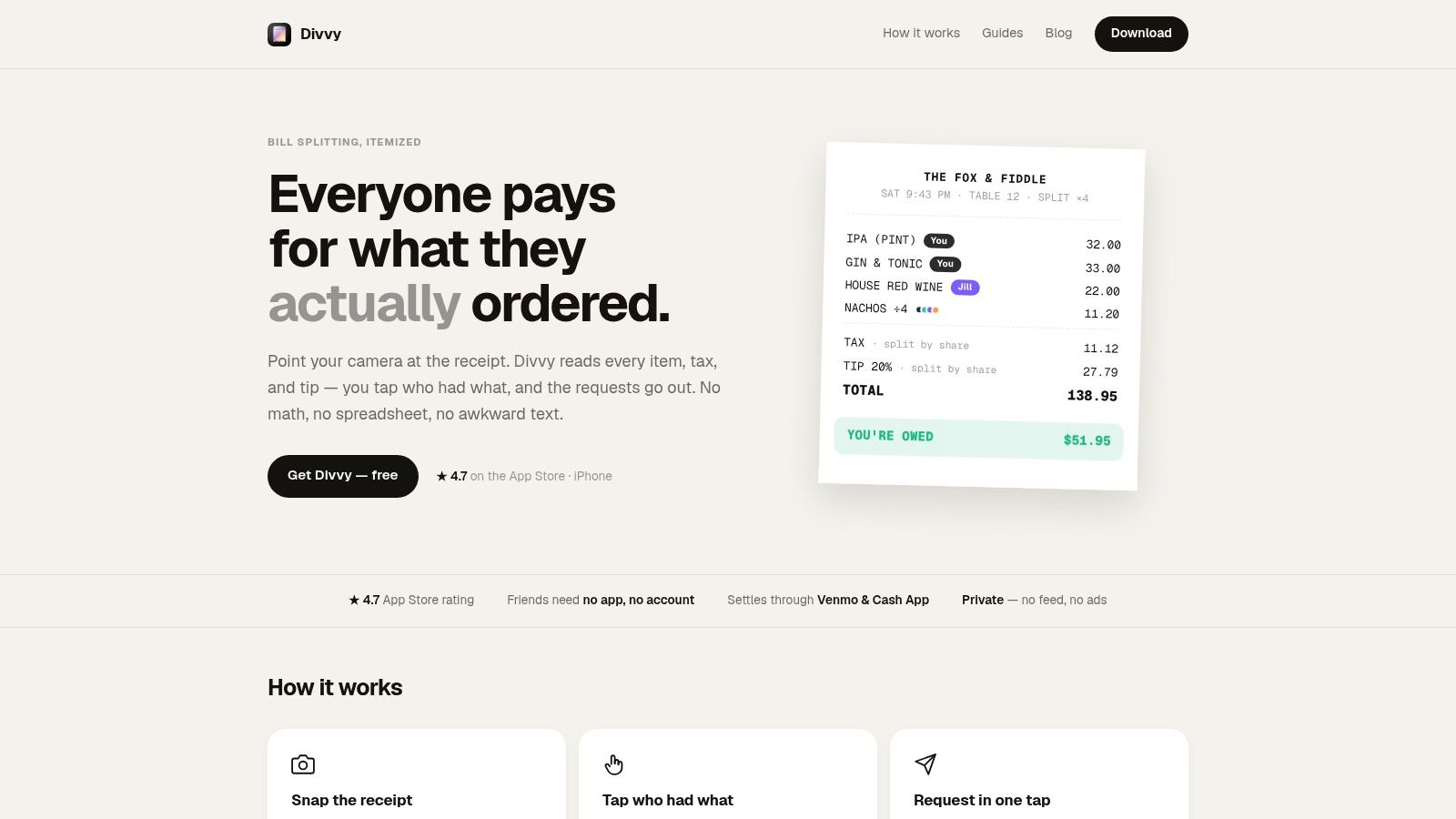
Receipt capture works best when you treat it as a starting point, not a reason to skip review. Check the imported names and amounts against the paper receipt, especially if the image is folded, dim, or crowded with modifiers. The same principle applies to restaurant systems, where OrderOut's restaurant technology platform provides useful context on digital receipt experiences and QR-based ordering workflows.
Assign individual and shared items
After the receipt loads, add the diners and tap each item to assign it. A burger and fries can go to one person, while an appetizer or family-style entrée can be divided evenly among the people who shared it. This visual approach is easier to audit than a note that says “Alex owes about this much.”
The workflow is simple:
- Review the scan. Confirm the line items and receipt totals.
- Add the group. Enter the people who need individual shares.
- Assign orders. Tap an item and select the person who had it.
- Divide shared dishes. Choose the relevant diners rather than assigning the whole item to one person.
- Check the balance. Make sure every item and receipt charge is accounted for.
For a deeper look at the technology behind this process, see how a receipt scanner works.
Once the assignments are complete, the app can turn the item list into individual totals. That shift, from a receipt everyone interprets differently to a shared visual record, is what makes the conversation calmer.
Calculating Fair Shares and Proportional Taxes
Item assignment solves only the first half of the problem. The receipt still has tax and tip, and those charges apply to the meal as a whole. Adding the same tax and tip amount to every person's item total recreates the unfairness that itemization was supposed to remove.
The cleaner method is proportional allocation. Each person's share of the pre-tax items determines their share of the tax and tip. Someone responsible for a larger portion of the food total pays a larger portion of those charges, while someone with a smaller item total pays less.
The arithmetic behind the result
Suppose one diner's assigned items represent about half of the receipt's pre-tax items. That person receives about half of the tax and tip allocation. If two people share a dish, the dish is first divided between them, then each person's resulting item share contributes to the proportional calculation.
The process can be understood in four stages:
- Item total: Add the items assigned to each person.
- Shared allocation: Divide shared plates among the selected diners.
- Charge ratio: Compare each person's item total with the receipt's item subtotal.
- Final amount: Add that person's proportional tax and tip to their assigned items.
This avoids a familiar argument about whether someone who ordered less should pay the same tax as someone who ordered substantially more. It also keeps the calculation consistent when a group includes drinks, sides, shared starters, or delivery charges.
A fair split isn't just “everyone pays for their food.” It also assigns the receipt's shared charges using the same logic.
Review discounts and rounding before sending
Receipts don't always behave neatly. A discount may apply to one item, a promotion may reduce the entire order, and rounding may leave a tiny remainder. Review those details before creating requests, then tell the group how the adjustment was handled. Clear rounding is better than pretending every total can be divided perfectly without explanation.
Divvy's approach to this calculation is described in its guide to proportional tax allocation. The important practical outcome is that each person sees a complete amount, rather than having to reproduce the tax-and-tip math independently.
That visibility also makes corrections easier. If a diner says they didn't have a particular side, you can change the item assignment and let the totals update instead of rebuilding the receipt manually.
Setting Up Requests Through Familiar Apps
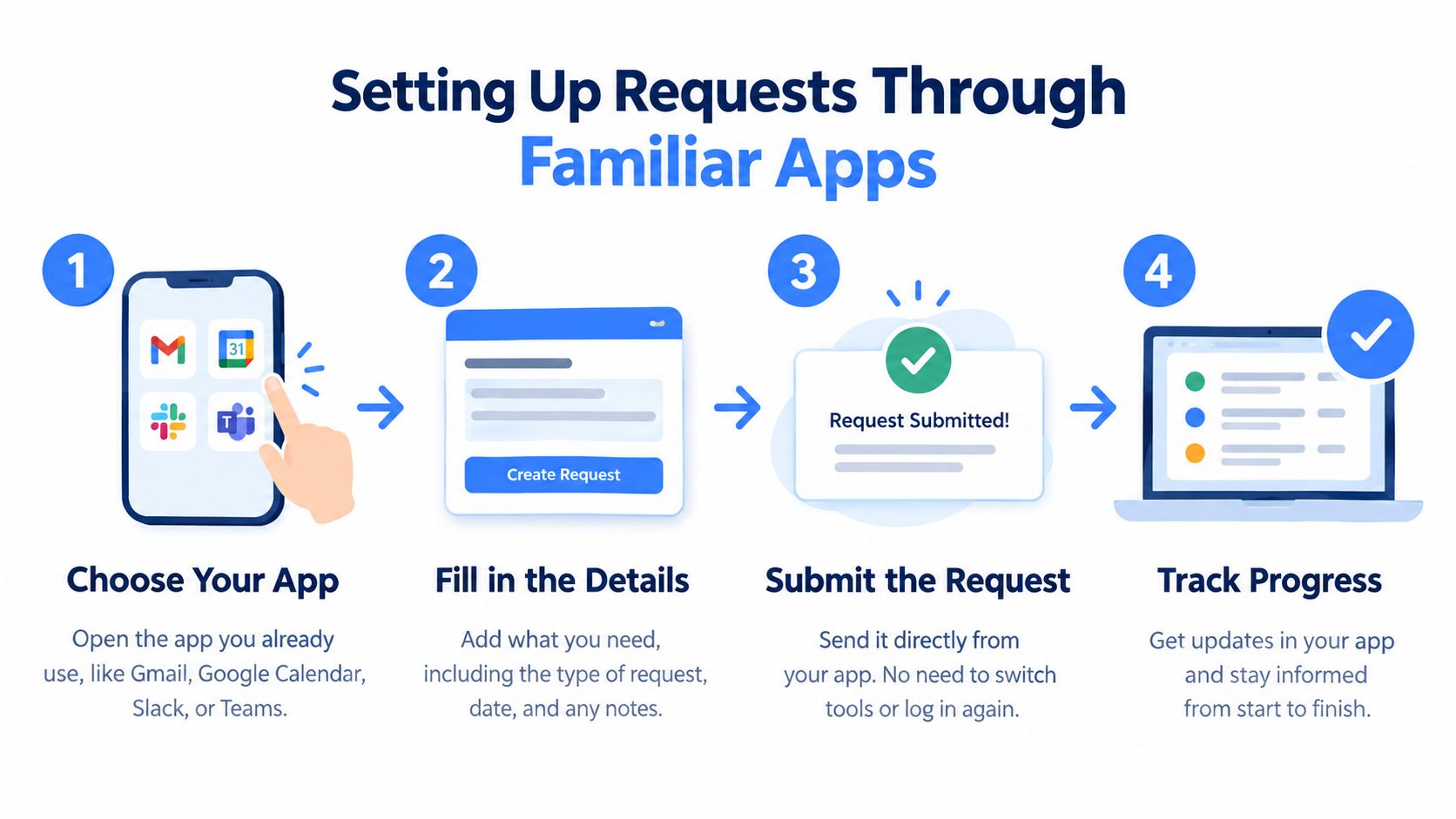
Calculating the amounts is only useful if people can pay without creating another coordination project. Ledger-style expense apps can be helpful for ongoing balances, but they often ask every participant to join the same system, create an account, and remember to check it. That's a poor fit for a single restaurant bill when everyone already uses familiar payment services.
Divvy is designed around the payer's immediate need. After the shares are calculated, the person who covered the restaurant bill can create requests through payment channels such as Venmo, Cash App, or Apple Pay. Friends can receive the request without installing the bill-splitting app or joining a shared ledger.
Choose the payment path that matches the group
Use the payment rail that your friends already recognize. A Venmo request may suit one group, while another prefers Apple Pay or Cash App. The point isn't to force a universal platform. It's to preserve the itemized calculation while meeting each recipient at a familiar payment step.
| Approach | What works | Where it can fail |
|---|---|---|
| Equal split through a payment app | Fast for similar orders | Unequal meals create hidden subsidies |
| Shared ledger app | Useful for repeated household expenses | Everyone may need to join and maintain the ledger |
| Itemized calculation with familiar payment apps | Shows each person's basis and reduces setup friction | Recipients still need to verify the request before paying |
| Separate payments at the restaurant | No reimbursement chase afterward | The restaurant may not support complex item-level payment handling |
For events and group ordering, the same principle appears in broader pay-your-own event setup guidance. Letting people pay their own portion can reduce collection work, but it requires a clear method for shared items and charges.
Verify before pressing send
Payment convenience doesn't remove the need for caution. Confirm the recipient's handle, review the requested amount, and make sure the message identifies the meal or event. A request that appears without context can look like spam, especially when friends receive many payment notifications.
The guide to requesting money on Venmo covers the mechanics of creating a request. In practice, pair the request with a short note such as “Saturday dinner, your assigned items plus proportional tax and tip.” That gives the recipient enough information to recognize the charge without reopening the entire calculation.
Payment access also varies. Someone may not use the same app, may need another payment method, or may prefer to settle later. Agree on an alternative and record partial payments rather than adjusting the remaining balances. A transparent fallback keeps the group from treating one payment service as universally available.
Automating Follow-Ups and Clearing Balances
The uncomfortable part often starts after the clever math is finished. You send the requests, everyone says they'll handle it, and then the group chat goes quiet. A second reminder feels personal, even when the unpaid balance is just buried under work messages and notifications.
Automated follow-ups separate the administrative task from the friendship. Instead of asking the person who paid to become the collection agent, the system can send reminders until each balance is settled. That doesn't guarantee payment, but it creates a visible process and removes the need for repeated personal nudges.
Make the request easy to resolve
A good follow-up includes the original context, the amount due, and the payment route. It shouldn't make the recipient search through old messages to figure out whether the request was for dinner, a taxi, or a shared grocery order. The clearer the first request, the less likely the reminder feels accusatory.
Before sending, check these details:
- Recipient identity: Verify that the request goes to the intended person.
- Description: Name the meal or event so the charge has context.
- Amount: Confirm the assigned items and proportional charges.
- Payment status: Record who has paid, who is pending, and whether anyone made a partial payment.
- Exception handling: Resolve duplicate payments, wrong recipients, or disputed items directly rather than silently changing totals.
Safety deserves attention here. Consumer Reports' 2025 Consumer Cyber Readiness Report found that nearly half of Americans had personally encountered a cyberattack or digital scam, and about one in ten had lost money after such an incident. The report also explains that peer-to-peer payment apps generally don't provide the same legally mandated fraud protections as credit cards, so users need to verify recipients and understand how disputes are handled.
Before paying: Confirm the handle, amount, and meal description. A convenient request is still an authorized transfer, not an automatic guarantee of recovery.
Divvy offers a workflow for itemized receipt scanning, payment requests, and automated reminders, with a Pro plan for users who want unlimited AI scans. It's suited to people who want to settle individual bills rather than maintain a continuing group ledger.
The best result is pleasantly uneventful. You scan the receipt, assign the items, check the proportional charges, send clear requests, and let the follow-up process do its job. Splitting a bill online shouldn't mean doing mental math at the end of a long night. It should mean settling the shared expense accurately, then getting back to the people you came to see.
Divvy turns a restaurant receipt into itemized shares, allocates tax and tip proportionally, and sends payment requests through familiar services without requiring every friend to install the app. Visit Divvy to scan your next receipt and stop chasing the group chat for reimbursements.