Divvy
DivvyHow Does a Receipt Scanner Work from Photo to Split Bill
By The Divvy Team · September 11, 2026 · 17 min read
You're at the end of dinner, the receipt is covered in tiny line items, and everyone remembers ordering something different. One person had the burger, two people shared the fries, another added a cocktail, and the total includes tax and tip. Someone takes a photo, opens a bill-splitting app, and hopes the numbers make sense before the group leaves the table.
So, how does a receipt scanner work well enough to turn that photo into individual amounts? It doesn't just “read the total.” A modern scanner cleans the image, recognizes printed characters, identifies what each piece of text means, and then uses the structured result to assign items and divide shared charges. The difficult part is not finding the final amount. It's making sure the right people pay for the right items.
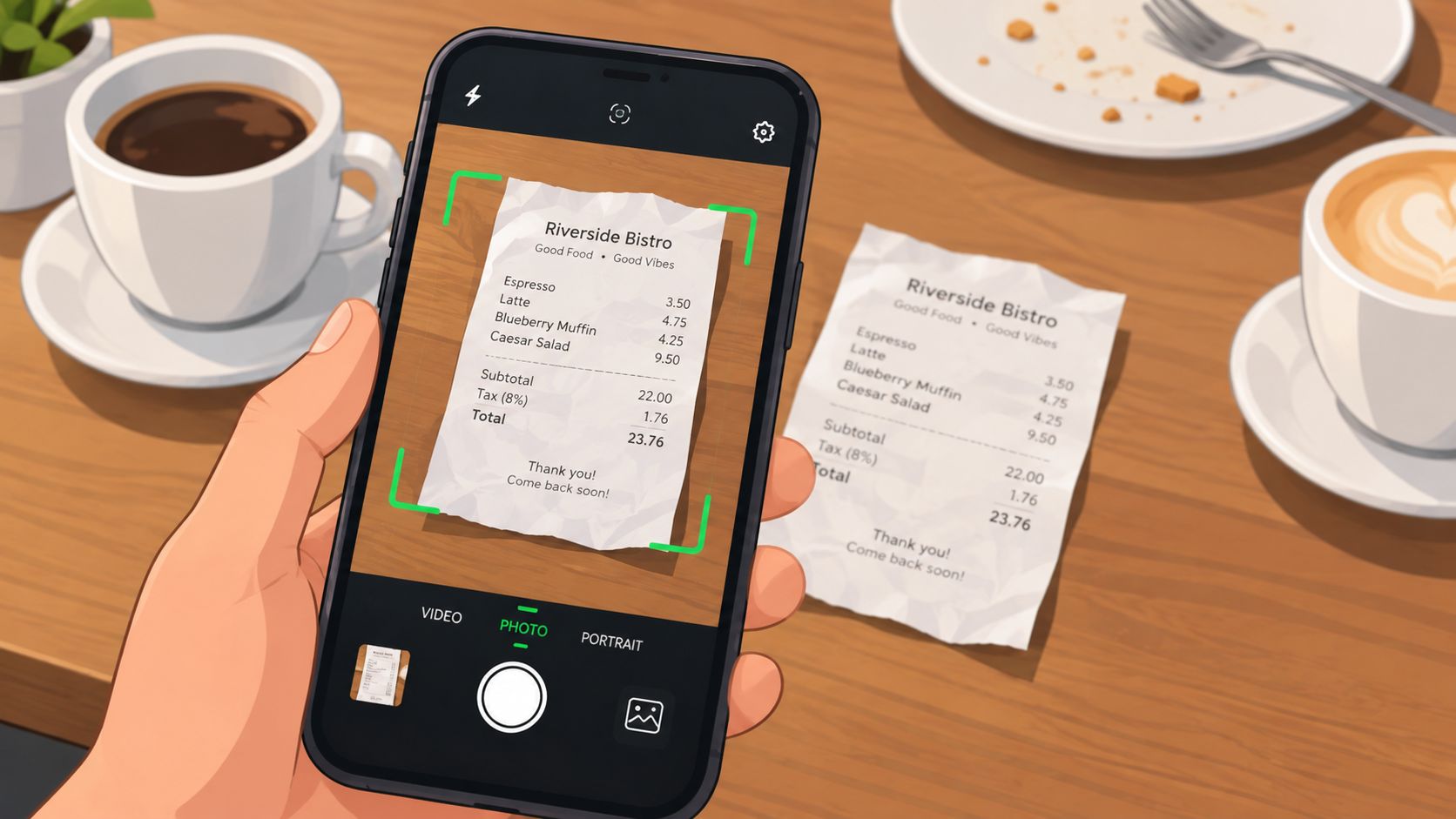
The process usually has four practical stages:
- Image preparation, where the app straightens, crops, and improves the receipt photo.
- OCR, or optical character recognition, where pixels become letters, numbers, and symbols.
- Document understanding, where software maps text into merchant details, line items, tax, tip, and total.
- Bill allocation, where people claim items, share dishes, and receive payment requests.
A scanner can make settlement faster, but automation doesn't remove the need for a quick review. A blurry price, a missed item, or a wrong tax allocation can create an unfair split even when the grand total looks correct. Understanding the pipeline helps you spot those errors and gives you a better way to judge whether the result is ready to send through Apple Pay, Venmo, or Cash App.
Table of Contents
- Introduction What Happens After You Snap the Receipt
- How OCR Turns Receipt Photos Into Machine Readable Text
- Inside the Scanning Pipeline From Image Cleanup to Text Detection
- How AI Parses Line Items Tax and Totals Into Structured Data
- How Tax and Tip Get Allocated Fairly Across Your Group
- Accuracy Privacy and What to Check Before You Trust the Scan
- Putting It All Together From Scan to Settled Payments
Introduction What Happens After You Snap the Receipt
When you photograph a receipt, the app starts with an image, not a spreadsheet. The receipt may be tilted, shadowed by your hand, folded near the subtotal, or printed in a faint thermal font. Before an app can decide who owes what, it has to turn that imperfect photo into information that software can organize.
The first stage is image cleanup. The scanner may correct the angle, isolate the receipt from the table, reduce visual noise, and improve contrast. This preparation matters because recognition systems work from visible patterns. If a character is hidden by a shadow or blurred by movement, later stages may have to guess.
Next comes OCR. The technology identifies shapes in the image and converts them into machine-readable text. At this point, the result may still be a loose block of words and numbers. The system knows what it sees, but not necessarily whether a number is a burger price, tax, subtotal, or final total.
Fairness check: A readable total doesn't prove that the line items are correct. Bill splitting depends on the detailed rows that connect purchases to people.
The scanner then applies layout and document understanding. It looks at position, spacing, nearby labels, and relationships between values to identify the merchant, date, item descriptions, prices, tax, tip, and total. That structured information lets a bill-splitting app present each item as something you can assign to a person or divide among several people.
Finally, the app calculates each person's share. A diner may claim an individual item, mark a shared appetizer for an even split, and receive a proportional share of tax and tip based on the items assigned to them. The app can then create payment requests, while the group checks the result before anyone settles.
The important distinction is between reading a receipt and using a receipt fairly. OCR gets the characters into the system. Layout analysis gives them meaning. Allocation rules turn that meaning into amounts people can verify.
How OCR Turns Receipt Photos Into Machine Readable Text
Optical character recognition, usually called OCR, is the layer that translates an image into text. A useful analogy is a person copying a printed page into a document, except the software compares visual patterns instead of understanding the words as a human does.
The process begins with pixels. The scanner looks for areas that resemble text, separates characters from their background, and matches visual shapes to letters, numbers, and symbols. A printed “8” has a different pattern from a “3,” but a blur, crease, or dark shadow can make those patterns harder to distinguish.
OCR has a long history. Early automation experiments appeared in the 1910s and 1920s. Emanuel Goldberg's 1914 Optophone converted printed text into audible signals, while Gustav Tauschek's 1929 Reading Machine explored machine reading of printed characters. Commercial OCR became more practical in the 1950s and 1960s, including IBM's branded optical character recognition systems launched in 1959. The history of OCR and receipt scanning shows why modern phone-based scanners are part of a much older effort to convert visual text into usable data.
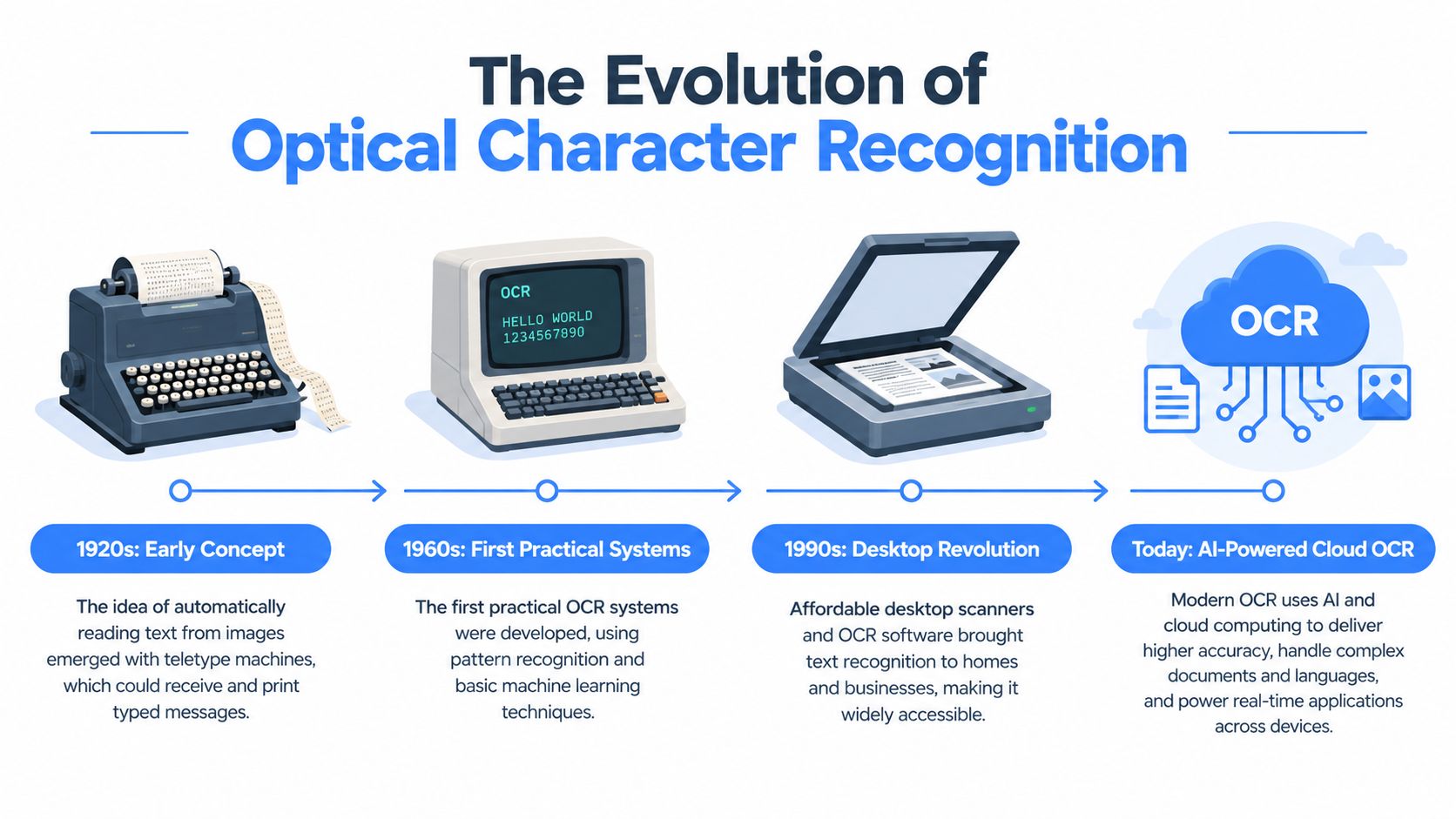
Why receipts challenge OCR
Receipts are harder than clean office documents because they vary in almost every visual detail. They can use narrow columns, abbreviations, unusual fonts, faded ink, curved paper, logos, and tightly packed numbers. A restaurant receipt may also place quantities, descriptions, prices, modifiers, discounts, and payment details close together.
Older rule-based OCR systems rely heavily on fixed expectations. A deep learning system can learn broader visual patterns from many examples, which helps it handle varied layouts, although it still depends on image quality and document structure. Recent review work says deep learning approaches are increasingly replacing older rule-based methods because receipts differ so widely in layout and quality, as summarized in this receipt scanner accuracy analysis.
For a clean, well-scanned receipt, advanced OCR engines can exceed 98% extraction accuracy, according to a recent receipt scanner market report. That figure describes extraction performance under the report's conditions, not a guarantee that every line item in every phone photo will be correct.
You can also use a general Zemith image analysis tool to understand how image-analysis systems inspect visual content before interpretation. It's a useful comparison because receipt scanning depends on both seeing the image clearly and assigning meaning to what appears in it.
OCR is only the first conversion. The app still needs to understand where each piece of text sits and what role it plays. For a concise explanation of the underlying technology, see what OCR technology is.
Inside the Scanning Pipeline From Image Cleanup to Text Detection
A receipt scanner works like an assembly line. Each stage prepares the image for the next one, and a failure near the beginning can affect every field that follows.
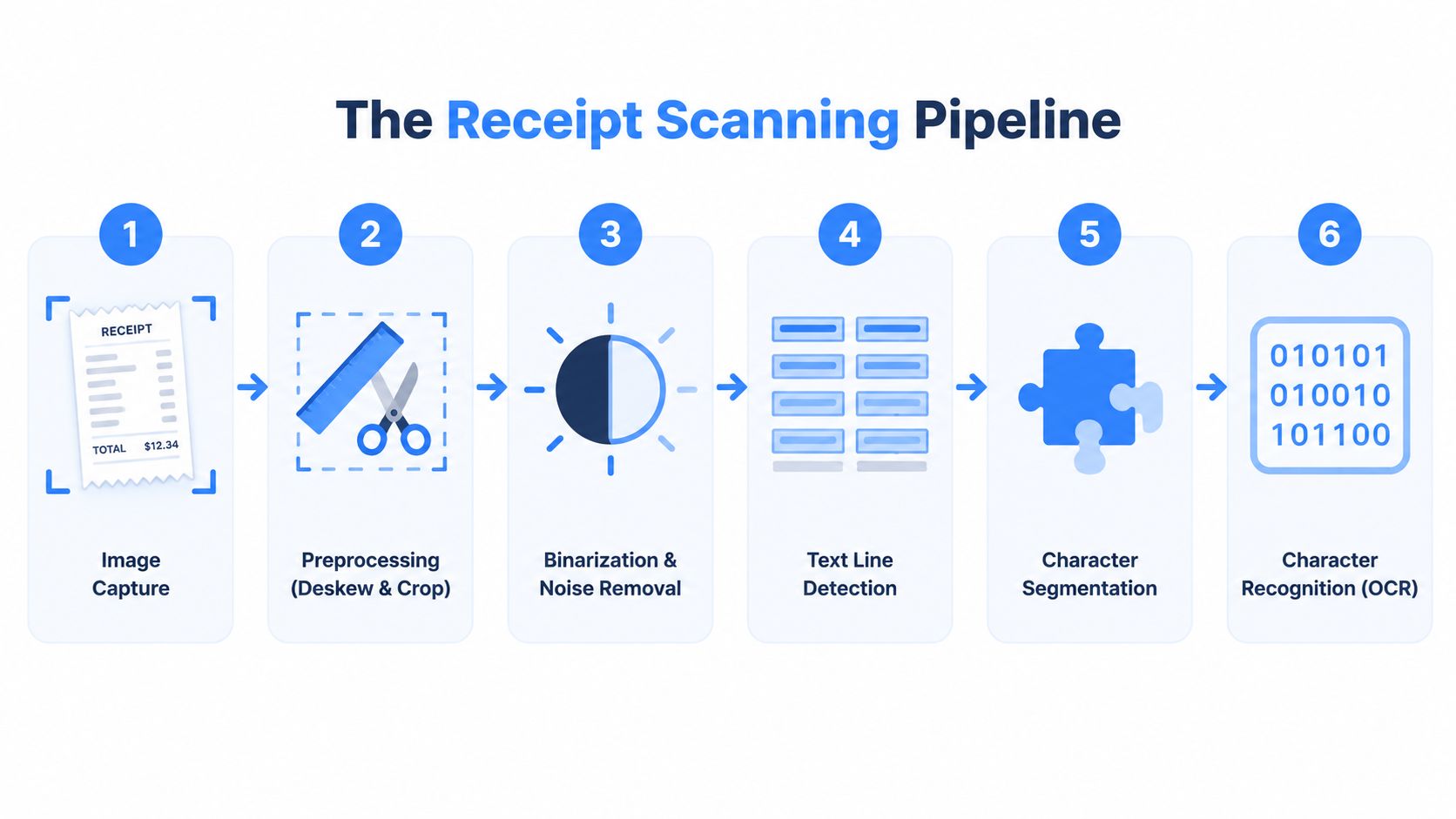
Stage one starts with capture
The phone camera records the receipt as a photograph. A straight-on shot with even lighting gives the software more useful visual information than an angled image taken while someone is moving the paper. The scanner may detect the receipt's edges and separate it from the table, napkin, or surrounding objects.
Preprocessing repairs the photograph
The system then performs several cleanup operations:
- Deskewing: It corrects a receipt photographed at an angle.
- Cropping: It removes unnecessary background and focuses analysis on the document.
- Denoising: It reduces shadows, speckles, folds, and other visual interference.
- Contrast improvement: It makes faint printed characters stand out more clearly.
These steps don't recover information that the camera never captured, but they can make existing information easier to recognize. A dark shadow crossing the tax line may still cause trouble after enhancement, while a mildly uneven background may become manageable.
Text detection finds the readable regions
Once the image is cleaner, the scanner searches for text lines and blocks. It needs to distinguish an item description from a logo, a price column from a payment reference, and the totals area from unrelated footer text. The page's visual arrangement begins to matter at this stage.
The OCR engine then segments characters and recognizes them. It produces raw text, often with coordinates or other layout information attached. Those positions become important later because two identical numbers can mean completely different things depending on where they appear.
Validation catches obvious contradictions
The final pipeline stage checks whether the extracted fields make sense together. A subtotal, tax, tip, and total should relate in a plausible way. A line-item price should look like a monetary value, and a date should follow a recognizable date pattern. These checks don't guarantee correctness, but they can flag suspicious results for correction.
Receipt photos commonly fail because they're blurry, cropped, shadowed, folded, low-light, or faded. The receipt extraction and validation guide describes preprocessing, field mapping, and validation as connected parts of the workflow rather than optional extras.
Practical rule: If the image is difficult for you to read, retake it before asking the scanner to interpret it. Better capture gives every later stage a better starting point.
For bill splitting, the best intervention point is often before processing finishes. Keep the camera parallel to the receipt, include every edge, avoid covering text with your fingers, and use enough light to separate print from paper. Those simple choices won't solve every layout problem, but they reduce avoidable recognition errors.
How AI Parses Line Items Tax and Totals Into Structured Data
A receipt becomes useful for fair bill splitting only after the scanner turns raw OCR into relationships. The text may list a restaurant name, item descriptions, prices, tax, payment details, and total in one long sequence. AI parsing sorts those fragments into fields an app can display, check, and assign.
A structured record may include:
- Merchant, such as the restaurant or store name.
- Metadata, including the transaction date.
- Line items, with descriptions, quantities, and prices.
- Charges, such as subtotal, tax, tip, discounts, and total.
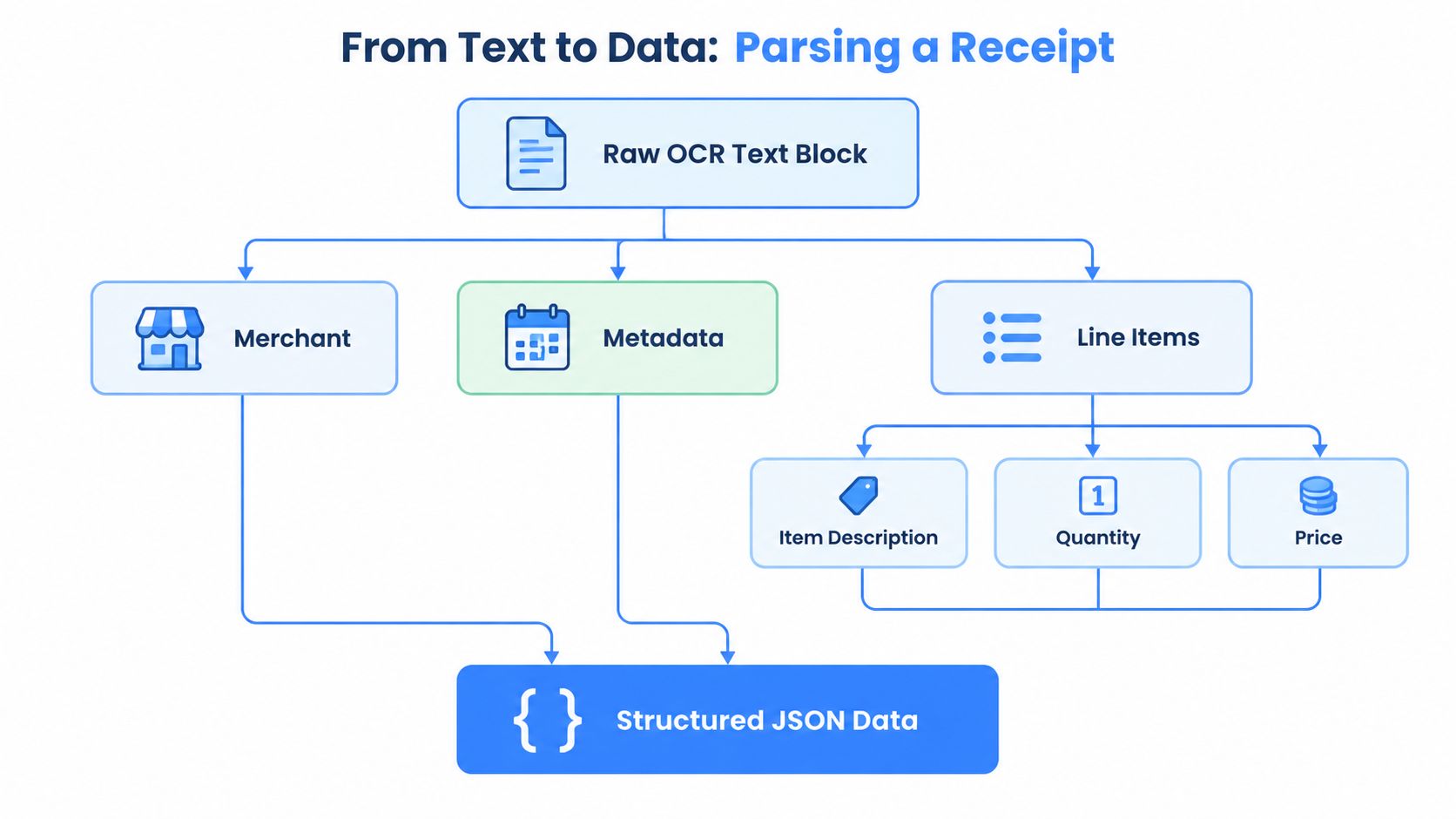
Position gives numbers their meaning
A receipt can show the same price beside an item and again near the payment section. OCR may read both correctly. The parser still has to determine which amount belongs to a purchased item and which belongs to a payment or reference entry. Labels, alignment, spacing, font treatment, and nearby words provide that context.
Merchant names, dates, and totals often appear beside familiar labels or in predictable parts of the receipt. Line items are more difficult because several columns must stay connected. The system must match each price to its description, decide whether a quantity changes the calculation, and recognize whether a discount changes the amount assigned to a diner.
That relationship determines whether friends settle fairly. A scanner can read the grand total correctly yet attach a price to the wrong item. The result looks complete, while one person is charged for someone else's food.
Diverse receipts expose structural weaknesses
Performance changes with the receipt collection being tested. ICDAR-SROIE contains 1,000 scanned receipts and four extraction fields, while ReceiptBench contains 10,656 real receipts across 19 fields. ReceiptBench reports structural parsing as the weakest sub-task for all tested models, with performance falling on harder, more varied receipts and phone-captured images. Its research also reports about 97.46 F1 for LayoutLMv3 on CORD, while showing that strong results on established benchmarks may not transfer to messier real-world images. See the ReceiptBench research paper for the benchmark details.
A separate pipeline comparison reported 87.46% accuracy for the strongest image pipeline and 47.00% after receipts were flattened into text first. The practical point is that the original image and its layout can carry information that plain text loses.
For a bill-splitting app, structured data supports actions such as selecting an item, assigning it to one person, or marking a shared dish. It also gives later tax and tip calculations a dependable starting point. If the item-to-price relationship is wrong, those calculations can be mathematically correct and still produce an unfair settlement.
How Tax and Tip Get Allocated Fairly Across Your Group
Once the app knows who has which items, it can calculate tax and tip without treating every diner as though they ordered the same amount. The usual proportional approach assigns each person a share of the subtotal, then applies the same proportions to shared charges.
Consider a group with three diners:
- Alex ordered items totaling $30.
- Bri ordered items totaling $20.
- Casey ordered items totaling $10.
- The subtotal is $60.
- Tax is $6.
- Tip is $12.
Alex accounts for half of the subtotal, Bri accounts for one third, and Casey accounts for one sixth. Their tax and tip shares follow those same proportions.
| Person | Items Ordered | Share of Subtotal | Tax Owed | Tip Owed | Total Due |
|---|---|---|---|---|---|
| Alex | $30 | 50% | $3 | $6 | $39 |
| Bri | $20 | 33⅓% | $2 | $4 | $26 |
| Casey | $10 | 16⅔% | $1 | $2 | $13 |
An equal split would charge everyone the same amount, even though Alex consumed more and Casey consumed less. Proportional allocation keeps the shared charges connected to the value of each person's items.
Fairness depends on assignment first. If a line item is attached to the wrong person, perfect tax and tip math only produces a precisely calculated mistake.
Shared dishes need a separate decision. If three people ate the same appetizer, the app can divide that item evenly among them. If two people shared it, only those two should receive portions of its price and the related tax and tip.
After reviewing the assignments, the payer can generate individual requests through a money app. The group doesn't need to perform the proportional calculation manually, but everyone should still check the item list, shared dishes, tax, tip, and rounding before sending payment.
Accuracy Privacy and What to Check Before You Trust the Scan
Fair settlement depends on more than a correct printed total. A scanner may recognize the merchant, date, and grand total while misreading a line price, quantity, or modifier. Those smaller errors can assign the wrong cost to one friend, then distort that person's share of tax and tip.
Image quality sets the starting point. A flat, well-lit receipt with all edges visible gives the system clearer evidence. Creases, glare, blur, faded ink, and narrow columns make the rows harder to separate. Image enhancement may rescue a poor photo, but aggressive processing can also alter characters in an otherwise readable image. The scanner should apply correction selectively instead of assuming more processing always improves the result.
Review the fields that affect payment
Check the items that can change a person's balance:
- Line descriptions and prices: Confirm that every amount matches the correct item.
- Quantities and modifiers: Look for duplicate quantities, add-ons, discounts, and removed ingredients.
- Shared dishes: Confirm who ate each shared item before dividing its cost.
- Tax and tip: Compare both amounts with the receipt and check the allocation method.
- Final total: Make sure the assigned items and shared charges reconcile with the printed total.
A confidence score can help direct attention to uncertain fields. Some systems may also send ambiguous scans for human review. These controls do not replace your check, but they make uncertainty visible instead of presenting every result as equally reliable.
Review the item assignments before anyone pays. A mathematically correct split can still be unfair if the scanner attached a side dish to the wrong person or missed an add-on.
Privacy is part of accuracy
A receipt can expose restaurant visits, alcohol purchases, travel, medications, and household spending. Before uploading one, check whether processing occurs on the device or in the cloud, who may access the image, whether scans are stored, and how long itemized data remains available.
Offline OCR can reduce the need to transmit images, while a cloud workflow may send difficult scans through several services. A hybrid design may offer fallback processing, but it also makes the data path harder to understand. The receipt scanning safety guide provides a framework for checking storage, access, and processing practices.
Trust is a product feature. Choose a scanner that shows uncertainty, explains what happens to receipt images, and continues to handle review when the connection is weak. That combination protects both private spending details and the fairness of the final bill.
Putting It All Together From Scan to Settled Payments
The complete journey is simple to describe, even though several technologies work underneath it:
- You photograph the receipt.
- The app cleans and straightens the image.
- OCR converts visible characters into machine-readable text.
- AI maps the text into merchant data, line items, tax, tip, and total.
- You assign items, divide shared dishes, and review the result.
- The app calculates proportional charges and creates payment requests.
- The group settles the remaining balances.
That sequence explains why line-item accuracy matters more than total accuracy alone. A correct grand total can still hide a wrong item assignment. A fair split requires both reliable extraction and a clear review step before payment.
For an iPhone workflow, take the photo in good light, keep the receipt flat, include the full page, and correct anything that looks uncertain. A tool such as the receipt scanning app from Divvy can use AI scanning to read receipt details, support tap-to-assign item allocation, and calculate tax and tip for each person's share. Treat those calculations as a starting point to verify, not as a substitute for reading the receipt.
The strongest workflow combines automation with accountability. Let the scanner handle repetitive recognition and proportional math, then let the people at the table confirm who ordered what. That keeps settlement quick without turning a technical error into an awkward conversation.
Try your next receipt with the full image visible, assign every item carefully, and compare the calculated total with the printed bill before sending a request.
Divvy helps iPhone users scan receipts, assign individual or shared items, and calculate proportional tax and tip for group bills. Visit Divvy to see how you can move from a receipt photo to reviewed payment requests with less manual math.