Divvy
DivvyBill Calculator App: What It Does and How to Choose One
By The Divvy Team · October 19, 2026 · 14 min read
The plates are empty, the receipt lands in the middle of the table, and everyone starts trying to remember what they ordered. One person had the shared appetizer, another skipped dessert, and someone's already asking how to handle the tip. A bill calculator app can turn that awkward end-of-meal huddle into a clear breakdown of who owes what, then help the group collect the money.
The useful distinction is that this kind of app is built to settle a particular bill, not necessarily to track every shared expense between friends over time. To choose one, look beyond the final total: check how it reads and assigns receipt items, handles tax and tip, and works when people don't all use the same payment app.
Table of Contents
- What a Bill Calculator App Actually Does
- How the Calculation to Settlement Pipeline Works
- Key Features That Separate a Good App From a Gimmick
- Bill Calculator Apps vs Ledger Style Expense Trackers
- A Walkthrough of AI Itemization and Proportional Splits
- Settling When Not Everyone Uses the Same Payment App
- Choosing the Right App for Your Situation
What a Bill Calculator App Actually Does
A bill calculator app takes the work of settling a specific purchase off the group. After dinner, you can photograph the receipt, check the items the app reads, assign each item to the person who ordered it, and decide how to divide anything everyone shared. The app then calculates each person's portion of the tax and tip and helps turn the result into a payment request.
That's more than a tip calculator, which typically starts with a subtotal and asks you to choose a tip. It's also different from an ongoing expense tracker, which keeps a running record of who paid for multiple things and how the group's balances change. Think of the bill calculator as a checkout assistant for one receipt, while a ledger is more like a shared notebook that stays open.
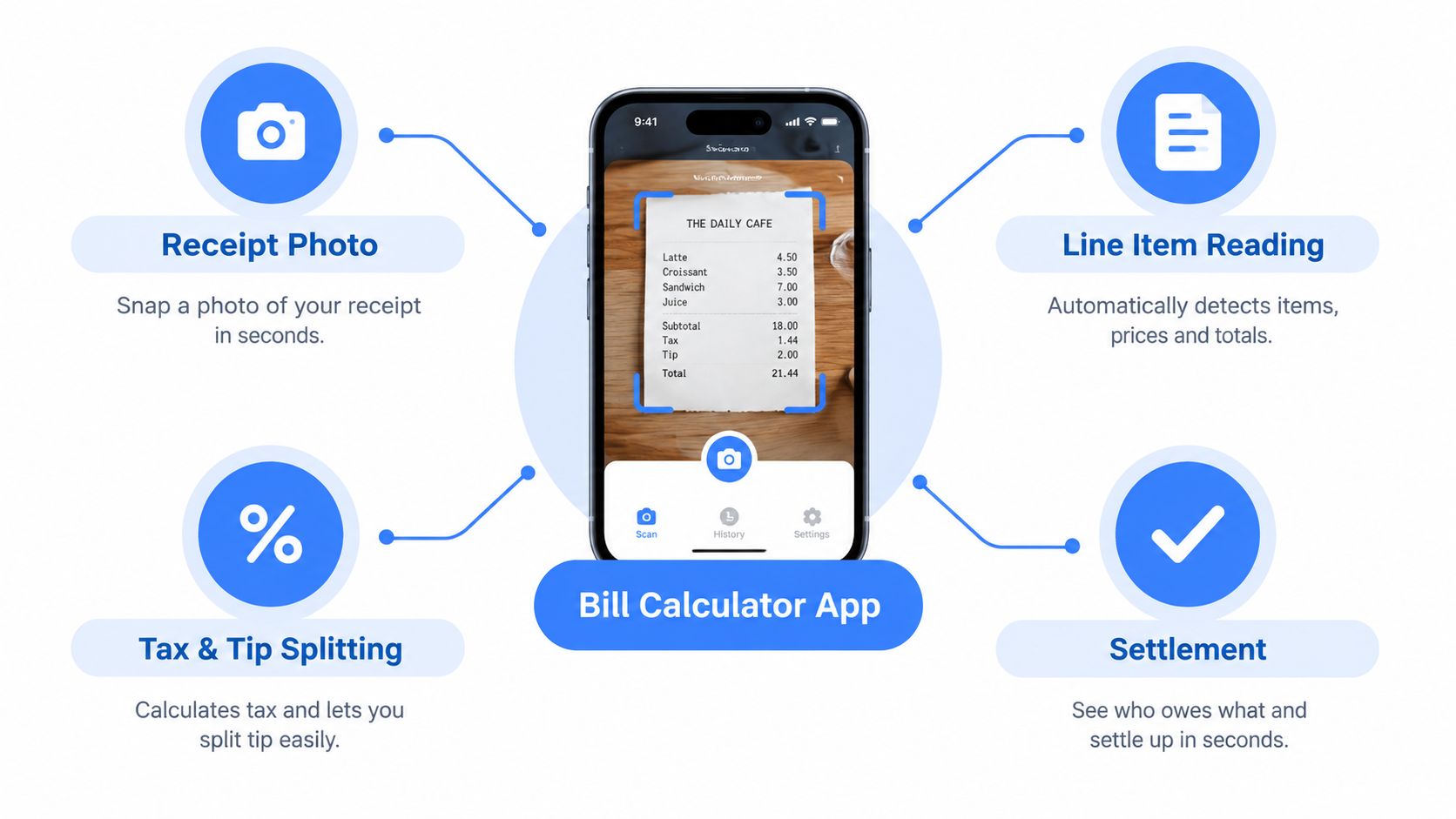
The receipt is the starting point, not the finish line
Suppose a group orders individual mains, a shared appetizer, and drinks. Someone has to figure out which line belongs to whom, whether the appetizer should be divided, and how to allocate shared charges without asking one person to do mental arithmetic while everyone waits.
A single-bill tool makes those relationships visible. You can check the detected receipt lines, correct anything that was read incorrectly, and assign items before the app totals each share. The receipt stays the source of truth, and the calculation follows the group's choices instead of assuming every person ordered the same amount.
Look for a closed loop
A true settlement tool carries the calculation through to the handoff: it prepares clear individual totals and gives the group a way to request or record payment. A renamed ledger app may track the expense but still leave someone to calculate item-level shares and explain the numbers afterward.
That distinction matters at the table. If the group wants to wrap up this meal and move on, choose a tool that focuses on one receipt and a clear settlement. If you need to manage recurring household costs or many shared purchases, an ongoing tracker may suit you better.
How the Calculation to Settlement Pipeline Works
A good app turns a paper receipt into a set of understandable decisions. The math matters, but so does seeing where each person's total came from.
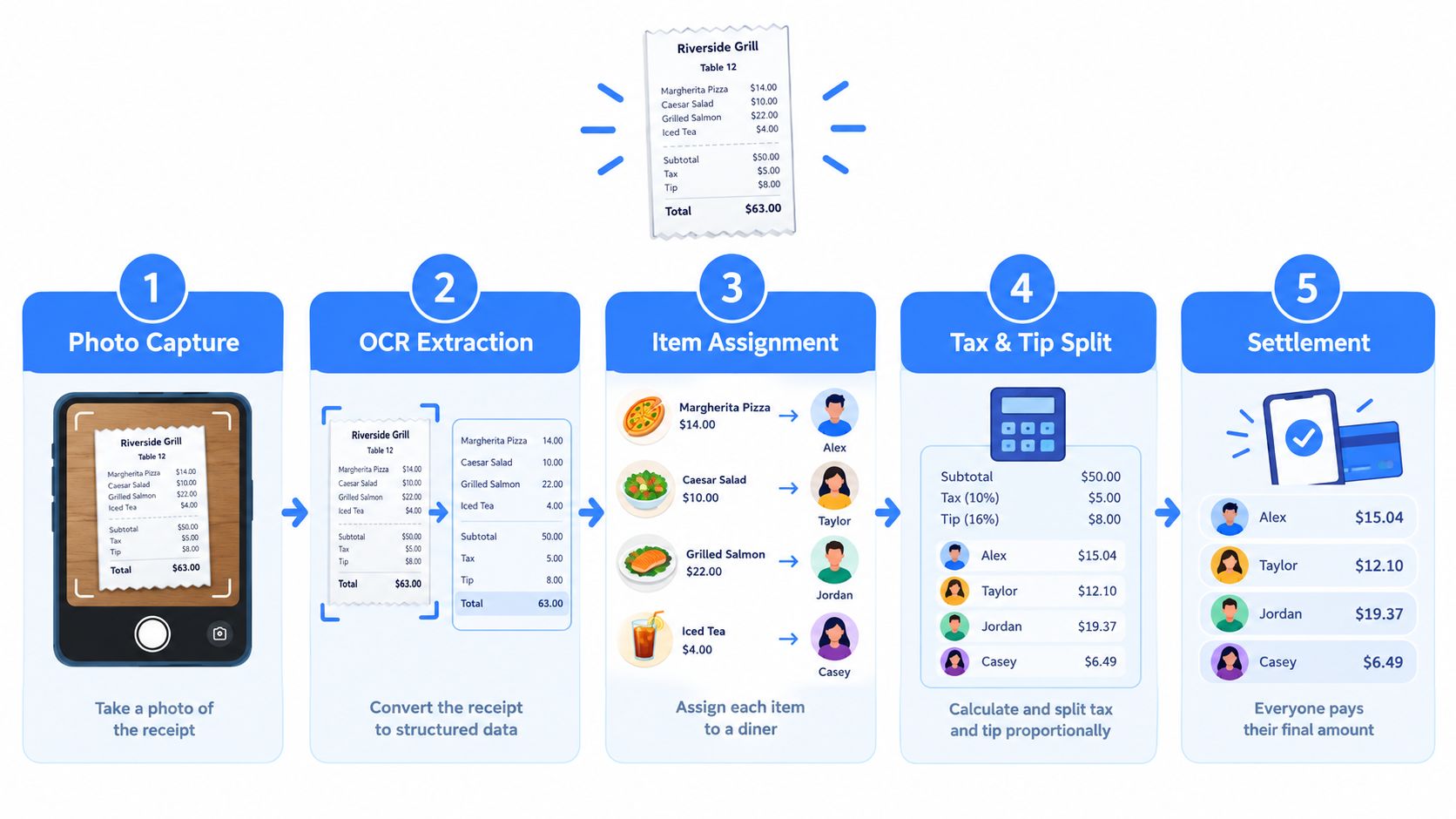
From photo to assigned items
Start by photographing the receipt. The app reads the printed lines and organizes them into items and charges, such as dishes, tax, and tip. Receipt scanning can make entry faster, but it isn't a reason to skip checking the result. A smudged line, modifier, or unfamiliar abbreviation may need a quick correction.
Next, add the diners and assign the items. If one person ordered a pasta dish and another ordered a salad, tap each item under the right name. If the table shared bread, split it among the people who shared it rather than assigning the whole cost to one diner.
The distinction between individual and shared items keeps the bill grounded in what people consumed. It also prevents the common mistake of dividing every line equally just because the group wants a quick answer.
From shares to settlement
Once the items are assigned, the app calculates each person's subtotal. It can then distribute shared tax and tip in proportion to those subtotals, so someone who ordered less doesn't automatically pay the same tax and tip as someone whose items cost more.
Before sending requests, check the assumptions: confirm the receipt total, the selected tip, and any charges that may already be included. Then review the individual totals and choose a way to ask each person to pay.
The app's job isn't only to remove arithmetic. It should make the result clear enough that the group doesn't have to negotiate the math all over again.
A useful way to evaluate any app is to follow the same sequence on its screen: receipt, items, people, shared charges, individual totals, payment. Whether the app displays each stage or handles some behind the scenes, you should be able to review the inputs and understand the result.
For a visual example of the process, watch the receipt-to-payment walkthrough.
Key Features That Separate a Good App From a Gimmick
A polished screen doesn't guarantee a useful split. Judge the app by whether it handles the parts that cause disagreement: item assignment, shared dishes, fees, payment preferences, and the handoff after the calculation.
The must-haves
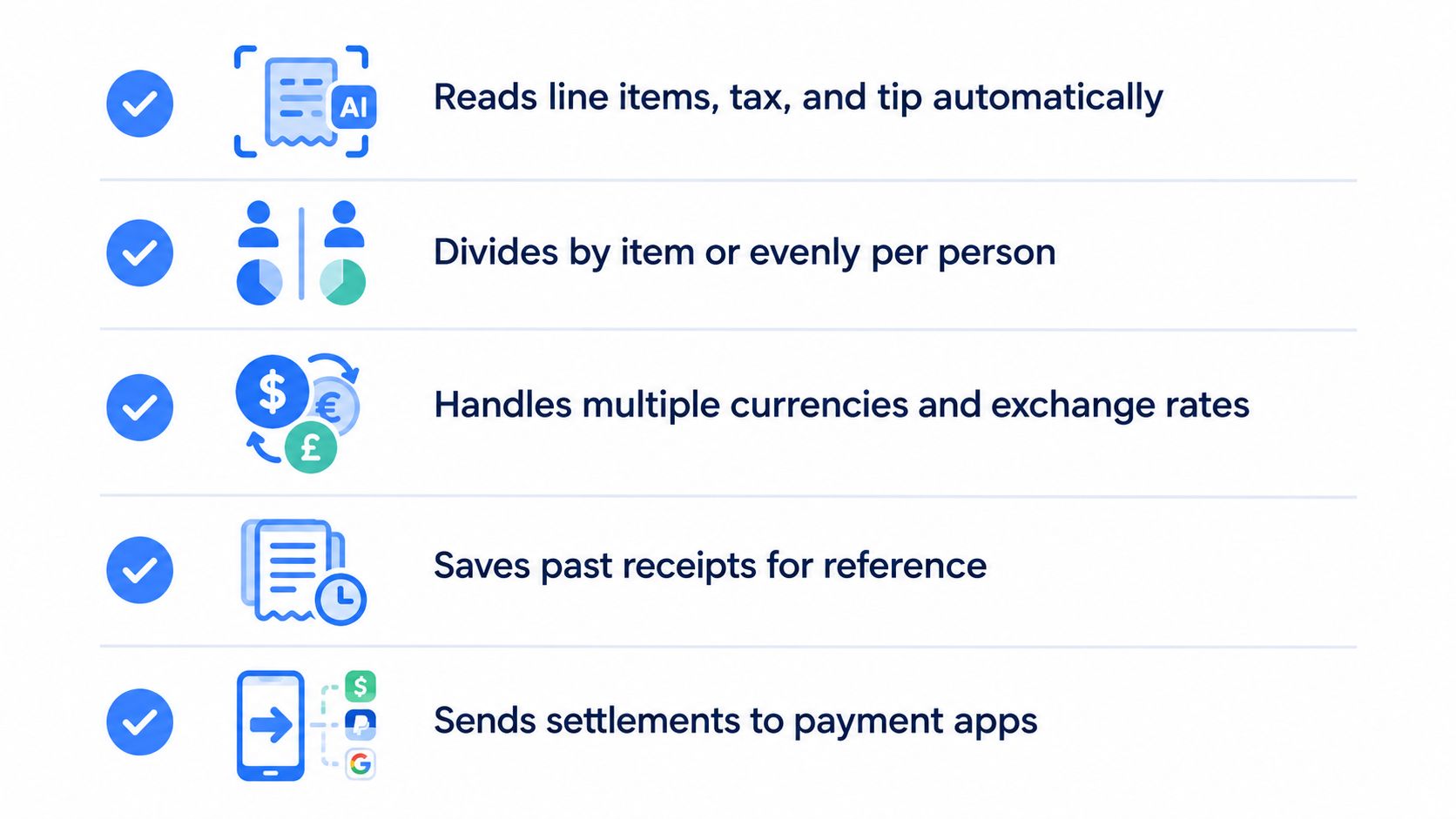
Start with receipt scanning that reads individual lines, not just the grand total. You should be able to correct a misread item, assign it to a person, and split a shared dish without creating a confusing workaround. Tax and tip allocation should follow each person's share, with a way to review how the app handled them.
That flexibility matters because diners don't always follow one tipping pattern. Bankrate's survey reports that 70% of adults who dine at sit-down restaurants always tip, while 35% typically leave at least 20%. Its digital-payment diner data also reports average tips of 19.4% at full-service restaurants and 15.8% at quick-service restaurants in Q1 2025 (Bankrate's tipping-culture survey). A calculator shouldn't treat a single default as universally fair. Let the group choose a tip and see how it affects each person's share.
The useful extras, and the warning signs
Payment requests can reduce the back-and-forth, especially if they work with services the group already uses. Reminders and a way to record who has paid also help, but they shouldn't make the calculation hard to check.
Keep this short test in mind when you compare apps:
- Receipt reading: Can you review and fix the itemized receipt?
- Flexible assignment: Can you assign separate items and divide shared ones?
- Fair allocation: Can you see how tax and tip are applied to individual shares?
- Practical settlement: Can the result be sent or shared without requiring everyone to adopt the same tool?
- Clear limits: Does the app explain which features are free and which require a paid plan?
A warning sign is a calculator that shows only one total per person without revealing how it reached that amount. Another is a tool that applies charges automatically but gives you no way to check whether the receipt already includes a service charge or gratuity. For a one-off split, transparency is more valuable than a long feature list.
Bill Calculator Apps vs Ledger Style Expense Trackers
The difference is the job each tool is designed to do. A bill calculator closes out one receipt. A ledger-style expense tracker records many transactions and helps a group reconcile what everyone owes across time.
| Situation | Bill calculator app | Ledger-style expense tracker |
|---|---|---|
| Group dinner | Assigns items and calculates each person's share of one receipt | Records the meal as one group expense or part of a running balance |
| Shared household | Splits a particular bill, such as a grocery receipt | Tracks recurring costs and payments among housemates |
| Group trip | Settles a restaurant or activity bill on the spot | Keeps track of shared spending across the trip |
A group of friends might use a bill calculator to divide a restaurant receipt, then turn to a ledger to track lodging and other shared travel expenses. Roommates might use a ledger for recurring bills but still want item-level splitting for a particular grocery purchase. The tool should match the transaction, not just the people involved.
Practical rule: If the question is “What does each person owe for this receipt?”, start with a settlement tool. If it's “How do we balance everything we've shared?”, use a ledger.
A single-bill app tends to suit people who regularly split meals and want to settle before leaving. A ledger works better when the group's costs accumulate and need to be compared over time. If you're weighing the broader options, this guide to a free shared expense tracker app can help clarify when ongoing tracking makes more sense.
Neither approach is automatically better. The right choice depends on whether your recurring problem is assigning a receipt or reconciling a collection of expenses.
A Walkthrough of AI Itemization and Proportional Splits
Take a restaurant receipt with three diners. One ordered an entrée and a drink, another ordered a salad, and the third ordered an entrée; the group also shared an appetizer. A receipt-scanning app can read the printed lines, but the people at the table still need to confirm that the items and amounts were captured correctly. For more on the scanning step, see this explanation of how a receipt scanner works.
Assign each item to the people who shared it
After reviewing the receipt, add the diners and tap the items under their names. Assign each entrée, drink, and salad to the person who ordered it. For the appetizer, choose the people who shared it so its cost is divided among them rather than charged to one person or automatically spread across the whole table.
This matters when a group's orders differ. If the person who had a salad and water is charged an equal share of every menu item, they may end up subsidizing someone else's more expensive order. Item-level assignment makes the basis of the split visible before tax and tip enter the calculation.
Review charges before sending requests
The app totals each person's assigned items, then allocates tax and the selected tip according to each person's share of the subtotal. If one diner skipped dessert, they aren't assigned that line. If the receipt lists an automatic gratuity or a service charge, pause to determine whether it's already part of the total and how the group wants to divide it. Adding an extra tip without checking can mean tipping twice.
Look over the final breakdown before sending payment requests. Each person should be able to see their items, their portion of anything shared, and the added charges that contribute to the total. That visibility turns “Why do I owe this?” into a checkable calculation instead of a conversation built on memory.
The walkthrough also gives you a quick test for an app: use a receipt with a shared dish and different individual orders. If the tool can't show who was charged for what, or you can't inspect how it allocated the added charges, it may not fit the group's needs.
Settling When Not Everyone Uses the Same Payment App
A payment button doesn't guarantee a settled bill. It only works smoothly if the sender's preferred service fits the recipient's account, location, and payment preferences. The group still needs a fallback when someone can't or doesn't want to use the suggested app.
Payment platforms also don't all work the same way in people's lives. Morning Consult's research describes differences in awareness and occasion use across services, and notes that payment behavior varies between Venmo and Cash App (Morning Consult's payment-platform research). Familiarity with one service doesn't mean every person in a group uses it, has it set up, or wants to receive money through it.
A well-designed settlement flow should make the numbers portable. It can provide an itemized summary to share by text or email, let the group agree on an alternative such as cash or bank transfer, and record partial payments so the organizer can tell what's still outstanding.
Make the handoff easy to verify
Before collecting money, check what payment options each person can use. Then send a clear request that includes the amount owed and enough detail to explain the calculation. If someone pays another way, record it against their share so the group doesn't accidentally send duplicate reminders or mistake a partial payment for a completed one.
For readers comparing common reimbursement options, this guide to Venmo vs. Cash App provides context for how those services differ. Whatever the group chooses, the calculator should help with the transition from arithmetic to payment, not assume everyone's wallet works alike.
Choosing the Right App for Your Situation
Choose based on the expense you want to settle. A restaurant receipt calls for quick item assignment and visible tax-and-tip allocation; recurring household costs or a long trip may call for an ongoing record. Don't assume that a free download includes every feature, or that every calculator handles charges the same way.
| Situation | Top feature to prioritize | Settlement style |
|---|---|---|
| Friends splitting a restaurant or takeout bill | Item assignment, shared dishes, and clear tax-and-tip treatment | Single-bill settlement |
| Roommates dividing rent and household expenses | A method that fits how the household allocates recurring costs | Ongoing tracking, with a calculator for individual bills |
| Trip organizers managing shared costs | A way to track multiple expenses and reconcile balances | Ledger for the trip, single-bill settlement for meals |
| Students and young professionals sharing frequent small payments | Simple requests and a clear record of who has paid | Single-bill settlement for each purchase |
| People who use Venmo or Cash App for reimbursements | Payment requests that fit existing habits and a workable fallback | Single-bill settlement, with a ledger if costs accumulate |
If you're also comparing tools for broader group or business expenses, Rally's expense platform comparison offers another way to assess which type of platform fits the job. For a restaurant split, Divvy is an option that scans receipts, lets people assign items, allocates tax and tip proportionally, and prepares payment requests through common money apps.
At your next group meal, try a candidate app with a real receipt before relying on it for a complicated split. Assign one individual order and one shared dish, check how the added charges are handled, and confirm that everyone can settle in a way that works for them.
Divvy helps groups scan a receipt, assign items, and calculate each person's share of tax and tip before sending payment requests through common money apps. If you want to make your next group meal easier to settle, visit Divvy and see whether its receipt-based approach fits your group.