Divvy
DivvyCan You Split Payments on DoorDash? A $106.14 Example
By The Divvy Team · October 21, 2026 · 9 min read
The short answer to "can you split payments on doordash" is no: a regular order has one cart owner and one checkout. The exception is a Group Order set to "Everyone Pays Separately," which DoorDash's help pages call Split Billing.
If that option isn't on your screen, one person's card takes the whole hit. That person is usually you. So this article does two jobs. It shows how Split Billing works, and it works out the fairest way to get paid back when it doesn't. Every share below is to the cent.
Where "can you split payments on doordash" gets a yes
DoorDash's consumer help article describes a Group Order as one cart, one checkout, by the person who created it. The split-by-person mode lives in DoorDash's Business help pages (the Group Orders Guide and Group Orders FAQ). I couldn't confirm it shows up on every personal account, so check before you promise your roommates anything.
To start a Group Order, per the consumer help article:
- Log in and pick a restaurant.
- Tap Group Order on the restaurant page.
- Send the link. Guests don't need a DoorDash account to use it.
- Close the order and check out.
You can schedule a group order up to 4 days ahead.
Pick the payment mode when you create the cart. You can't change it afterward. If you chose wrong, delete the cart and start over.
The Split Billing fee rule
From the DoorDash Group Orders FAQ:
- The delivery fee is split evenly among all participants.
- Service fees are split in proportion to each person's order.
- The Dasher tip is applied per participant and kept private from the cart creator.
Split Billing limits
Also from the FAQ:
- No alcohol in a split billing order.
- No PayPal, Venmo or Apple Pay through third-party platforms.
- Only the cart creator can apply promo codes (they apply proportionally to everyone) or DoorDash credits.
- Only the creator can check out. The creator can remind or drop anyone who hasn't paid before checkout.
DoorDash for Business pitches Group Orders for teams of up to 15 people. Its blog (Oct 15, 2026) says business group orders cost nothing extra, but standard delivery and service fees still apply.
Two payment methods is a different thing
On a single order, DoorDash adds a second payment method only when a DoorDash gift card or DoorDash credits don't cover the whole order (Financial Panther, 2022). You can't put half on one friend's card. DoorDash also has a Klarna option, which spreads one person's payment over time and leaves the order with one payer.
When Everyone Pays Separately doesn't appear
Plan on the organizer paying the whole order if any of these is true:
- Your account doesn't show the payment mode option.
- Alcohol is in the cart.
- The cart already exists and was created in the wrong mode.
- Your roommates want to pay with Venmo or Apple Pay inside the cart.
Some third-party guides say the host always covers delivery, service fee and tip on a group order. DoorDash's own FAQ says Split Billing divides them. Trust DoorDash, and keep the fallback ready anyway.
Worked example: four roommates, one $71 order
Here is one receipt, worked three ways. Four roommates order dinner: Alex, Ben, Cara and you. You're the organizer and the one holding the phone.
| Roommate | Food | Share of food |
|---|---|---|
| Alex | $16.50 | 23.2% |
| Ben | $18.00 | 25.4% |
| Cara | $22.00 | 31.0% |
| You (organizer) | $14.50 | 20.4% |
| Food subtotal | $71.00 | 100% |
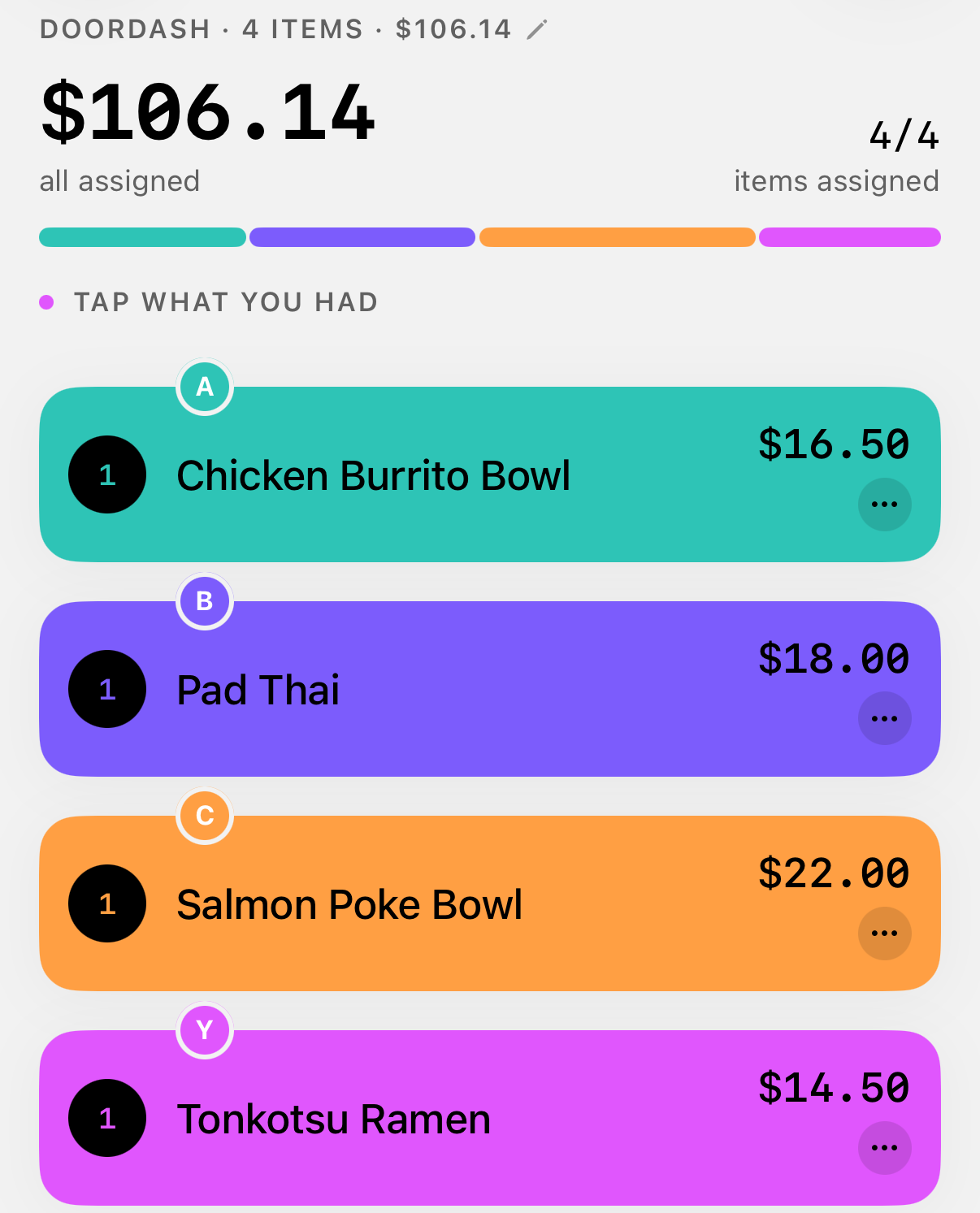
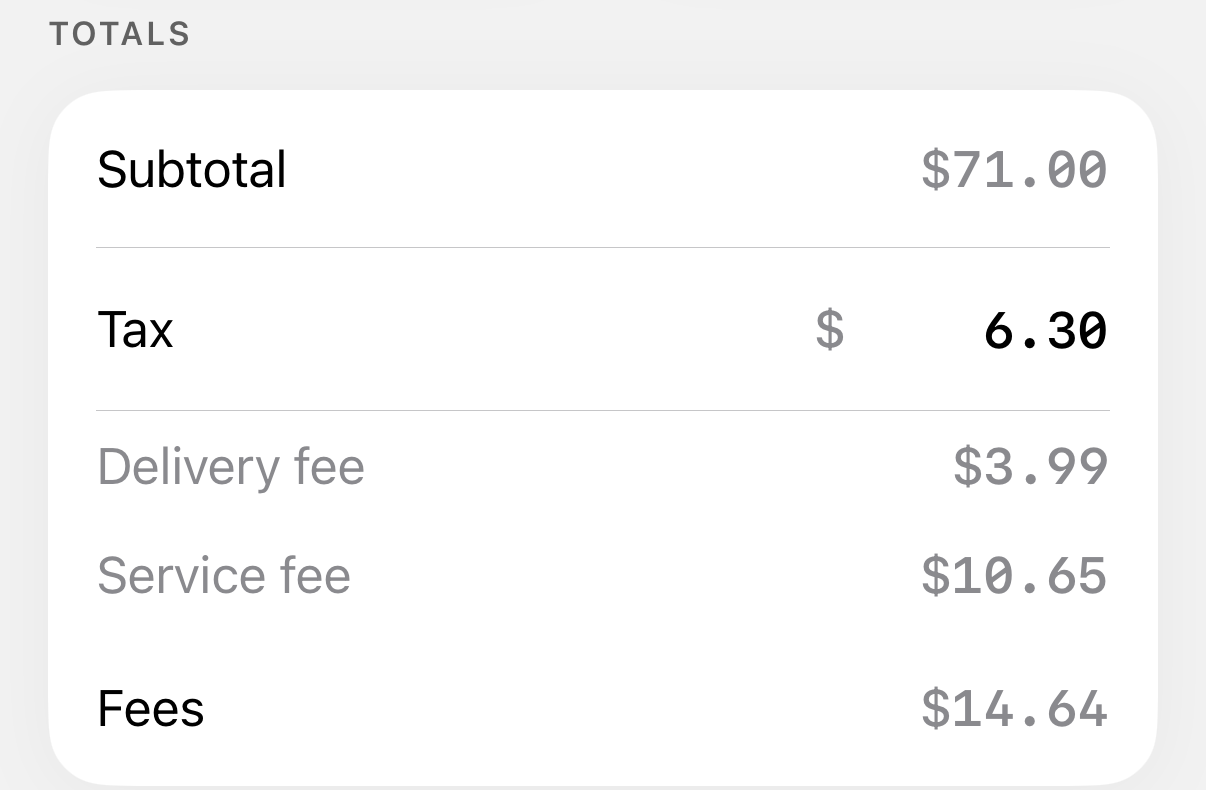
The rest of the receipt:
- Delivery fee: $3.99
- Service fee, 15% of subtotal: $10.65 (the rate in the markets that kept DoorDash's older fee structure)
- Tax, 8.875% of subtotal: $6.30
- Tip, 20% of subtotal: $14.20
- Total: $106.14
Way 1: the organizer pays everything
Your card is charged $106.14. You ask Alex, Ben and Cara for their food only: $16.50, $18.00 and $22.00, or $56.50 in all.
You're then out $49.64. That is $14.50 for your own food plus $35.14 of delivery, service fee, tax and tip that covered all four dinners. You paid 34.9% of the bill for 20.4% of the food.
An even four-way split of $106.14 is $26.54 each. Against the proportional split below, Alex would overpay by $1.87 and Cara would underpay by $6.35.
Way 2: DoorDash's Split Billing rule
Delivery goes four ways. Service fee follows each person's order. Each person tips privately. I've assumed everyone tips 20% on their own food. Real tips will vary, which is the point of keeping them private. Tax follows each person's food.
| Roommate | Food | Delivery | Service fee | Tax | Tip | Total |
|---|---|---|---|---|---|---|
| Alex | $16.50 | $1.00 | $2.48 | $1.46 | $3.30 | $24.74 |
| Ben | $18.00 | $1.00 | $2.70 | $1.60 | $3.60 | $26.90 |
| Cara | $22.00 | $1.00 | $3.30 | $1.95 | $4.40 | $32.65 |
| You | $14.50 | $0.99 | $2.17 | $1.29 | $2.90 | $21.85 |
| Total | $71.00 | $3.99 | $10.65 | $6.30 | $14.20 | $106.14 |
The $3.99 delivery fee doesn't divide by four evenly, so one person gets the 1¢ discount. The 15% service fee lands on half-cents for Alex ($2.475) and you ($2.175), so I rounded one up and one down to keep the total at $10.65.
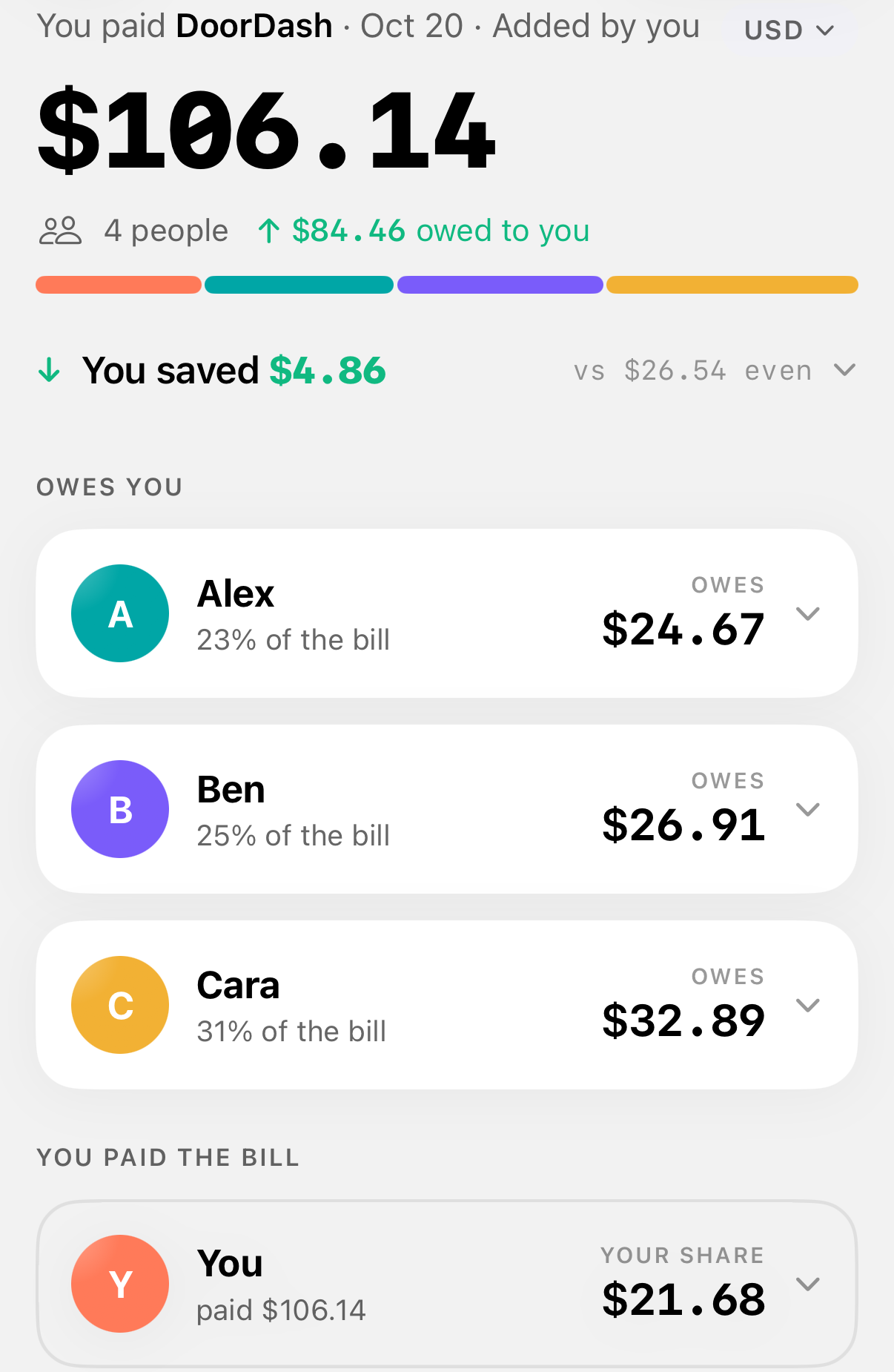
Way 3: fully proportional
Now delivery, service fee, tax and tip all follow each person's share of the food.
| Roommate | Food | Delivery | Service fee | Tax | Tip | Total |
|---|---|---|---|---|---|---|
| Alex | $16.50 | $0.93 | $2.48 | $1.46 | $3.30 | $24.67 |
| Ben | $18.00 | $1.01 | $2.70 | $1.60 | $3.60 | $26.91 |
| Cara | $22.00 | $1.24 | $3.30 | $1.95 | $4.40 | $32.89 |
| You | $14.50 | $0.81 | $2.18 | $1.29 | $2.90 | $21.68 |
| Total | $71.00 | $3.99 | $10.66 | $6.30 | $14.20 | $106.15 |
The shares add to $106.15, one cent over the receipt. Alex's and your service fees both hit a half-cent and both rounded up. Take the cent yourself: you pay $21.67 and the total matches the receipt.
What the three ways show
Under DoorDash's even delivery split, Cara (31% of the food) and you (20%) each pay about $1.00 toward delivery. Proportionally, Cara would pay $1.24 and you $0.81. Service fee, tax and tip already follow the food in Way 2, so the gap between Ways 2 and 3 is under 25 cents per person. On a $106 order, that is a rounding argument you can skip.
The real gap is between Way 1 and the other two. In Way 1, you're out $49.64 against a fair $21.68, a difference of $27.96. That is the money worth asking for.
To run your own receipt, put the food subtotal and each person's items into the bill split calculator. The guide to splitting tax and tip walks through the proportional method step by step.
Fees that change your numbers in 2026
A new DoorDash fee structure began rolling out in late July 2026, with a variable service fee based on distance and order size. California, Chicago, Colorado, DC, Massachusetts, Minnesota, NYC, Puerto Rico and Seattle keep the older structure. There the service fee is 15% of the subtotal for most orders, and 5% for most eligible DashPass restaurant orders. That's the 15% I used above.
Elsewhere, read the actual fee off your receipt and use that number. The method doesn't change.
The delivery fee is a flat amount per order that varies by merchant. Tax follows local rules. Tips are optional and 100% go to the Dasher. DashPass brings the delivery fee to $0 and reduces the service fee on eligible orders. I found nothing in DoorDash's documentation on whose DashPass applies to a cart with several payers, so don't count on a discount until you see it on the receipt.
Getting paid back after you fronted the order
If you paid the whole thing, the fix is quick.
- Screenshot the receipt while the order is still in your history.
- Work out each person's share, with delivery, service fee, tax and tip following the food.
- Send the amounts the same night. "I'll Venmo you later" is how $26.91 turns into a three-week wait. The guide to asking someone to pay you back has scripts for when it drags.
Divvy bill splitting is an iPhone app for exactly this step. Point the camera at the receipt and Divvy reads every line item, the tax and the tip. Tap a name on each item, and tax and tip are split by each person's share of the items. Each person's share becomes a Venmo or Cash App request in one tap, with reminders until it's paid. Friends open a share link, see what they owe and pay, with no app or account needed.
If your household orders together every week, don't settle each order on its own. Keep a running tally of who fronted what and settle up once a month, alongside rent. If you already split rent with the rent split calculator, which works evenly, by income or by room size, the month's order tally can ride along in that same transfer. One transfer a month beats six small ones.
Frequently asked questions
Can I put half a DoorDash order on a friend's card?
No. A regular order takes one cart owner's payment. A second payment method appears only when a DoorDash gift card or credits don't cover the whole order. To have each person pay their own part, create a Group Order with Everyone Pays Separately, if your account offers it.
Can the person who made the group order see what everyone tipped?
Under Split Billing, no. DoorDash's Group Orders FAQ says the Dasher tip is applied per participant and kept private from the cart creator.
I already made the group cart. Can I switch to everyone paying separately?
No. The payment mode is chosen when you create the cart and can't be changed. Delete the cart, start a new Group Order and pick Everyone Pays Separately at the start.
Does a promo code get shared in a split billing order?
Only the cart creator can apply promo codes or DoorDash credits. In a split billing order, a promo code applies proportionally to everyone, so each person's total drops in line with their share of the food.
Does DoorDash's Klarna option let me split an order with friends?
No. Klarna lets one person spread their own payment over time. The order still has one payer, so the organizer needs to collect from everyone else.
Sources
- Can You Split Payment On DoorDash? - Financial Panther
- How to Place a DoorDash Group Order for Your Team at Work
- Group Orders Guide | Business Support | DoorDash Help Center
- Group Orders FAQ | Business Support | DoorDash Help Center
- What is a group order and how can I create one? | Customer Support | DoorDash Help Center
- What fees do I pay on Caviar and DoorDash? | Customer Support | DoorDash Help Center