Divvy
Divvy7 Cheap Travel App Picks for Smarter Trips
By The Divvy Team · September 28, 2026 · 15 min read
Your group has found a promising destination, but the money questions keep multiplying. Which dates are cheapest? Is that low fare still available at checkout? Should you pay extra to protect a booking that might change? Once you're on the trip, who covered the hotel, meals, transfers, and shared activities, and what does each person owe?
A cheap travel app rarely solves every stage equally well. The strongest approach combines flexibility tools, fare alerts, booking limitations, risk controls, and convenient group settlement. Use flight-search platforms to discover and compare fares, then use Divvy as the companion for itemized shared expenses, not as a replacement for flight search. Metasearch prices can change when you reach the provider's checkout page, while paid protections and unusual fare strategies need careful review.
The modern travel app market is already mainstream. One travel app market report says travel apps generated over $1 trillion in revenue in 2024, while another market summary says more than 900 million people used a travel app in 2024. The opportunity is choosing the right tool for each money problem. For broader deal-hunting context, see this guide to the best travel deals app for 2026.
Table of Contents
- 1. Divvy
- 2. Skyscanner
- 3. Google Flights
- 4. KAYAK
- 5. Momondo
- 6. Hopper
- 7. Skiplagged
- Top 7 Cheap Travel Apps, Comparison
- Match the App to the Money Problem
1. Divvy
Divvy is the best choice for the part of a budget trip most booking apps ignore: settling shared costs accurately after you've paid. It's an iPhone-first bill-splitting app that turns a restaurant receipt, hotel charge, activity bill, or group purchase into clear individual balances.
Point your camera at a receipt and Divvy's AI receipt scanning reads line items, tax, and tip. You can assign dishes to specific people, split shared plates evenly, and let the app allocate tax and tip proportionally. That prevents one traveler from paying for somebody else's meal or absorbing an unfair share of service charges.
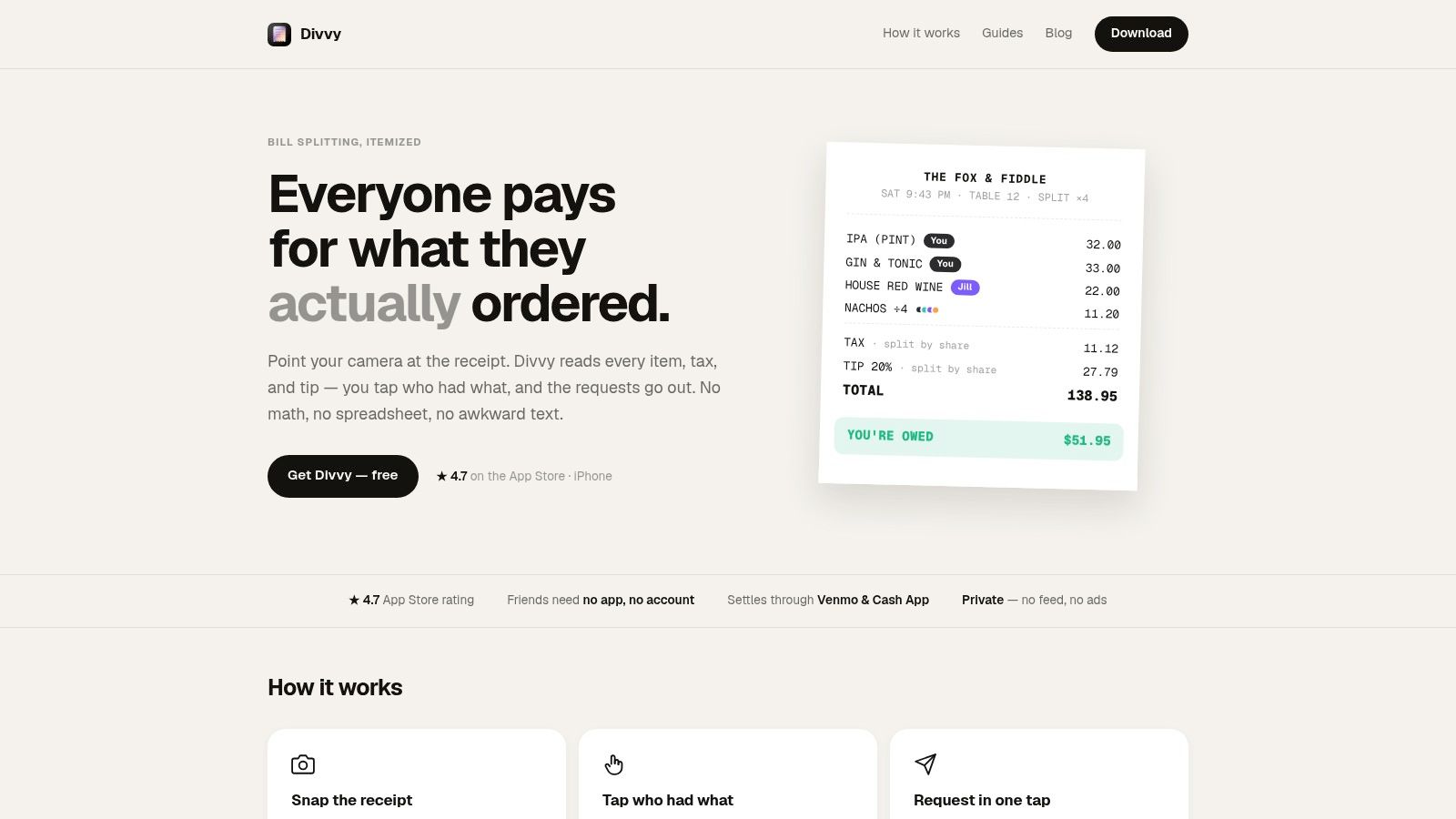
Best for exact group settlement
Once the receipt is divided, Divvy creates pre-filled payment requests through Apple Pay, Venmo, or Cash App. Friends don't need to install Divvy or create accounts to pay, which removes a common source of friction in travel groups. Automated reminders continue nudging people until balances are settled, so the organizer doesn't have to keep sending awkward messages.
Divvy also supports trip expense tracking for flights, hotels, meals, and activities. Groups can split costs equally, by percentage, or by exact amounts, and the app can handle different currencies while friends plan an international trip. Its web-based travel budget calculator can help estimate shared costs before departure, while the app handles actual receipts afterward.
Practical rule: Use a fare app to find the booking. Use Divvy to document and collect the shared costs that follow.
The trade-off is platform support. Divvy is currently available on the Apple App Store, not Android, so mixed-platform groups may need a different workflow for some participants. The free download includes core features, while unlimited AI receipt scans and enhanced group tracking require Divvy Pro. OCR can occasionally misread a messy receipt, so verify the item assignments before sending requests. Read more about how a bill-splitting app can simplify shared expenses.
Visit Divvy if your biggest travel-budget problem starts after the booking is complete.
2. Skyscanner
Skyscanner is the strongest flexibility-first cheap travel app for travelers who can adjust their destination or dates. Its “Explore Everywhere” search shows possible destinations from your departure airport, while “Whole Month” helps reveal cheaper travel windows.
That makes Skyscanner useful before you commit to a specific itinerary. Enter your origin, keep the destination open, and compare the calendar instead of searching only one fixed weekend. You can also combine routes with multi-city searches and compare results across airlines and online travel agencies.
Where Skyscanner fits
Set a Price Alert when you've found a route worth watching. Saved lists and app or email notifications help you monitor changes without repeating the same search manually. Skyscanner's “Drops” feature highlights fares that have recently fallen by 20% or more, according to its product description and feature guidance.
The main limitation is that Skyscanner is a metasearch engine, not usually the final booking desk. You click through to the airline or OTA, and the provider handles payment, ticketing, baggage, changes, and support. Month-view prices are indicative, so the fare may change before checkout.
Use Skyscanner when your priorities are broad discovery and date flexibility. Don't treat the first displayed fare as guaranteed until the provider's final page shows the complete price and conditions.
Compare the total itinerary, not just the headline fare. Baggage, change rules, connection length, and provider support can change the value of a cheap result.
After booking, use Divvy for the travel expense splitting that Skyscanner doesn't provide.
3. Google Flights
Google Flights is the best tool for fast route comparison and price-trend visibility. It runs in the browser rather than as a conventional standalone travel app, but its clean interface makes it one of the quickest ways to test different dates, airports, airlines, and stopover patterns.
The date grid and price graph show how fares move across nearby travel days. Predictive guidance may indicate that prices are unlikely to drop, which helps you decide whether to book now or keep watching. Google Flights can also direct you to the airline or agency for checkout, and select partner itineraries may include a limited price guarantee.
Use it before you lock the itinerary
Start with Google Flights when you know roughly where you want to go but can shift the departure or return date. Search nearby airports, inspect the calendar, and filter out impractical connections before you compare providers. The interface is especially effective for a group organizer who needs a quick view of options before asking everyone to commit.
Google Flights generally doesn't complete the transaction itself. You'll usually finish on an airline or partner site, and coverage varies. Some routes or airlines may appear without a direct price link, or may not appear in the results at all.
The limited price guarantee can be useful when it's available, but check the itinerary's specific conditions before relying on it. A guarantee attached to a selected partner booking isn't the same as universal protection across every search result.
Use Google Flights for clarity and speed, then verify the final provider price, fare family, baggage rules, and cancellation terms at checkout. It's a discovery and comparison layer, not a complete group-expense system.
4. KAYAK
KAYAK is the most practical pick when your trip budget includes more than flights. Its search covers airfare, hotels, and cars, so you can compare several major cost categories in one place. That makes it a good fit for travelers building a complete itinerary rather than chasing a single low ticket.
The Explore map helps you see destinations that fit your departure point and budget preferences. Price Alerts send push or email notifications when tracked prices change, and the app keeps alert management straightforward. Strong filters make it easier to remove unwanted airlines, airports, stopovers, hotel features, or vehicle types.
Best for multi-product planning
KAYAK works well for a group organizer who needs to coordinate transport and accommodation at the same time. You might use the Explore map to shortlist destinations, then compare flight and hotel combinations before sharing a few realistic options with the group.
Its main weakness is the same one found across metasearch services. KAYAK can send you to an airline, OTA, hotel, or car provider, and the final price may shift after you click through. Some bookings may be handled by the listed provider rather than inside KAYAK itself, so support and change policies depend on where you complete the purchase.
Keep screenshots or confirmation emails for every group booking, especially when one person pays upfront. Record the actual charged amount, currency, and included extras. Then use Divvy to split the resulting receipt or shared charge by exact amounts instead of estimating everyone's share from the search screen.
KAYAK is the right choice when you want one broad search interface and dependable alerts. It isn't the right tool for collecting reimbursements from friends after the booking.
5. Momondo
Momondo is the best choice for inspiration-first fare discovery. Its calendar visualization makes cheaper travel days easy to spot, while the Explore tool helps you search destinations within a budget rather than starting with a rigid plan.
The calendar's green dates provide a quick visual signal for lower-cost combinations. That's useful when your group is debating several departure windows, or when you know you want a low-cost break but haven't decided where to go. Price Alerts let you continue monitoring a route through the app.
Why its calendar earns a place
Momondo reduces the effort involved in scanning dates one by one. Instead of opening separate searches for each possible departure, you can look for patterns and identify days that deserve a closer comparison. This makes it particularly useful during the early planning stage, before everyone has arranged time off.
Momondo is still a metasearch service. Prices and availability can change when you reach the airline or OTA, and you typically complete the booking with the provider Momondo refers you to. Check the final fare, baggage allowance, payment fees, and change conditions before paying.
Use Momondo when the destination or date is flexible and visual comparison matters. If your dates are fixed and your route is simple, Google Flights may be faster. If you're also comparing hotels and cars, KAYAK may fit the wider trip better.
Once the group has booked, stop using the fare calendar as a record of what people owe. The relevant figure is the amount charged. Divvy can turn that real receipt into itemized requests, including proportional tax and tip where applicable.
6. Hopper
Hopper is the best option when you've found a promising fare but booking uncertainty is the main risk. Its mobile-first experience combines fare discovery with optional products such as Price Freeze and cancel or change protections.
Price Freeze can give you time to finalize dates before committing to the full fare. Optional “Cancel for Any Reason” or change products may reduce the impact of uncertain plans, but they're paid add-ons with specific terms. Hopper may issue vouchers or payouts as credits within its ecosystem, so read the remedy carefully before assuming you'll receive a cash refund.
A protection product only has value if its exclusions, deadlines, payout method, and fees fit your actual risk.
The trade-off is cost. Add-ons and service fees can raise the total price, which may erase the saving you found in the first place. The U.S. Federal Trade Commission filed a complaint in 2026 alleging deceptive practices involving certain Hopper in-app products. Treat that as a reason to inspect the terms and checkout breakdown carefully, not as a substitute for reading the offer itself.
Use Hopper when a paid option genuinely solves a known problem, such as needing time to confirm leave or coordinate a group. Don't add protection automatically to every booking. Compare the complete Hopper price with the airline or OTA's direct terms, and confirm whether a voucher, credit, or refund is available if your plans change.
Hopper can manage the booking risk. It still won't itemize a group dinner or collect each traveler's share after arrival. Add Divvy for that settlement stage.
7. Skiplagged
Skiplagged is a specialist tool for travelers willing to accept strict itinerary trade-offs in exchange for the possibility of a lower fare. Its defining feature is hidden-city search, where you book a ticket with a connection and leave the itinerary at the connecting airport, which is your real destination.
This strategy can reveal cheaper one-way or last-minute options, but it isn't a normal booking shortcut. You need to understand the restrictions before paying, because the itinerary must be followed in a very specific way.
The baggage and itinerary rules matter
Hidden-city travel requires carry-on luggage only. A checked or gate-checked bag will usually be tagged to the ticket's final destination, not the airport where you plan to leave. You also shouldn't use this approach when you need to protect later segments, because missing a flight can affect the rest of the itinerary.
Skiplagged provides support guidance and FAQs about baggage and situations where hidden-city tickets are inappropriate. Airlines may object to the practice, creating practical and policy risks that don't apply to a standard ticket. The tool also offers ordinary fare searches and hotel deals, but its main appeal is the hidden-city option.
Use Skiplagged only when you understand the route, can travel with a carry-on, and accept the consequences if plans change. It's not a good default recommendation for families, travelers with checked luggage, or anyone who needs a flexible itinerary.
For experienced budget travelers, Skiplagged belongs in the unconventional savings category. Verify the rules before booking, save the itinerary details, and don't confuse a lower displayed fare with lower overall risk.
Top 7 Cheap Travel Apps, Comparison
| Product | 🔄 Implementation complexity | ⚡ Resource requirements | ⭐ Expected outcomes | 📊 Ideal use cases | 💡 Key advantages |
|---|---|---|---|---|---|
| Divvy | Moderate, iPhone app with OCR/AI and group flows | iPhone required; internet; optional Pro subscription for unlimited scans | High, accurate item-level splits; faster settlements; fewer disputes | Group dinners, trips, roommates, recurring bills | Item-level OCR splits; one‑tap payment requests; privacy-forward; works even if others don't install |
| Skyscanner | Low, metasearch aggregator across sources | Web/mobile; internet; no in-app booking engine | Good, finds cheapest destinations/dates and fare windows | Flexible travelers exploring cheapest routes/dates | Explore/Whole Month search; price alerts; Drops highlights; broad coverage |
| Google Flights | Low, fast web-based search + forecasting | Minimal, web access; lightweight UI | Very good, clear price trends and predictive tips; occasional price guarantees | Date‑flexible planning and quick fare analysis | Fast interface; price graph; predictive tips; direct handoff to carriers/OTAs |
| KAYAK | Low, metasearch for multiple travel products | Web/mobile; internet; links out to providers | Good, broad comparisons for flights, hotels, cars; reliable alerts | Multi-product searches and alert-driven monitoring | Intuitive filters; Explore map; robust in‑app alert management |
| Momondo | Low, deal-oriented metasearch with strong visuals | Web/mobile; internet; calendar visualization | Good, excellent at surfacing cheap dates and inspiration | Inspiration-first searches and quick budget spotting | Calendar “green dates”; Explore tool; strong visualizations for date selection |
| Hopper | Moderate, mobile booking plus fintech add-ons (Price Freeze, protections) | Mobile app; paid add-ons and service fees; notifications | Variable, can lock fares and reduce risk but adds cost; read terms | When you want to hold a fare while finalizing plans | Price Freeze and purchase protections; mobile-first alerts, evaluate add-on terms and costs |
| Skiplagged | Moderate, specialized search for hidden-city fares | Web/mobile; internet; best with carry‑on only travel | High (conditional), can reveal large savings but with policy/travel risks | Experienced travelers seeking hidden-city or one-way savings | Uncovers hidden‑city fares; provides guidance on baggage/risks; best for experienced users |
Match the App to the Money Problem
Choose the app based on the stage where you're trying to save. Use Skyscanner, Google Flights, KAYAK, or Momondo when flexible dates, broad comparisons, destination discovery, and fare alerts matter. Skyscanner is the strongest choice for open-ended exploration, Google Flights is fastest for route and date analysis, KAYAK is better for comparing flights with hotels and cars, and Momondo is especially useful when its calendar makes cheaper dates easier to spot.
Consider Hopper when uncertainty makes a paid booking add-on worth examining. Price Freeze and cancellation or change products can be useful, but they increase the total cost and come with terms that control what you receive. Review the service fees, exclusions, deadlines, and whether the remedy is a refund, payout, or in-app credit.
Treat Skiplagged as a specialist option, not a general cheap travel app. Hidden-city fares can create savings for experienced travelers, but carry-on-only rules, disrupted itinerary segments, and potential airline policy issues make the trade-off substantial.
For group trips, add Divvy after booking. Scan receipts for meals, hotels, activities, and other shared purchases, assign individual dishes or shared items, and let the app allocate tax and tip proportionally. You can send payment requests through Apple Pay, Venmo, or Cash App, and friends don't need to install Divvy or create accounts to pay.
The travel app market has evolved from basic booking interfaces into a wider mobile ecosystem. Historical travel technology traces consumer booking back to American Airlines' eAAsySabre in the early 1980s, while the late 2000s brought the smartphone and mobile-internet shift that enabled app-based services such as Airbnb and Uber, as described in this history of travel app development. Today, discovery and settlement still work best as separate tasks.
Before you finalize anything, verify the provider's total price at checkout. Review protection terms and unusual-fare restrictions, then confirm every shared expense, currency, tax, tip, and assigned item before sending requests. That final check is what turns a cheap-looking trip into a trip your group can actually afford.
Divvy uses AI receipt scanning to itemize meals and shared travel costs, allocate tax and tip proportionally, and send payment requests through familiar payment apps. Add it after booking to keep group expenses precise and settled, then visit Divvy to start organizing your next trip's shared bills.