Divvy
DivvyReceipt Scanner App iPhone: Split Bills Without the Math
By The Divvy Team · July 29, 2026 · 15 min read
You're at the table after dinner, the receipt is already on the cardholder's phone, and everyone starts doing the same bad math. One person had the burger, another split the appetizers, someone grabbed two drinks, and now the group is debating tax, tip, and who “kind of” owed less. That's where a receipt scanner app iPhone setup stops being a convenience and starts being a sanity saver.
The right app doesn't just read numbers off a slip. It turns a messy dinner, grocery run, or weekend trip into a clean, itemized settlement that people can pay without a group chat full of corrections. If the app can't handle line items, tax and tip allocation, and payment requests to non-users, it's not built for real group life, it's just a camera with a database.
Table of Contents
- Why Splitting Bills Still Feels Broken
- How Mobile OCR and AI Itemization Work
- Key Features to Evaluate in a Receipt Scanner App
- Ledger Apps Versus Per-Item Settlement Tools
- Real-World Use Cases for Receipt Scanner Apps
- Practical Tips for Accurate Scanning and Smooth Settlement
- Choosing the Right Receipt Scanner App for Your Group
Why Splitting Bills Still Feels Broken
The dinner ends, the server drops one check, and the whole table pretends the calculator app is enough. It isn't. Someone ordered the shared fries, two people skipped dessert, one friend insists tax should be “just split evenly,” and the person who paid is already tired of chasing reimbursements in Venmo later.
That's the problem. The friction isn't scanning a receipt, it's settling a bill fairly when people consumed different things and nobody wants to become the accountant of the night. A total-only split turns into argument bait the moment appetizers, cocktails, or shared plates show up.
The hidden mess is tax and tip
Tax and tip are where casual bill splitting gets sloppy fast. If the app just divides the total evenly, the person who ordered the cheapest entree ends up subsidizing the heavy spender. That feels minor when you're splitting coffee, but it gets annoying the second a larger dinner, a grocery basket, or a travel tab enters the picture.
A serious receipt scanner app iPhone workflow needs to itemize first, then settle. That's because the same fields used for expense tracking, merchant name, date, total, tax, and sometimes line items, are the ones that let software compute exact per-person shares. Smart Receipts describes AI-powered OCR that can extract those fields in seconds, and Apple App Store listings for related iPhone apps describe automatic extraction of key receipt details after a photo or file import.
Practical rule: if an app can't read the receipt into structured data, it can't do fair bill splitting. Everything else is decoration.
The annoying part is how familiar the failure pattern is. One person covers the bill, everyone promises to “settle later,” and then later never happens cleanly because nobody remembers who had what. That's why receipt scanning for group meals is less about digitizing paper and more about making post-meal settlement boring, fast, and transparent.
How Mobile OCR and AI Itemization Work
A practical iPhone receipt scanner follows a clear pipeline. The camera captures the receipt, OCR converts the image into machine-readable text, and parsing logic or AI sorts that text into fields like merchant, date, total, tax, currency, and line items. The app listing for Receeto Receipt Scanner App describes this OCR plus parsing flow, and that distinction matters because reading text is not the same thing as understanding what belongs where.
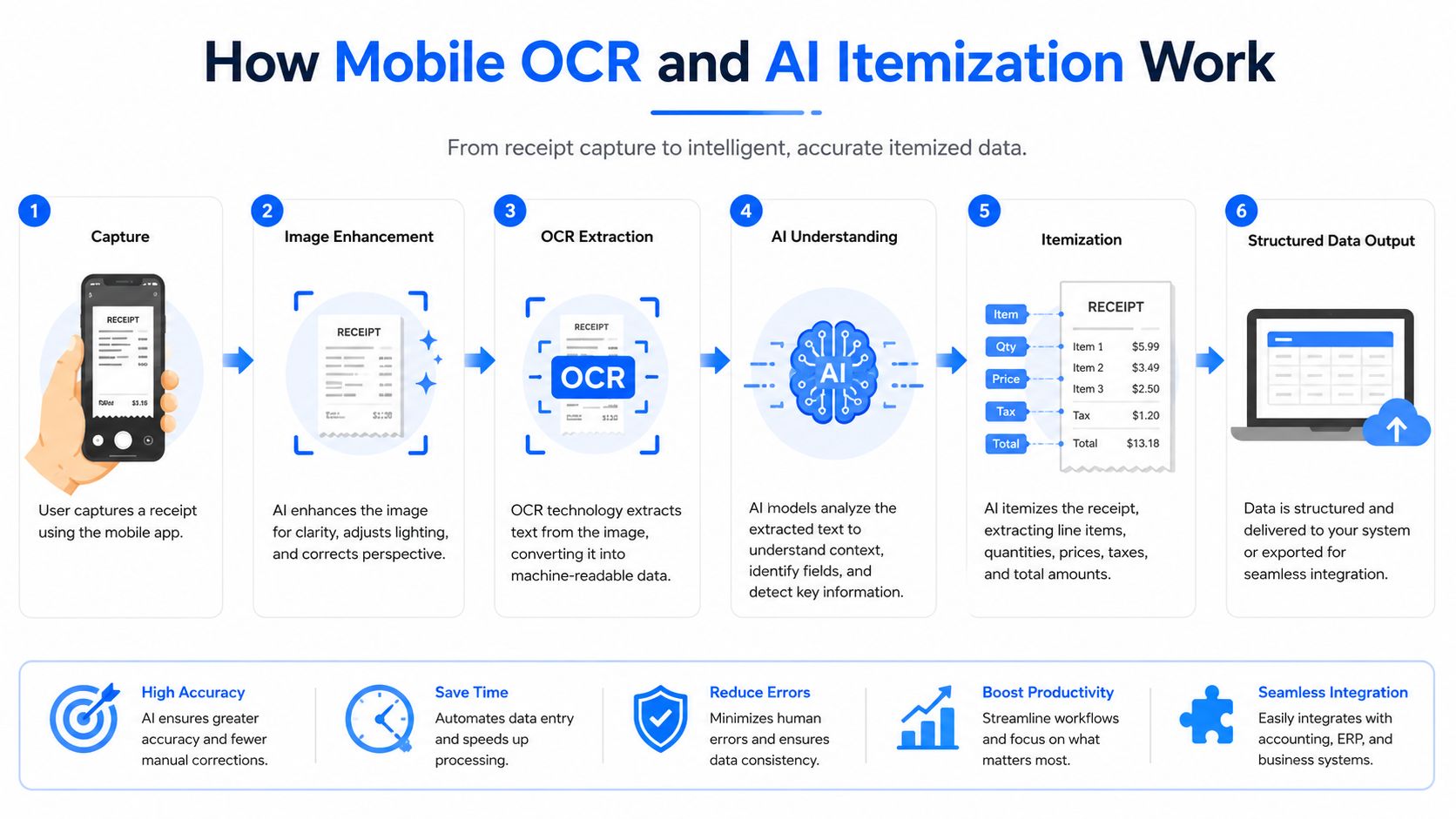
From photo to structured receipt
The workflow is straightforward. You take a photo of a restaurant receipt, the app finds the edges, reads the text, identifies the burger, pasta, drinks, tax, and tip, and then shows those fields back to you for review. That review step matters because no OCR system is perfect, especially on crumpled slips, faded thermal paper, or long receipts that do not fit neatly in one frame.
A receipt scanner only starts to matter for group meals once it can turn that photo into structured data. The app needs to know which line belongs to which person, because a total-only scan still leaves you with the same old argument about who owes what. For a practical walkthrough of the capture and parsing flow, see this mobile receipt scanner app guide.
For bill splitting, line-item extraction is the feature that changes the outcome. A total-only scanner can tell you the check was paid, but it cannot tell the app that one person should get the $18 burger and another should get the $14 pasta. Apps that support automatic split transactions can assign shared costs item by item and then prorate tax and tip according to each person's share, which is the clean way to avoid cross-subsidization on uneven orders. The Receipts for YNAB listing calls out that item-level approach directly.
What “AI-powered” usually means in practice
Most app marketing leans hard on “AI,” but the useful part is narrower than the slogan. The model usually handles region classification and field mapping, not magic. That is why better apps cut down on manual correction, because they are not just reading text, they are deciding which text is the merchant, which number is the tax, and which rows are individual items.
The practical test is simple. If the app cannot show you the extracted items before settlement, it is not helping with group expense division. It may still be fine for archiving receipts, but it is the wrong tool for splitting a dinner without a cleanup session afterward.
Key Features to Evaluate in a Receipt Scanner App
A lot of App Store reviews obsess over scan speed and ignore the stuff that ruins a night out. For bill splitting, you want an app that handles ugly receipts, supports meaningful allocation rules, and gets money back into people's hands without forcing everyone into a new ecosystem. Batch capture and privacy also matter, especially if you're dealing with travel receipts or repeated outings.
| Feature | What to Look For | Why It Matters |
|---|---|---|
| Scanning accuracy | Handles crumpled, faded, or long receipts without constant rescans | Bad capture means manual cleanup, and manual cleanup is where people stop using the app |
| Tax and tip allocation | Proportional allocation tied to item share, not just equal division | Keeps cheaper diners from subsidizing heavier orders |
| Payment requests | Works with common payment apps and doesn't require friends to install a new tool | Non-users need a low-friction way to pay |
| Security and data handling | Clear offline or local-device options, minimal cloud dependence | Receipts expose spending patterns and location history |
| Batch scanning | Can handle multiple receipts from one outing or trip session | Saves time when you're reconciling a whole night, not one bill |
Accuracy is table stakes, not the finish line
The OCR has to work on messy reality. Paper curls. Ink fades. Someone stuffs a receipt into a pocket and hands it over later. That's why a scanner with decent edge detection and parsing is useful, but it still isn't enough by itself. The question is whether the app keeps you moving after the scan or throws you into manual cleanup.
Don't ignore money movement
If you have to teach everyone a new app just to reimburse you, you've already lost most groups. Payment requests through familiar tools matter more than fancy dashboards, because friends will pay faster when the request lands where they already live. Divvy, for example, is an iPhone app that itemizes bills with AI receipt scanning, lets you assign items, and sends payment requests through common money apps, which keeps the settlement step close to the way people already pay each other.
Batch handling is the underrated feature
This is the part most guides skip. One dinner is one thing, but a weekend creates a pile of receipts, restaurant tabs, bar tabs, and rideshare slips. A newer 2026 comparison from Finny highlights batch capture as a real differentiator, including a workflow that can process up to 5 photos simultaneously. That lines up with how people travel, they don't return from a trip with one receipt, they return with a stack.
If your app only feels good on a single clean receipt, it's solving the demo, not the outing.
Ledger Apps Versus Per-Item Settlement Tools
Ledger-style apps and per-bill settlement tools are built for different jobs, and mixing them up causes frustration. A ledger app is great when the same group shares costs over time, like roommates logging groceries, utilities, or household supplies. A per-item settlement tool is better when one meal or one outing needs to be resolved immediately, especially when nobody wants to maintain a shared account.
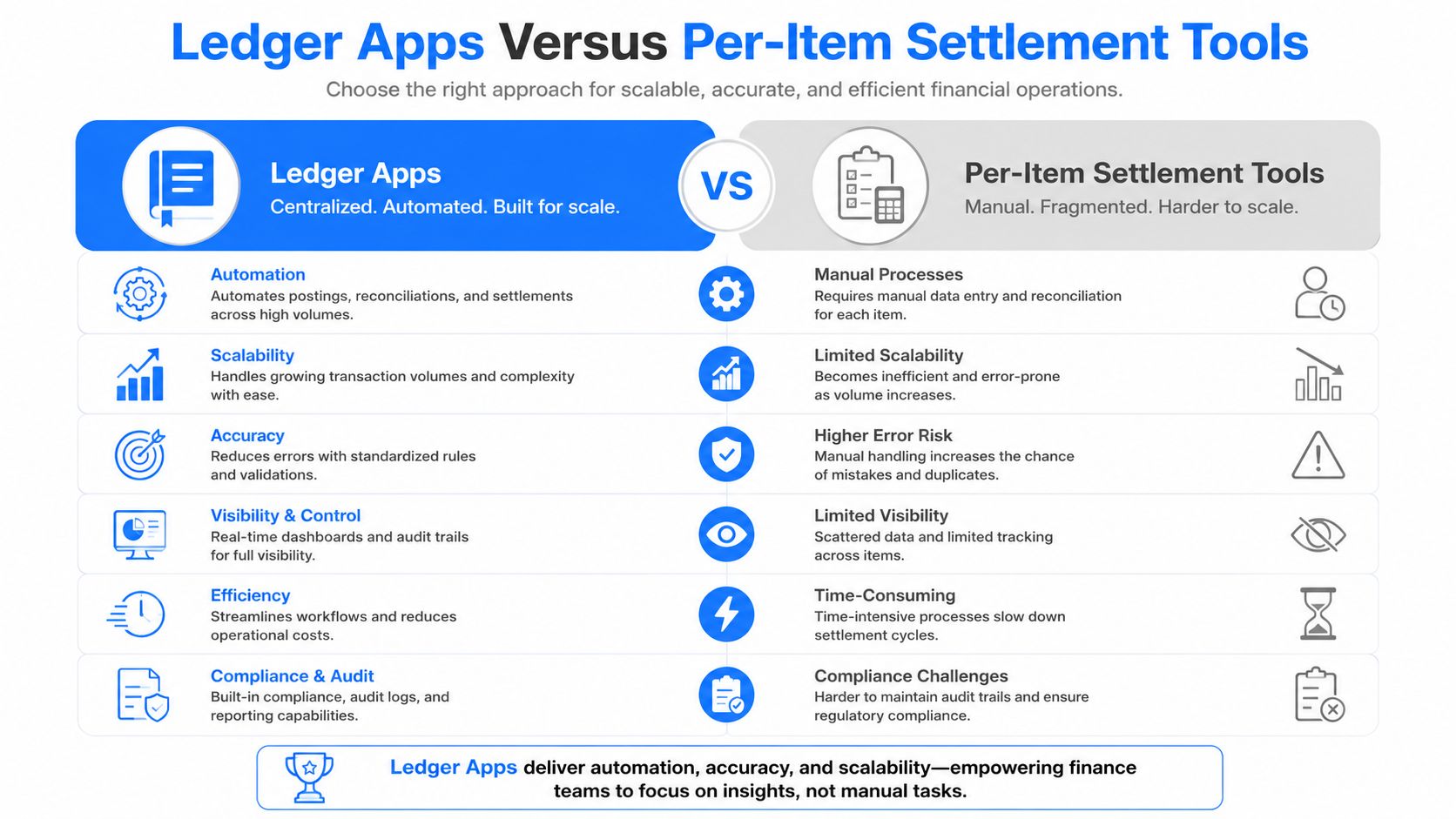
Why ledgers feel awkward at restaurants
Ledger apps ask for ongoing discipline. Everyone has to join, everyone has to remember to enter expenses, and balances keep accumulating until someone settles them later. That's fine for roommates who split rent and recurring household costs, but it's clunky for a one-off dinner where the goal is to make the check disappear before people leave the table.
Per-item settlement tools flip that logic. They focus on one bill, one receipt, and one clean resolution. That fits social plans because the organizer can scan, assign, and request payment without asking the whole table to adopt a permanent accounting system. The split check app guide makes the same basic case, immediate settlement is better than running balances when the group is temporary.
Non-users should not be a blocker
This is the part that matters most in real life. Your friends will not all install a bill-sharing app just because you like being organized. Tools that can request payment through Apple Pay, Venmo, or Cash App reduce the adoption problem because people can pay inside the systems they already use.
That's why immediate settlement wins for dinners, bars, and travel. Nobody wants to become a “member” of a split ledger after a birthday meal. They want a clear amount, a reasonable reason, and a payment request that doesn't feel like homework.
Real-World Use Cases for Receipt Scanner Apps
A restaurant bill is the obvious case, but it's not the only one that breaks manual math. Grocery runs, trip expenses, and mixed group outings each create different friction, and the app has to survive all three if you expect people to keep using it.
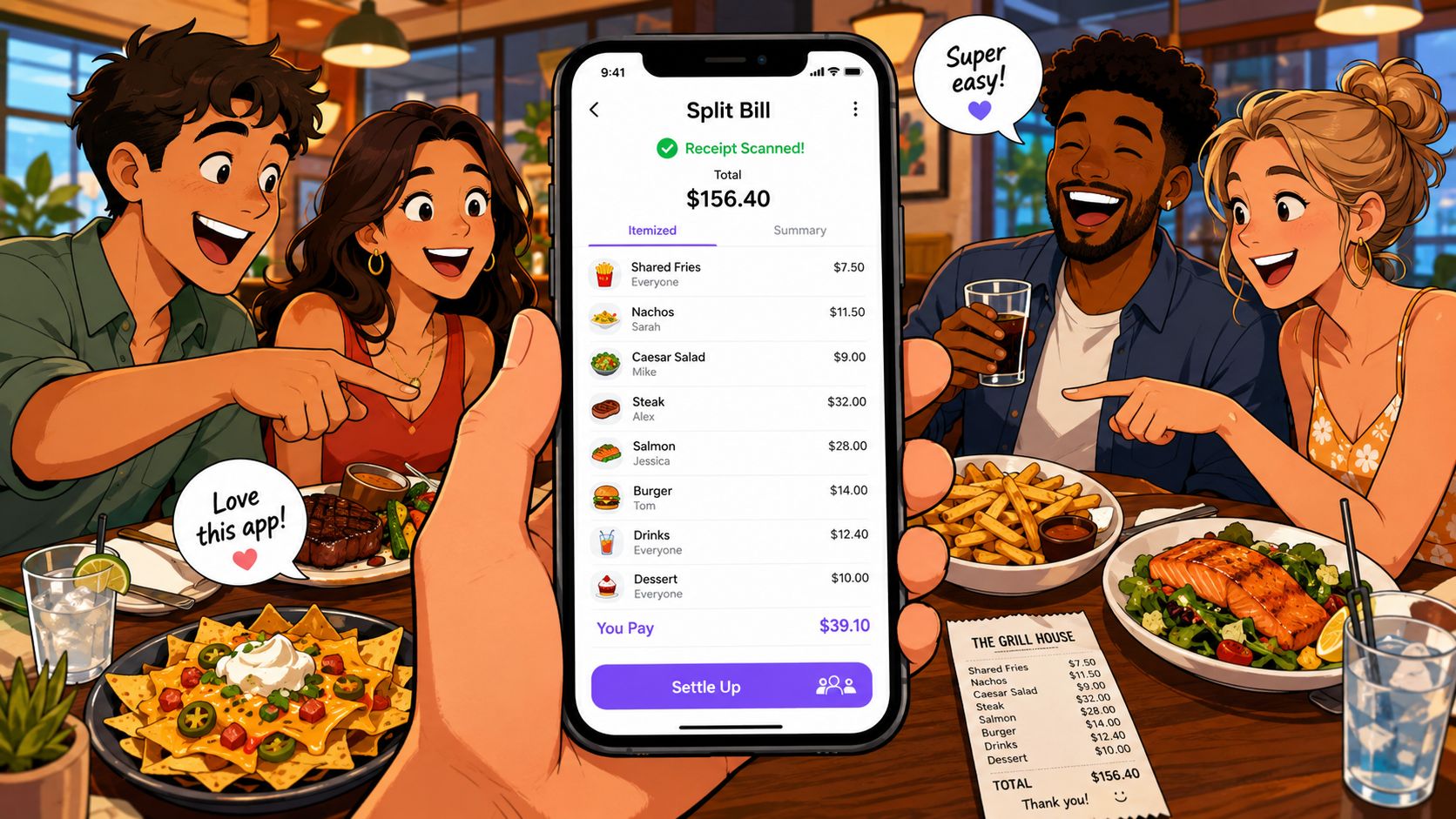
Restaurant bills with shared plates
At dinner, one person gets the bill, scans it, and tags items to each person. Shared appetizers can be split evenly, while individual entrees stay attached to the right diner. The app then allocates tax and tip based on each person's share, which is exactly where sloppy manual splitting usually goes wrong.
The nice part is that this turns the post-meal conversation into a review, not a debate. People can see what they owe, see which items were shared, and pay without a second round of napkin math. That's the difference between “I think you owe me” and “here's your exact share.”
Roommate grocery runs
Grocery receipts are messier because they mix household and personal items. One person buys milk, another grabs snacks, and the same receipt includes shared pantry staples. The useful workflow is to scan once, tag the shared items, and then assign personal items directly to the right person.
Item-level scanning matters more than polished UI. The app doesn't need to guess the household dynamics. It just needs to let you allocate cleanly and move on.
Trip organizers juggling multiple receipts
Travel is where bad tools fall apart. You've got dinner, drinks, a café stop, and a ride back to the hotel, all from one night. A trip organizer needs batch capture, quick editing, and payment requests that can go out right away, because waiting until everyone's home is how reimbursements get lost.
If the app can handle a whole outing in one session, the organizer doesn't have to rebuild the story later from screenshots and memory. That saves time and avoids the usual “who paid for what?” confusion that shows up the next morning.
Here's the part people underestimate: the best app is the one that handles the unglamorous middle between scan and payment. Not the scan alone.
Later in the process, what matters is whether the app can carry that itemization all the way to settlement without making the organizer chase people manually.
Practical Tips for Accurate Scanning and Smooth Settlement
A receipt scanner only feels effortless if you help it a little. The best results come from flattening the paper, using good light, and scanning before the receipt gets destroyed in a pocket or purse. That sounds basic because it is, and basic is what keeps the OCR from becoming your problem.
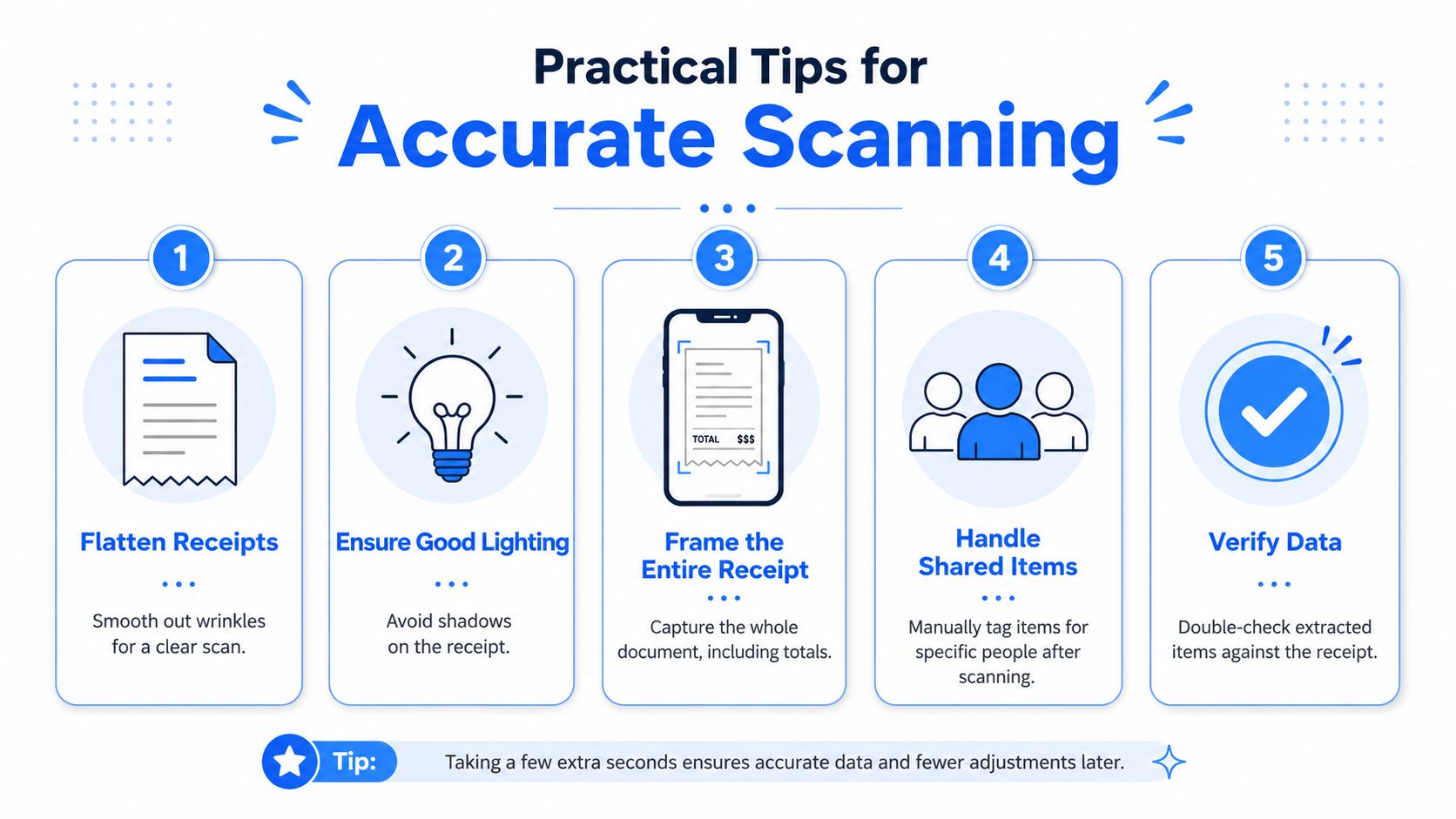
Make the photo easy to read
Use a flat surface and keep the full receipt in frame, especially the totals at the bottom. Shadows, bends, and clipped edges are the fastest way to force a second scan. If the receipt is long, scan it while it's still crisp instead of waiting until it's folded and faded.
Check the split before sending requests
Don't blast payment requests immediately after scanning. First, verify that shared items are split the way the group expects and that tax and tip look reasonable relative to each person's items. That one extra glance avoids annoying follow-up messages and embarrassing corrections.
Handle slow payers with less friction
Send the request while the meal is still fresh. People pay faster when the memory of the outing is still in their head and the amount matches the bill they just saw. If your app supports reminders, let it do the nudging instead of turning yourself into the group's collections department.
A good habit is to keep the tone light and specific. Don't write a long explanation, just make the request match the receipt and move on. The cleaner the request, the fewer excuses people have.
Use batch scanning the right way
If you've got multiple receipts from one outing, process them in one sitting instead of spacing them out over days. Batch capture helps when you're coming home from a trip or emptying a wallet full of paper. Finny's comparison notes that some apps can scan multiple receipts at once, including a mode that handles up to 5 photos together, which is exactly the kind of convenience that keeps people from procrastinating.
Scan first, settle second, and never let the receipt pile become a weekend project.
Choosing the Right Receipt Scanner App for Your Group
Pick the app based on how your group spends money, not on the longest feature list. If you only split the occasional dinner, you need fast itemization, simple payment requests, and low friction for non-users. If you're managing roommates or repeated shared expenses, a ledger-style app may make more sense than a one-bill tool.
Privacy should also be part of the decision. Receipts reveal where you went, what you bought, and when you were there, so a local-device or offline-friendly workflow can matter more than a prettier dashboard. The receipt management app guide is useful if you care about broader organization beyond bill splitting, but for social settlement, keep the focus on itemization and payment flow.
The practical test is simple. Choose the app that removes the most friction after the meal, not the one that looks smartest in the App Store. If it makes people pay faster, argue less, and stop pretending the calculator solves everything, it's doing the job.
If you're tired of doing dinner math in your head, try a workflow built for itemized settlement instead of generic expense tracking. Divvy reads receipt line items, splits tax and tip by share, and sends payment requests through familiar apps so the group can settle without the usual back-and-forth.