Divvy
DivvySplit Check App Guide: How to Split Bills the Easy Way
By The Divvy Team · July 25, 2026 · 14 min read
You're at the table, the plates are empty, and the check lands in the middle like a tiny math exam no one asked for. Someone says, “I had the salad,” someone else points at the shared fries, and the person with the biggest card starts doing napkin math. A good split check app exists to end that exact moment without turning dinner into a spreadsheet session.
It's easy to think these apps are just about dividing a restaurant bill evenly. They're not. The value is that they can read a receipt, assign items to people, handle tax and tip more fairly, and send payment requests without making everyone download the same tool or stay trapped in a running ledger.
Table of Contents
- The Group Dinner Problem Everyone Knows
- What a Split Check App Does
- How the Core Workflow Works
- Split Check Apps vs Ledger-Style Expense Apps
- Why Proportional Tax and Tip Matters
- Splitting a Bill Step by Step With Divvy
- Practical Tips for Picking and Using a Split Check App
The Group Dinner Problem Everyone Knows
Friday night starts fine. Six friends order three shared appetizers, two salads, four entrées, three cocktails, a bottle of wine, then tax and an 18% tip show up at the end. Nobody planned to become the accountant at the table, but now everyone is staring at a check that mixes personal items, shared items, and awkward assumptions about fairness.
That's where the familiar scramble begins. One person says, “Let's just split it evenly,” while another points out they only had water and a side dish. Someone tries to reconstruct the meal from memory, someone else starts a phone calculator, and the loudest person in the group ends up doing the work nobody wanted. If the math gets messy enough, one friend pays the whole bill and sends Venmo requests later, which is usually when the silence starts.
Practical rule: the harder it is to explain a split out loud, the more useful a dedicated app becomes.
A split check app exists because dinner math gets weird fast. A simple even split works only when everyone ordered similarly. The minute a table has shared plates, uneven ordering, or different drinks, the “just divide by the number of people” method creates tension. In the late 2010s, item-level bill splitting had already become a phone-based workflow. Divvy was described in a 2017 industry article as a 99-cent iOS app that used the iPhone camera and OCR to scan receipts, highlight each item, and let users drag items to dinner companions, while also calculating each person's share including tax and tip, up to 16 diners. For background on receipt handling more broadly, see Divvy's receipt management app overview.
That early workflow matters because it shows what people were asking for. They didn't want a prettier calculator. They wanted the table to stop arguing, the math to happen quickly, and the awkward part to end before everyone leaves.
What a Split Check App Does
A split check app works like the digital version of a good server who remembers who had what, except the app keeps the record and does the math without asking the table to reconstruct dinner from memory. It takes a messy receipt, turns it into structured items, and gives the group a clear bill to settle.
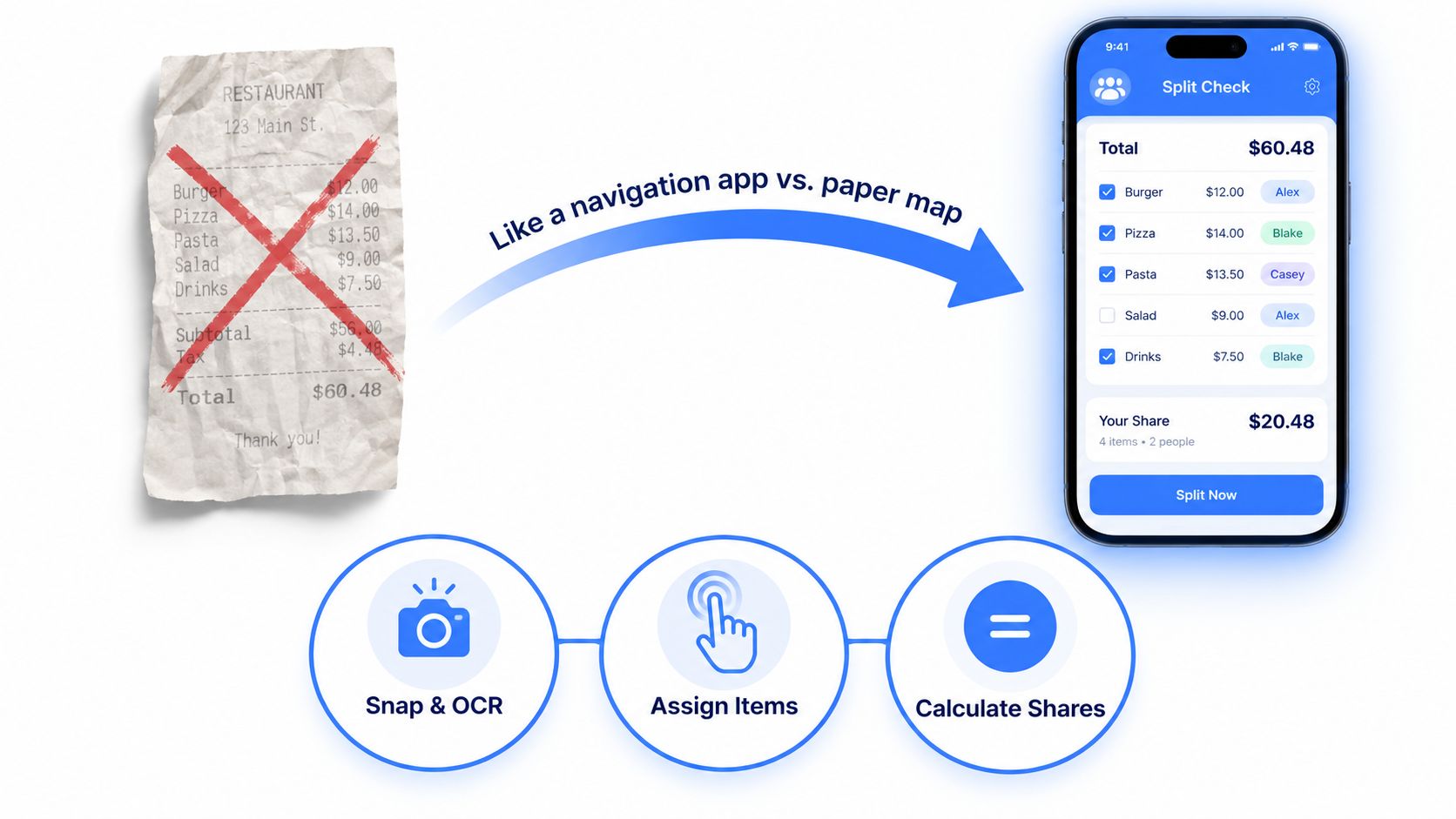
The first job is reading the receipt with the phone camera and OCR, short for optical character recognition. That scan turns printed line items into text the app can work with. In Divvy's early example, the app scanned a receipt, highlighted each item, and let people move items to the right person, which is the basic pattern the category still follows. For a deeper look at how receipts are organized and stored, see our guide to receipt management apps.
Then the app turns that raw receipt into a bill people can split. You assign items to one diner, divide a shared plate, or mark something for the whole table. After that, the app calculates what each person owes, including how tax and tip should be shared so one person does not end up covering extra cost just because their entrée was cheaper.
That is where a split check app differs from a calculator or spreadsheet. A calculator only helps after someone has already figured out the shares. A spreadsheet still asks one person to enter the items, decide who gets charged for what, and keep the fairness rules straight. A split check app reduces that chain of work to a few taps.
Many apps also connect to payment options like Apple Pay, Venmo, or Cash App, so the last step becomes a request instead of a reminder. Other diners often do not need to install the same app. If the bill request can land in the money app they already use, the group avoids one more download and one more round of instructions.
The core value is not the split. It's the removal of the follow-up.
A split check app reads the receipt, lets you assign costs in a way that matches the table, applies tax and tip logic, and moves the money without turning dinner into a bookkeeping session.
How the Core Workflow Works
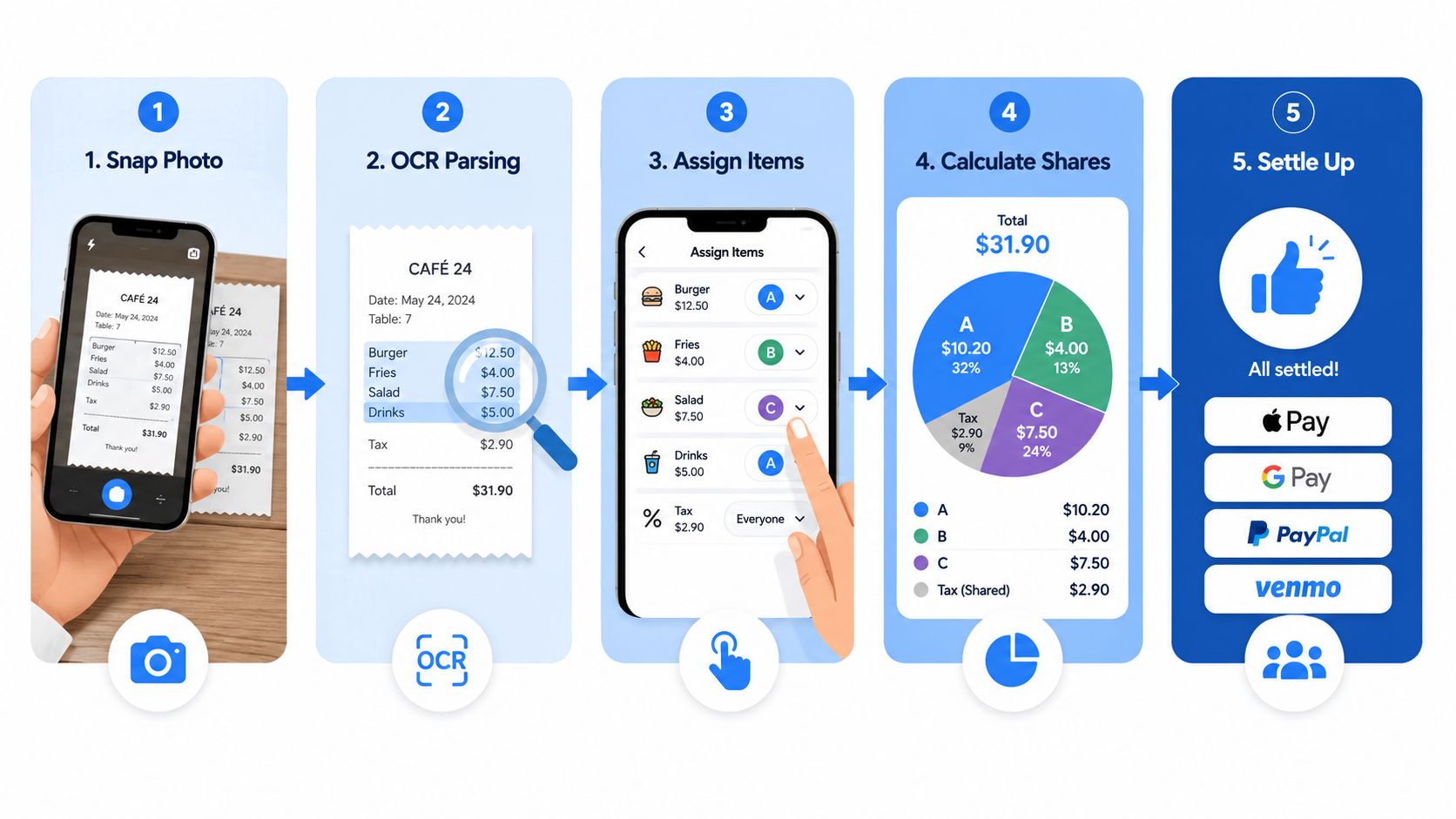
The workflow usually follows the same five moves. Once you see them, the app feels a lot less mysterious.
1. Snap the receipt
Someone opens the app and takes a photo of the check. That image becomes the starting point, which is much easier than trying to read paper in dim restaurant lighting while the server is waiting.
2. Read the line items
OCR pulls text from the receipt, including the items and the pricing structure around them. That matters because a split check app is not just reading a total, it is turning a messy paper bill into something the app can work with item by item. In Divvy's restaurant-splitting workflow, the app scans the receipt, highlights each item, and lets users drag items to the right people, which shows how item-level capture moved bill splitting from manual typing to image-based input. Market coverage of bill-splitting tools also points to receipt scanning, proportional tax and tip allocation, and payment integration as core features.
3. Assign items to people
Now you tap each item onto a person's avatar or mark it as shared. If two people split a pizza, the app can divide that item instead of making one person eat the full cost. This step is what keeps the bill tied to the actual order, instead of averaging everything together and calling it fair.
4. Calculate each person's share
The app totals each person's items, then allocates tax and tip based on share of consumption. That matters because tax and tip are part of the final cost, not extra charges floating outside the bill. If one diner ordered a salad and another ordered the steak, the app should not treat their share of the table the same way.
5. Send payment requests
At the end, the app creates requests through the payment method the group already uses. That turns the last part of dinner into a simple payment prompt instead of a round of reminders, IOUs, and follow-up texts.
Practical rule: if the app makes you do the same math twice, it is not saving enough time.
The mental model is simple. Photo in, OCR reads it, items get assigned, tax and tip get allocated, and the app sends out requests. Once you understand that flow, the first tap to the first payment notification makes much more sense.
Split Check Apps vs Ledger-Style Expense Apps
A group dinner exposes the difference fast. Everyone has the same check in front of them, but the app you choose decides whether the bill gets settled right now or turned into a running record for later.
A lot of people lump split check apps and expense trackers into the same bucket, but they solve different problems. One settles a single bill immediately. The other tracks who owes whom across time.
| Dimension | Split Check App | Ledger-Style Expense App |
|---|---|---|
| Main goal | Settle one bill immediately | Track shared spending over time |
| Typical setting | Restaurant, bar, takeout | Trips, roommates, recurring group costs |
| Input style | Receipt photo, item assignment | Manual entries or ongoing expense logs |
| Money movement | Payment requests sent right away | Balance tracking, reimbursement later |
| Group behavior | People can pay and leave | Group keeps a shared ledger open |
| Mental load | End the awkwardness at the table | Keep a running record of debts |
The difference sounds small, but it matters at dinner. A ledger app is useful when a group wants a long-running record, like roommates tracking utilities or friends splitting trip costs over several days. A split check app fits the moment when everyone wants to settle up before the dessert plates are cleared.
That is why restaurant-focused products try to keep the workflow short. The goal is immediate closure, not a shared balance sheet that stays open after the server leaves. No one wants to revisit who paid for the nachos three weeks later when they are just trying to head out.
The market has also been shifting toward faster settlement instead of persistent logs. A market roundup from Market.us describes restaurant-splitting apps as centered on receipt scan, item assignment, tax and tip calculation, and payment requests, which points to demand for instant settlement rather than an ongoing ledger.
Why Proportional Tax and Tip Matters
Equal splits feel easy, but they can be unfair the moment the table orders differently. If Alex orders a $40 steak and a $12 cocktail, while Jordan orders a $14 salad and water, splitting the whole check evenly makes Jordan subsidize Alex's meal. That's not “simple fairness.” It's just averaging away the difference in what each person consumed.
Why proportional feels more accurate
A proportional split starts with each person's subtotal, then allocates tax and tip by that share. That means the person who ordered more also pays more of the extra charges. The app isn't guessing generosity. It's tying the overhead to the size of each person's order.
This matters in real tables because shared dishes and uneven ordering are normal. One person might take the appetizer, another might order the entrée, and a third might only split a bottle of wine. A proportional method gives you a clearer story when someone asks, “Why do I owe that much?”
The fairness logic gets even more important with discounts and service charges. If a coupon applies to only part of the bill, or a service charge replaces tipping, a crude equal split can distort the final numbers. Recent product coverage notes that apps are moving toward itemized, receipt-scanning workflows that automatically assign line items and distribute fees by share of consumption, and that local billing norms vary because some regions already include service charges or don't treat tipping the same way (Apple App Store listing context).
Practical rule: if the app can't explain how it handled tax, tip, discounts, and shared items, don't trust the total.
The best way to explain proportional splitting to friends is to keep it simple. “You pay tax and tip on what you ordered.” That's easier to defend than “we all pay the same because the calculator said so.”
Split tax and tip more fairly with this guide
Splitting a Bill Step by Step With Divvy
Five friends finish dinner and the check comes to $187.40 including tax and tip. One person opens Divvy on an iPhone, takes a photo of the receipt, and the app reads the line items instead of making anyone type them by hand. That's the first relief point, because the receipt turns from paper into a structured list.
From photo to payment requests
The next move is item assignment. Each friend gets tapped into the items they ordered, and shared dishes can be split rather than pinned on one person. Once the receipt is organized, the app calculates each person's total and applies tax and tip proportionally, so the final split reflects consumption instead of a forced average.
From there, payment requests can go out through common money apps like Apple Pay, Venmo, or Cash App. Friends who never installed the app can still receive the request and pay it, which removes a lot of coordination friction. Divvy also sends automated reminders until balances are settled, so the person who paid up front isn't left chasing everyone afterward.
A good split app should make the payment feel like the end of dinner, not the start of a collection campaign.
The product details behind this workflow line up with itemized splitting guides that show how people can split a bill by item and move straight into settlement instead of juggling a shared ledger (Divvy bill splitting guide). Divvy also offers a Pro plan with unlimited AI scans, which matters if someone uses the app often enough to hit the free tier's limits.
The useful thing about this workflow is how little explanation it needs once you try it. Scan, assign, confirm, request. That's the whole handoff from “Who had what?” to “Everyone's paid.”
Practical Tips for Picking and Using a Split Check App
The best app for you depends on more than the receipt scanner. Start with the tier you'll use. If you split bills only occasionally, a free plan may be enough. If you handle frequent group dinners, a subscription can make sense when it removes scan limits and other friction, especially if the app offers a paid tier like Divvy Pro's unlimited AI scans.
What to check before you download
- Free tier limits: Confirm how many receipt scans you can do before the app pushes you toward a paid plan.
- Privacy controls: Read whether the app stores receipt images, and check what it shares with third parties.
- Invite flow: Make sure one request link or payment request works for everyone, even if they don't install the app.
- Payment support: Look for the money apps your group already uses, such as Venmo, PayPal, or Apple Pay.
- Tax settings: Verify that the app lets you choose proportional or custom allocation when the bill gets messy.
The international angle matters too. A lot of split-check content still assumes U.S. dining habits and U.S. payment rails, but people outside the U.S. may need offline receipt capture, multilingual OCR, and billing logic that matches local tax or service-charge rules. One Play Store listing highlights OCR support for 76 languages and offline receipt scanning, which shows that better receipt capture, not just basic bill math, is a real product gap (Google Play listing).
Use it well at the table
Keep one person in charge of the scan, then confirm assignments before sending requests. Don't rush shared items, because that's where the arguments usually start. If your group already agreed on a tip approach, enter it once and stick to it.
The social part matters as much as the software. If someone usually forgets to pay, send the request before everyone leaves. If one friend never installs anything, use the app that can still reach them through their existing payment method. That's the difference between a tool that looks clever and a tool people keep using.
If your next dinner is already on the calendar, try a split check app before you sit down. Open one, scan the receipt, and see whether it can turn the usual end-of-meal math into a clean request everyone can pay without a group chat chase.