Divvy
DivvyTricount vs Splitwise: Which to Use When You Front the Bill
By The Divvy Team · October 30, 2026 · 14 min read
In tricount vs splitwise, tricount is free with no daily expense cap and no paid tier, while Splitwise is free up to 4 expenses a day and Pro removes the cap. Pick tricount for a simple trip or a one-off group. Pick Splitwise if you need recurring rent, multiple payers, a web app or export.
That's the short version. The rest is two worked bills, a price check with dates, and what you give up if you switch. Divvy bill splitting shows up along the way as a third option, for the cases where the receipt is the hard part.
A tricount vs splitwise test: the €15 bill
Say you and your partner split a €15 meal equally. You paid €10 at the counter and your partner paid €5 for the drinks. Each share is €7.50. You paid €10, so you're up €2.50. Your partner paid €5, so they owe you €2.50.
Worked example: one bill, two payers
| Paid | Share | Net | |
|---|---|---|---|
| You | €10.00 | €7.50 | +€2.50 |
| Your partner | €5.00 | €7.50 | -€2.50 |
Here is where the apps part ways.
- Splitwise can record this as one expense with two payers. Splital's free-plan breakdown lists expenses paid by more than one person as free, and Splital's tricount comparison lists multiple payers as supported. Banana Split's comparison treats multiple payers per bill as a Pro feature. The sources disagree, so check the screen before you rely on it.
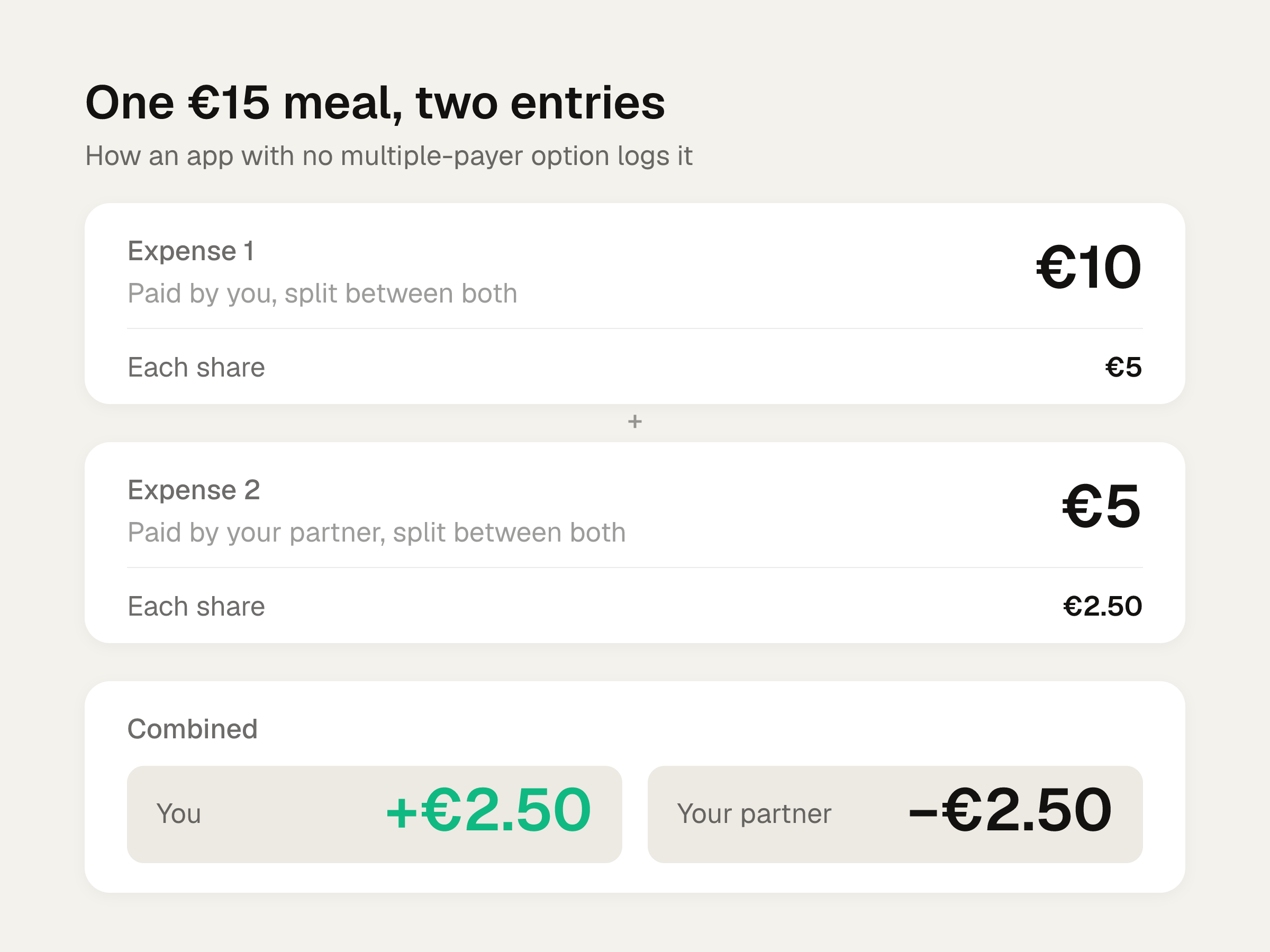
- Tricount does not support multiple payers, per Splital. You enter a separate expense for each amount paid: €10 paid by you, split between both of you, then €5 paid by your partner, split between both of you. The shares are €5 and €2.50 for each of you. As Banana Split puts it, the balance survives but the history gets confusing. It reads like two meals.
Banana Split's data on 183,000 groups says 11% of groups have an expense fronted by 2 or more people. That rises to 22% for groups lasting more than 6 months. Banana Split makes a competing app, so treat that as vendor data. It does suggest this isn't a rare case on long-running groups.
The Splitwise cap: 4 expenses a day
Splitwise's own Pro help page says free users can add up to 4 expenses a day, and Pro removes the limit. Banana Split says the count is per account across all groups.
Splital's tricount comparison says its authors hit a limit of 3 a day. I'm going with 4, because that's Splitwise's own figure. If you hit the wall sooner, that's why it's worth knowing the number is contested.
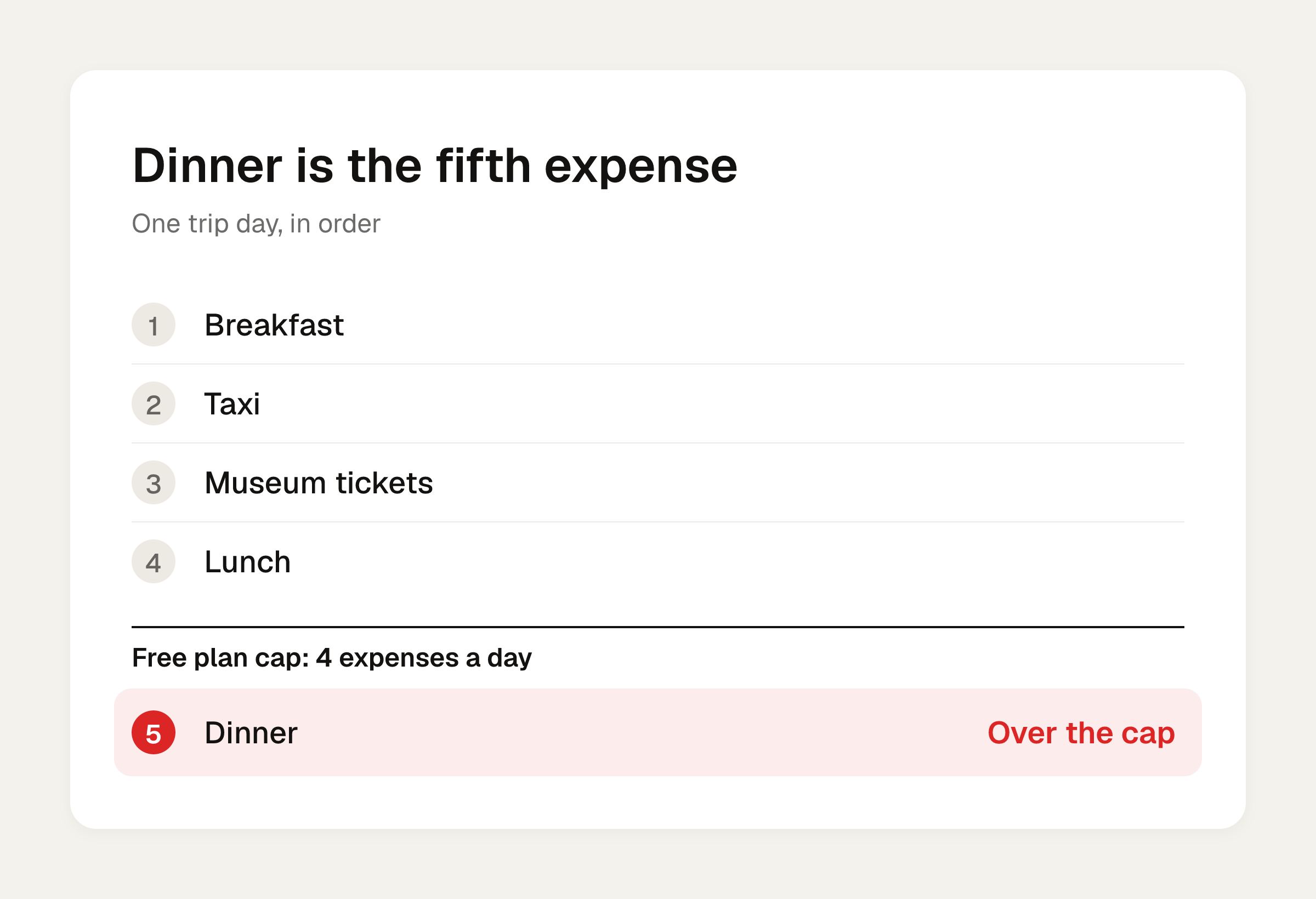
A trip day runs past 4 faster than you'd think:
- Breakfast
- Taxi
- Museum tickets
- Lunch
- Dinner
That's 5, and the organizer fronted most of them. Banana Split's data says 73% of its groups have at least one day with 5 or more expenses, and 34% have a day where one member paid for 5 or more things. Again, vendor data, but it matches how trips go.
There is a workaround. Per NomadCrew, a friend can log the expense for the person at the limit and change the payer to that person's name. Splitwise doesn't specify a universal daily reset time or timezone, so don't plan around midnight. The full rundown is in Splitwise's free limit, explained.
If you'd rather skip the workaround, Divvy bill splitting is an option: it has no daily expense limit and no ads.
What Splitwise Pro costs, with dates
Prices move, so each figure has its check date.
- Splital, as of October 2026: €5.99 a month or €47.99 a year, per its Pro vs free article. Duo, for two people, is €69.99 a year and annual billing only. A Trip Pass is annual only, and the monthly plan doesn't include one.
- HippoSplit, checked July 2026: $4.99 a month, or about $40 a year, per user, per HippoSplit's comparison.
Splitwise's help page describes the Duo + Trip Pass as an annual subscription billed once a year for two people.
Each person buys Pro separately. HippoSplit says so, and per Splital, buying Pro does not upgrade everyone in your groups. Friends keep free-plan limits unless they subscribe. If you front every cost on a trip, you're the one who hits the cap, so you're the one paying.
Divvy bill splitting is set up differently. Only the group organizer pays for Divvy Pro, which costs $29.99 a year in the US, billed annually through the Apple App Store. Everyone else joins through a share link at no cost, so one subscription covers the whole group.
What Pro adds in Splitwise, per Splitwise's help page:
- No daily cap
- Currency conversion
- Receipt scanning and itemizing
- Search across all expenses
- Charts of spending by category
- Default splits
- Early access to new features
- Card transaction import in select countries
A warning on currency conversion. In Splital's test, Pro converted every expense into the new currency, and the change couldn't be reversed. Try it on a test group first.
Re-check Splitwise's own pricing page before you buy. Every number above comes from a third party or a help page, on the date given.
What tricount gives you for free
Tricount's comparison page (reviewed 10 September 2026) says recording and splitting shared expenses is free with no daily cap. Its App Store listing says no subscription, no hidden fees and no limit on tricounts or expenses. The listing shows over 21 million users and 7.5K ratings averaging 4.9.
Also free, per those sources:
- No ads
- Currency conversion, with repayments shown in the group's main currency
- Offline tracking
- Payment requests and payment recording
- Photo sharing
- The first group without registering, per Splital
Sign-up is murky. HippoSplit says sign-up now runs through a bunq account, since bunq owns tricount. Splital says the first group needs no registration. Requirements may vary, so open the app and see what it asks you for.
The tricount page also says it's easier than Splitwise. That's a vendor claim about itself, and the page notes that features, paid extras and payment availability may change or vary by platform and region.
Side by side
| tricount | Splitwise free | Splitwise Pro | |
|---|---|---|---|
| Daily expense cap | None | 4 a day | None |
| Ads | None | Yes | Ad-free |
| Currency conversion | Free | Not included | Included |
| Recurring expenses | Add each bill by hand | Free, set once (per Splital) | Included |
| Percentage splits | No | Yes | Yes |
| Web app | No | Yes | Yes |
| Export | No in-app export | CSV, free | CSV |
| Multiple payers | No | See the note above | Yes |
The multiple-payer and recurring rows depend on the source. Splital lists both as free. Banana Split treats both as Pro. Check before you commit to a group.
Divvy bill splitting belongs in this comparison as an option too, so here is how it lines up on the rows we can state:
| Divvy bill splitting | |
|---|---|
| Daily expense cap | No daily expense limit |
| Ads | No ads |
| Who pays for Pro | Only the organizer, $29.99 a year in the US |
| Splitting a receipt | Tap a name on each item; shared items can be split |
| Tax and tip | Split by each person's share of the items |
| Friends need the app or an account | No, they open a share link |
Where Splitwise is stronger
- Recurring rent. Per Splital, set it once and it's added on a schedule. Tricount's page says each recurring bill is added manually every month.
- Percentage splits. Useful for a 60/40 rent. The free plan splits equally, by exact amounts, by percentages, or by shares, and saving a default split requires Pro. Tricount has no percentage option and no reusable custom split.
- Web app and export. Splital's Pro vs free article says Splitwise has both for free. Tricount has neither. The CSV omits expense notes and how the expense was split, so it's a partial record.
- Combined balances. If the same person is in three of your groups, Splitwise combines what you owe each other and can record one settlement across them. In tricount, cross-group balances need manual math.
- Debt simplification you can turn off. Splitwise can suggest fewer repayments. For example, if Alex owes Bea €20 and Bea owes Chris €20, Alex pays Chris directly. You can switch that off for free. Tricount always keeps it on.
- Your data stays put. Tricount's page says existing data stays in Splitwise, and Splitwise supports recurring expenses.
Where tricount is stronger
- No cap. Five expenses on a trip day cost nothing extra.
- No ads. Per tricount's comparison page, Splitwise is ad-free only with Pro.
- Free currency conversion. In Splitwise it's a Pro feature.
- Low friction. Friends can join by link, and the App Store release notes say friends outside the app can be shown what they owe.
Other apps, and what each does well
Three of the comparison articles come from people who build their own apps. Treat their claims as vendor claims, but each credits itself with something real. Divvy bill splitting is our app, so weigh that too.
- Divvy bill splitting. An iPhone app for iOS 17 or later. Point the camera at a receipt and it reads every line item, the tax and the tip. Groups for trips, roommates or recurring crews keep a running balance of who owes whom across many receipts. More on this in the Splitwise alternative page.
- Banana Split. Its author says it is free, with no daily limit and no account required. Its strength is the data: 183,000 groups and 3.8 million expenses, which is where the cap numbers above come from. Source: Banana Split.
- Splital. Its article says the free plan includes unlimited expenses and groups, free recurring expenses, saved default splits, multiple payers, search and automatic categorization. That is the one that covers the rent and multiple-payer gaps without a paid tier. Source: Splital.
- HippoSplit. Its article says the free plan includes unlimited expenses, no ads, every split method, 150+ currencies with live rates, and 20 AI receipt scans a week. It also says one Premium subscription covers the whole group. Source: HippoSplit.
A trip example: when equal splitting breaks
The taxi costs €36 and three people are in it. Each share is €12. Easy.
It only works if everyone joined every expense. If one friend skipped the taxi, leave them off and split €36 two ways: €18 each. Both apps let you pick who's in on each expense, so the habit matters more than the app. Check the "split between" names every time you log something. In Divvy bill splitting, the same habit applies: you tap a name on each item to assign it to whoever had it.
A real receipt: tax and tip by what each person ordered
Equal splitting gets unfair fast at a restaurant. Here's a dinner for three, in dollars, with 8% tax and a 20% tip on the pre-tax subtotal.
| Item | Who | Price |
|---|---|---|
| Pasta | Ana | $18.00 |
| Wine | Ana | $12.00 |
| Steak | Ben | $30.00 |
| Beer | Ben | $8.00 |
| Salad | Cam | $14.00 |
| Soda | Cam | $4.00 |
| Fries | Shared by all 3 | $9.00 |
Subtotal: $95.00. Tax: $7.60. Tip: $19.00. Total: $121.60.
The fries are $3.00 each. Then each person's tax and tip follow their share of the items:
| Person | Items | Tax (8%) | Tip (20%) | Share |
|---|---|---|---|---|
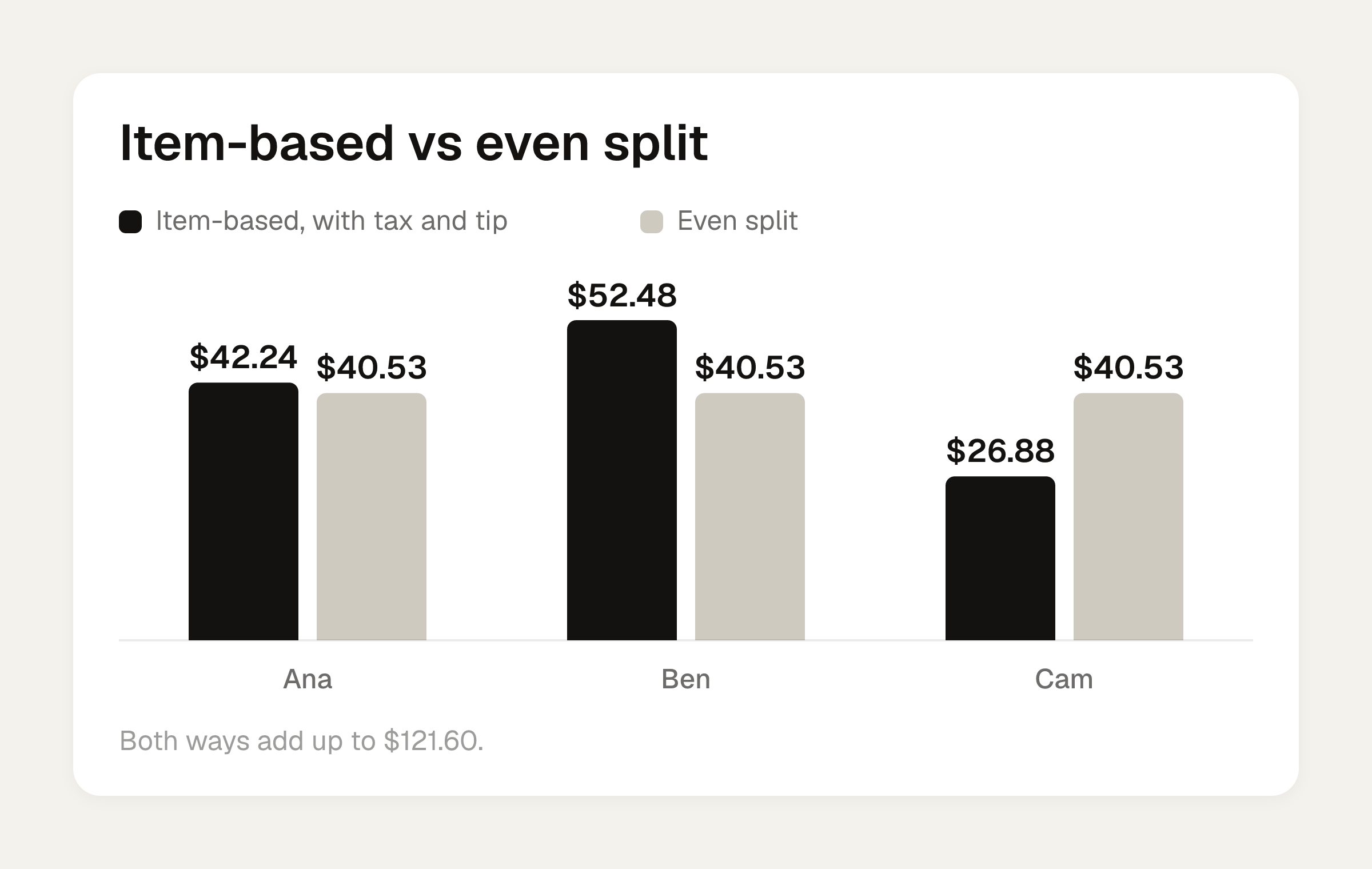
| Ana | $33.00 | $2.64 | $6.60 | $42.24 |
| Ben | $41.00 | $3.28 | $8.20 | $52.48 |
| Cam | $21.00 | $1.68 | $4.20 | $26.88 |
The three shares add up to $121.60. An even split would be $40.53 each. Cam would overpay by about $13.65 and Ben would underpay by almost $12.
You can run these numbers with the bill split calculator, by item or evenly, with tip. For the method behind it, see how to split tax and tip fairly.
Moving from Splitwise to tricount
Tricount can import a Splitwise group. Its release notes say Splitwise groups can be moved over with no limits, no ads and no fees.
- Check the Splitwise group first. Look for missing costs and fix them before you import.
- Run the importer, then check together. Go through the entries and balances with the group.
- Share the new group. Agree that new expenses go there from now on.
Tricount's page says existing data stays in Splitwise, so you keep the original as a record.
Risks to know before you pick
- A 2024 one-star App Store review for tricount says an update erased a weeklong trip's data. The developer replied that it couldn't be retrieved because it wasn't on its servers. That's one review, but it's a reason to screenshot your balances on a long trip.
- A 2025 review on the same listing says the missing export or big-picture view was becoming a dealbreaker.
- Two sources say tricount's Premium tier was retired, and HippoSplit says its CSV and PDF export went with it. Banana Split agrees the old Premium tier is gone and adds that tricount has no web version.
- Tricount's App Store privacy label says data may be used to track users across other companies' apps and websites.
- Neither app moves money. Both only show balances and who pays whom.
- Tricount's page says features, paid extras and payment availability may change or vary by platform and region.
If the real problem is one receipt
If you're the one who fronted a dinner and the hard part is splitting the receipt by what each person ordered, Divvy bill splitting is an option. It's an iPhone app and needs iOS 17 or later. Point the camera at a receipt and Divvy bill splitting reads every line item, the tax and the tip. Tap a name on each item to assign it, and a shared item can be split between people. Tax and tip are split by each person's share of the items, which is the Ana, Ben and Cam math above. Each person's share becomes a Venmo or Cash App request in one tap, with reminders until it's paid. Friends don't need the app or an account: they open a share link, see what they owe, and pay.
Divvy bill splitting is free to download. Divvy Pro costs $29.99 a year in the US and includes unlimited AI receipt scans. Only the organizer pays for it, so one subscription covers the whole group.
Before you pay for Splitwise Pro
If the 4-a-day cap is what's pushing you, price it out first. The full Splitwise Pro price breakdown lays out monthly, annual and Duo plans. Then compare it against tricount or Divvy bill splitting for the length of your trip.
Frequently asked questions
Do I need an account to use tricount?
It depends on who you ask. Splital says the first group can be created without registering. HippoSplit says sign-up now runs through a bunq account. Requirements may vary, so open the app and see what it asks for.
If I buy Splitwise Pro, do my friends get it too?
No. Per Splital, buying Pro doesn't upgrade everyone in your groups, and friends keep free-plan limits unless they subscribe. HippoSplit says each person buys Pro separately.
Can tricount export my trip data?
There is no in-app export, per Splital. HippoSplit says CSV and PDF export disappeared when Premium was retired. Screenshot your final balances before you close out a group.
Does tricount or Splitwise send the money?
Neither one. Both show balances and who pays whom. Tricount has payment requests and payment recording, but the actual transfer happens somewhere else.
Can I fix the Splitwise cap without paying?
A friend can log the expense for the person at the limit and change the payer to that person's name. Splitwise doesn't specify a universal daily reset time or timezone, so you can't count on a clean midnight reset. Divvy bill splitting has no daily expense limit if you'd rather avoid the cap altogether.
Sources
- tricount vs Splitwise
- What is Splitwise Pro?
- Tricount vs Splitwise 2026: Which to Pick, Tested on 183,000 Groups
- Tricount vs Splitwise: Free Plans & Features - Splital Blog
- Splitwise Pro vs Free: Cost, Limits & Features - Splital Blog
- Tricount vs Splitwise 2026: Which Is Better? (Plus Settle Up)
- tricount: Split & Settle Bills - App Store - Apple
- Splitwise Daily Limit: 4 Expenses. Does Everyone Need Pro?