Divvy
DivvyWhy Is My PayPal Money Pending and How to Fix It
By The Divvy Team · September 15, 2026 · 16 min read
PayPal money usually shows as pending because PayPal is verifying the transaction, not because the funds are permanently lost. A pending or held payment can remain unavailable for up to 21 days, and some cases can last up to 30 days, while rare holds may last up to 180 days.
You may be a freelancer checking whether an invoice payment is available, a buyer wondering why a recipient hasn't received your money, or a first-time seller watching a completed order sit in a pending state. The label feels alarming because it doesn't tell you which checkpoint is delaying settlement.
PayPal uses “pending” for several different situations. The recipient may not have claimed the payment, an eCheck may still be clearing, PayPal may be applying a seller hold, or a transaction may be under a broader risk or identity review. Those causes look similar on the surface, but each requires a different response.
A useful way to understand the situation is to compare it with an authorization hold versus a charge. A temporary hold doesn't necessarily mean the transaction failed or that the money disappeared. It means the payment hasn't reached its final stage.
Table of Contents
- Why PayPal Money Shows as Pending in the First Place
- The Four Hidden Types of Pending Balances
- How to Check Your PayPal Status and Decode the Labels
- PayPal Hold Timelines You Should Expect
- Actionable Steps to Release or Speed Up Pending Funds
- Preventing Future PayPal Holds as a Seller or Sender
- When to Wait, When to Contact PayPal, and When to Escalate
Why PayPal Money Shows as Pending in the First Place
Suppose a freelancer receives payment after sending a PayPal invoice. The client sees the payment leave their account, but the freelancer sees the money marked pending and can't use it. In another common scenario, a buyer sends money to a friend, then notices that the recipient's payment hasn't appeared as available.
In both cases, PayPal is placing a checkpoint between authorization and final settlement. The platform may verify the payment source, review the transaction for risk, confirm account information, or wait for the seller to complete the transaction. PayPal describes a pending payment as one that's still under review, while an eCheck remains pending as the bank transfer clears through the financial system. (PayPal's payment-status guide)
That checkpoint protects both sides, although it creates real frustration. A buyer wants confirmation that the order is moving. A seller wants access to revenue already shown in the account. PayPal's controls are designed to reduce exposure to fraud, disputes, chargebacks, delivery problems, and returned payments before funds become available.
The pending label hides different checkpoints
The most useful first question isn't “How do I make PayPal release my money?” It's “Which type of pending payment am I looking at?”
The four common categories are:
- Unclaimed recipient payment: The recipient hasn't accepted the payment, or the email address or phone number isn't connected to a verified PayPal account.
- eCheck clearing: The bank-funded payment is still moving through the clearing process.
- Seller hold: PayPal has temporarily restricted access to funds because the seller has limited history, unusual activity, or delivery risk.
- Risk or compliance review: PayPal needs additional verification, such as identity information, transaction documentation, or other account checks.
Those categories have different owners. A recipient can claim an unclaimed payment. A sender may need to wait for an eCheck. A seller can usually add fulfillment information, while an account holder facing identity review must complete PayPal's requested checks.
Practical rule: Pending describes the payment's current stage. It doesn't, by itself, prove that the payment failed or that the money is gone.
PayPal's published guidance shows that many pending states follow defined windows, including up to 21 days for certain held payments and, in rare cases, up to 180 days for unresolved issues. (PayPal balance terms) Identifying the exact reason lets you stop guessing and choose the action that matches the checkpoint.
The Four Hidden Types of Pending Balances
A pending balance is easier to understand when you treat each type like a different queue.
1. Unclaimed recipient payment
You send money to an email address or phone number, but the recipient hasn't linked that contact information to a verified PayPal account. The payment waits for acceptance, much like a letter waiting at a post office until the intended person proves their identity.
The recipient should check the email address or phone number used, sign in to PayPal, and confirm the payment if PayPal presents that option. If the recipient doesn't accept it, PayPal gives 30 days for acceptance before automatically canceling and returning the money. (PayPal's explanation of pending or unclaimed payments)
Self-diagnosis: If the status says Unclaimed or Pending and the recipient hasn't accepted the payment, the recipient must claim it or the sender may need to cancel it if cancellation is available.
2. eCheck clearing
An eCheck is funded through a bank transfer rather than an instantly available PayPal balance or card payment. It resembles a paper check sitting in a bank's clearing process. PayPal says an eCheck can take up to 7 business days to clear. (PayPal's payment-status guide)
The seller shouldn't treat the payment as final while it remains pending. Confirm the funds are available before shipping goods or delivering work.
Self-diagnosis: If the transaction identifies an eCheck or clearing bank payment, the correct first action is to wait for clearance and avoid fulfillment before settlement.
3. Seller hold
PayPal may hold money received by a new or lower-history seller while it checks delivery and dispute risk. Think of it as a security deposit held until the transaction's main obligation is complete. PayPal's guidance says initial payments for new sellers can be held for up to 21 days. (PayPal's new-seller guidance)
The seller can often help by uploading valid tracking information, completing the order, and responding to requests for proof of shipment or delivery.
Self-diagnosis: If the payment says Held or refers to a new seller, delivery, or funds availability, the seller should provide fulfillment evidence rather than ask the buyer to resend the payment.
4. Risk or compliance review
A risk review is broader than a normal seller hold. PayPal may examine unusual sales patterns, a recent increase in activity, multiple disputes, a changed product category, incomplete identity verification, or pending identity and video KYC checks. The experience is similar to a card issuer temporarily reviewing an unusual purchase.
The account holder should read the exact action request and complete it through PayPal's own account interface. Sending repeated payments won't bypass the review and may make the situation harder to track.
Self-diagnosis: If the status says Under Review, Verification Required, or refers to compliance or identity checks, complete the requested verification and wait for PayPal's review.
| Pending Type | What It Means | Typical Duration | Who Can Fix It |
|---|---|---|---|
| Unclaimed recipient payment | The recipient hasn't accepted or linked the payment | Up to 30 days before automatic cancellation in the documented situation | Recipient or sender |
| eCheck clearing | The bank-funded payment is still clearing | Up to 7 business days | Sender and bank process |
| Seller hold | PayPal is checking delivery and seller-related risk | Up to 21 days in documented new-seller cases | Seller |
| Risk or compliance review | PayPal needs additional risk or identity checks | Depends on the unresolved review | Account holder and PayPal |
How to Check Your PayPal Status and Decode the Labels
Start with the transaction itself rather than the account balance. Sign in to PayPal, open Activity, filter or search for the payment, and select the transaction. On mobile, open the relevant payment from the activity feed and expand the details. On desktop, the same transaction page generally contains the status and any available explanation.
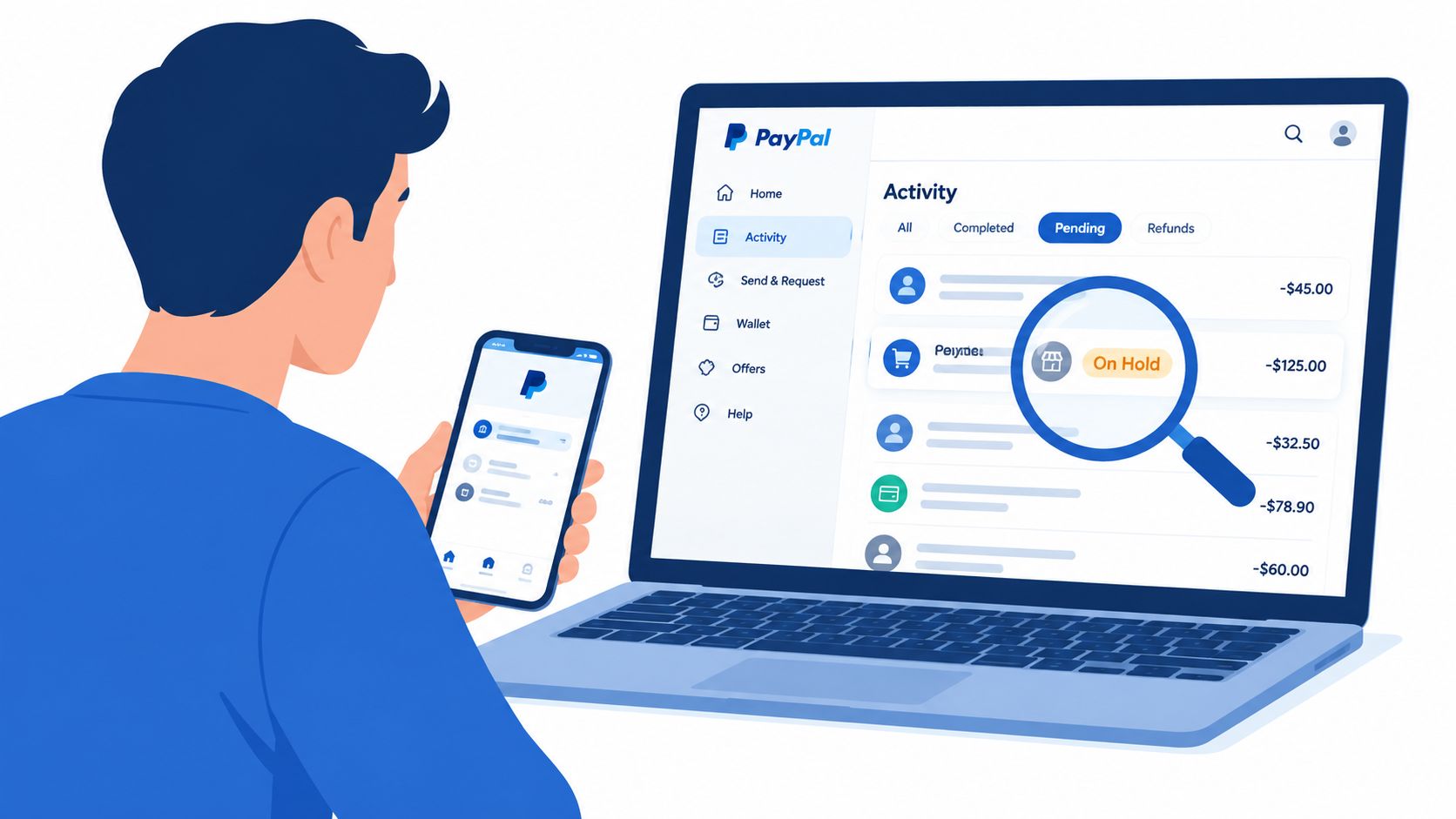
Look for a note below the status, a Status details link, or a message describing what PayPal needs next. The wording matters because Pending, Unclaimed, Clearing, Held, and Under Review don't identify the same problem.
Translate the status into plain English
- Pending: PayPal hasn't fully settled or finished reviewing the payment.
- Unclaimed: The recipient hasn't accepted it or hasn't connected the destination contact information to PayPal.
- Clearing: The funding source, commonly an eCheck, is still moving through the bank process.
- Held: PayPal has restricted access while it checks seller, delivery, dispute, or return risk.
- Under Review: PayPal is conducting a risk, identity, or compliance review.
“Authorization” means PayPal has recorded approval to attempt the payment, not necessarily that the recipient can spend the funds. “On hold for new seller” points to a seller-risk control, while a request for identity documents points to account verification.
Take a screenshot of the status note, transaction ID, date, and requested action. Keep it with tracking records, delivery confirmation, buyer messages, and any documents PayPal asks you to submit. That record prevents you from relying on memory when you contact support.
The video below can help you recognize the activity-page terminology before you decide whether to wait or act.
PayPal Hold Timelines You Should Expect
PayPal's published timelines depend on the reason for the hold, the type of payment, and the seller's account history. The standard documented window for many new-seller holds is up to 21 days, but that doesn't mean every transaction remains unavailable for the entire period. (PayPal's new-seller guidance)
A seller can sometimes reach an earlier release milestone by adding tracking that PayPal can verify. PayPal says funds may be released about 24 hours after delivery confirmation when tracking information supports delivery. For a service, marking the service completed can release funds about 7 days later. (PayPal balance terms)
What the windows mean
The 21-day window generally reflects a seller-risk and delivery checkpoint. New or infrequent sellers have less transaction history for PayPal to evaluate, so PayPal may wait for evidence that the order was shipped or completed.
Some transactions can remain pending for up to 30 days when the seller hasn't completed the transaction or the recipient hasn't accepted a payment. This isn't interchangeable with the standard seller hold. Read the transaction note to determine whether the missing action belongs to the buyer, recipient, seller, or account holder.
A rare hold can last up to 180 days, particularly when unresolved risk, verification, claims, or account issues remain. Waiting without completing the requested verification usually won't solve that kind of restriction. (PayPal balance terms)
| Hold Window | Typical Trigger | Milestone That Releases Funds | Earliest Release |
|---|---|---|---|
| Up to 21 days | New or lower-history seller, delivery or dispute risk | Verified tracking, delivery confirmation, or completed service | About 24 hours after delivery confirmation for eligible tracked transactions, or about 7 days after service completion |
| Up to 30 days | Recipient hasn't accepted or seller hasn't completed the transaction | Recipient acceptance or transaction completion | After the missing action, subject to PayPal's review |
| Up to 180 days in rare cases | Unresolved risk, claims, account, or verification issue | Required verification or resolution of the account issue | Depends on the specific restriction |
The timeline is a guide, not a promise that every payment follows the same route. PayPal's status message is more important than a generic countdown.
Actionable Steps to Release or Speed Up Pending Funds
Use this sequence before contacting support. It starts with checks that take little effort and moves toward actions requiring documentation.
Read the hold reason. Open PayPal, select Activity, choose the pending transaction, and read the full status note. Write down the transaction ID and the exact action PayPal requests. If the message identifies an unclaimed payment, contact the recipient. If it identifies an eCheck, don't ship until it clears.
Check the funding method. An eCheck can remain pending for up to 7 business days, so the sender should confirm that the bank account has enough available funds and allow the clearing process to finish. (PayPal's payment-status guide) A seller shouldn't mark an eCheck-funded order as settled just because the buyer initiated it.
Upload shipment tracking. Sellers should open the transaction details, choose the option to add tracking or update order information, select the carrier, and enter a valid tracking number. PayPal needs to be able to match the number to the shipment. A copied or invalid number won't establish delivery.
Complete the service order. For consulting, digital work, repairs, or other services, use the transaction's completion option when the work is finished. Keep the agreement, delivery record, and buyer correspondence in case PayPal asks for evidence.
Answer account requests. If PayPal requests identity information, proof of shipment, proof of delivery, or another document, submit it through the account's notification, Resolution Center, or designated upload path. Don't send sensitive documents through an unsolicited message or an unfamiliar link.
Ask the buyer to confirm receipt. Where PayPal provides a receipt-confirmation option, the buyer can use it after receiving the goods. The buyer should only confirm actual receipt, not a promised or incomplete delivery.
Contact support with evidence. If tracking shows delivery or the requested verification is complete but the funds remain unavailable beyond the stated expectation, contact PayPal with the transaction ID, carrier record, completion date, and a concise request for status clarification.
Use one clear question: “The transaction shows delivery confirmation, the requested information is complete, and the funds remain pending. Can you confirm the remaining release condition and expected review step?”
If the payment relates to an online store, it can also help to understand how payment platforms handle temporary restrictions through a guide to Shopify holds. For a separate payment workflow, review how to link Venmo to PayPal rather than sending a second payment while the first one is unresolved.
Preventing Future PayPal Holds as a Seller or Sender
Avoiding holds is mostly account maintenance. PayPal's funds-availability guidance connects delays with limited history, dormant selling activity, unusual sales patterns, disputes, returns, incomplete verification, and changes in selling behavior. (PayPal's funds-availability guidance)
Seller hygiene
Confirm your email address and bank information before accepting regular payments. Complete identity verification promptly, describe products accurately, and ship with a trackable carrier. Upload tracking soon after dispatch so PayPal can connect the payment with fulfillment evidence.
Keep buyers informed when an order is delayed, and follow a clear return process. A consistent record with fewer disputes gives PayPal better evidence about how your account operates. Avoid abrupt changes in product category, unexplained sales spikes, or pricing patterns that don't match your normal activity.
Sender awareness
Senders should check the recipient's email address or phone number before confirming payment. A typo can create an unclaimed payment that waits for acceptance instead of reaching the intended account.
Choose a funding method with a clear availability status, and make sure the bank account or card is properly linked and verified. Confirm the shipping address and item details before paying, especially when the transaction involves goods.
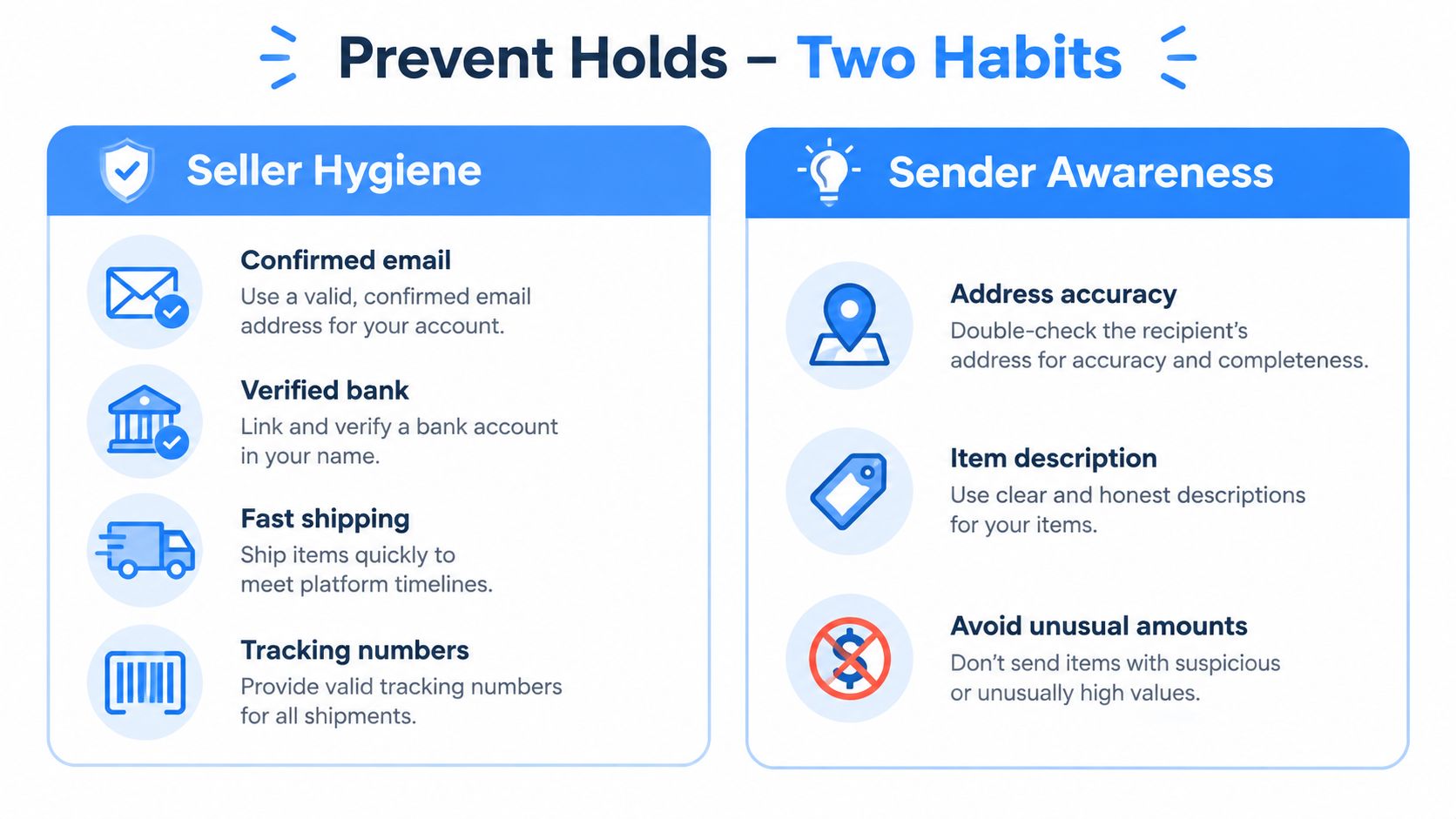
A weekly check can catch problems before a payment becomes urgent. Review open transactions, unresolved account alerts, missing tracking numbers, and messages requesting verification. If you regularly divide shared expenses, an itemized request through Divvy's rent payment tools can make the requested amount and purpose clearer before someone sends money.
When to Wait, When to Contact PayPal, and When to Escalate
Use the status and its stated window to choose the next move.
Wait when the transaction is within a documented review or clearing period, the status is normal, and no action request is outstanding. An eCheck can take up to 7 business days, and many new-seller holds can remain unavailable for up to 21 days. (PayPal's payment-status guide)
Act through self-service when PayPal identifies a missing recipient acceptance, tracking number, delivery confirmation, completed service, or verification document. The right action is usually visible in the transaction details, not in a second payment attempt.
Contact PayPal when the stated window has passed, a completed milestone hasn't changed the status, or the message refers to risk, compliance, or identity review. Include the transaction ID, timeline, shipment or completion evidence, screenshots, and the exact question you need answered.
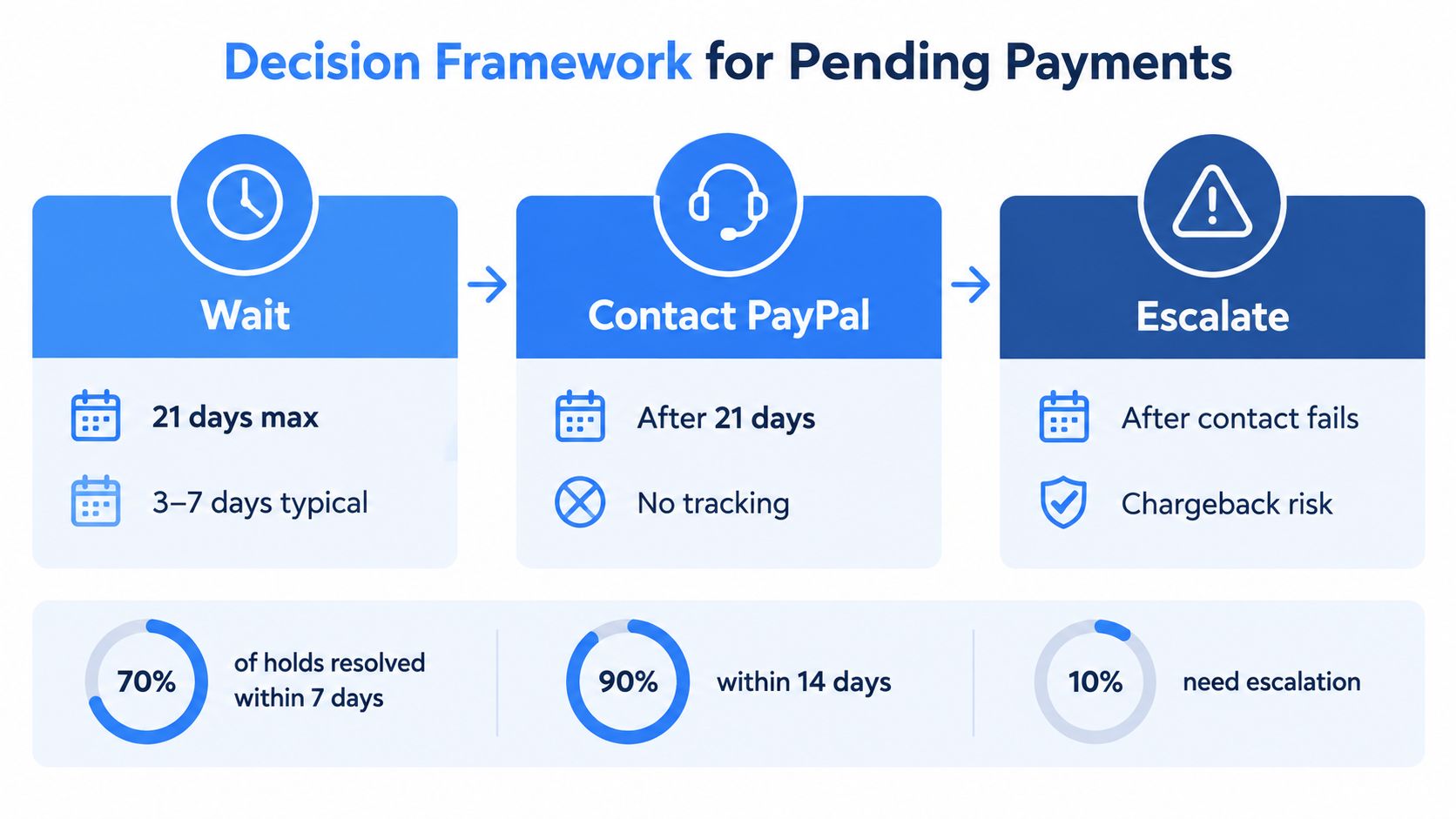
Escalation is appropriate when standard support doesn't resolve a documented problem or when you believe the transaction is fraudulent. Use the PayPal Resolution Center for a formal case, keep every message and receipt, and contact your bank or card issuer only when the facts support an unauthorized-payment or confirmed-fraud claim. Don't initiate a chargeback because a legitimate payment is still pending, since that can create a separate dispute.
If you use another peer-to-peer service, review how to send money through Cash App and apply the same discipline: verify the recipient, record the transaction, and avoid duplicate payments.
The practical decision path is simple: read the label, identify who controls the next step, complete that step, and document the result. A pending PayPal payment is usually a known verification state, not proof of permanent loss.
Divvy helps friends and roommates itemize a bill with AI receipt scanning, allocate tax and tip by each person's share, and send specific payment requests through common payment apps, including PayPal. Visit Divvy to make shared expenses clearer before anyone sends money.