Divvy
Can You Request a Refund on Venmo? A $185.60 Dinner Example
By The Divvy Team · November 8, 2026 · 7 min read
The short answer to "can you request a refund on venmo" is no, not for personal payments: Venmo has no refund button, and once money reaches the other person's account it generally can't be canceled or reversed. What works is a charge request for the exact amount you overpaid, or Take Back if the payment is still Pending.
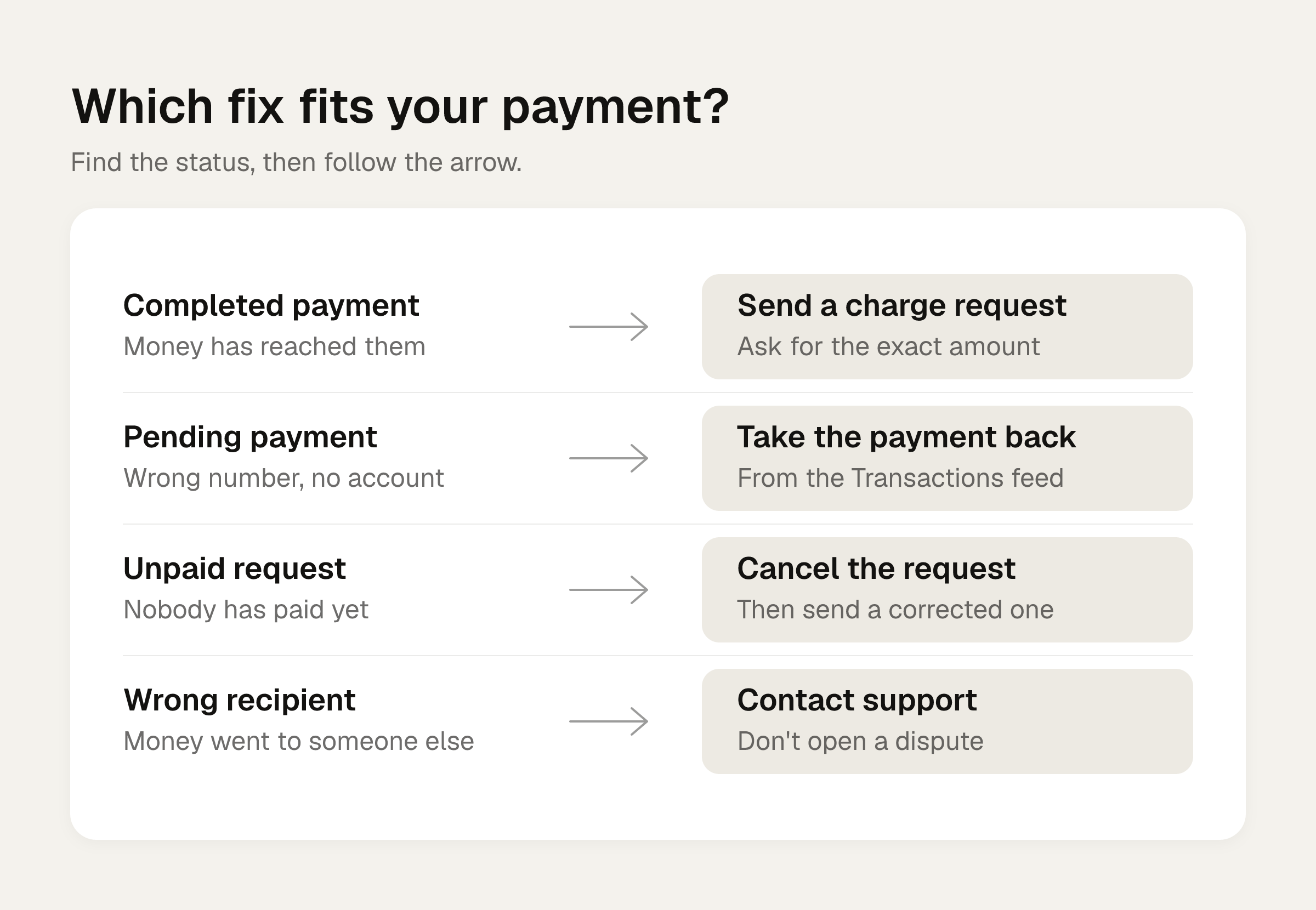
The catch is knowing the exact amount. So this article starts with a dinner receipt, works out what everyone really owes, and then walks through each fix. Venmo's rules below come from its help pages and two news and how-to articles, all checked in November 2026. Venmo can change them, so check the app if something looks different.
Worked example: a $185.60 dinner and one wrong Venmo payment
Maya fronts dinner for four on her card. The receipt:
- Maya: salmon $26.00, wine $12.00
- Ben: burger $18.00, beer $8.00
- Priya: pasta $22.00, salad $9.00
- Sam: steak $34.00, soda $4.00
- Shared by all four: nachos $12.00 ($3.00 each)
The subtotal is $145.00. Tax at 8% is $11.60. A 20% tip on the subtotal is $29.00. The total is $185.60.
Tax and tip follow what each person ordered, so the person with the bigger plate pays more of both. (The tax and tip guide covers the method.)
| Person | Items (with $3.00 nachos) | Tax | Tip | Share |
|---|---|---|---|---|
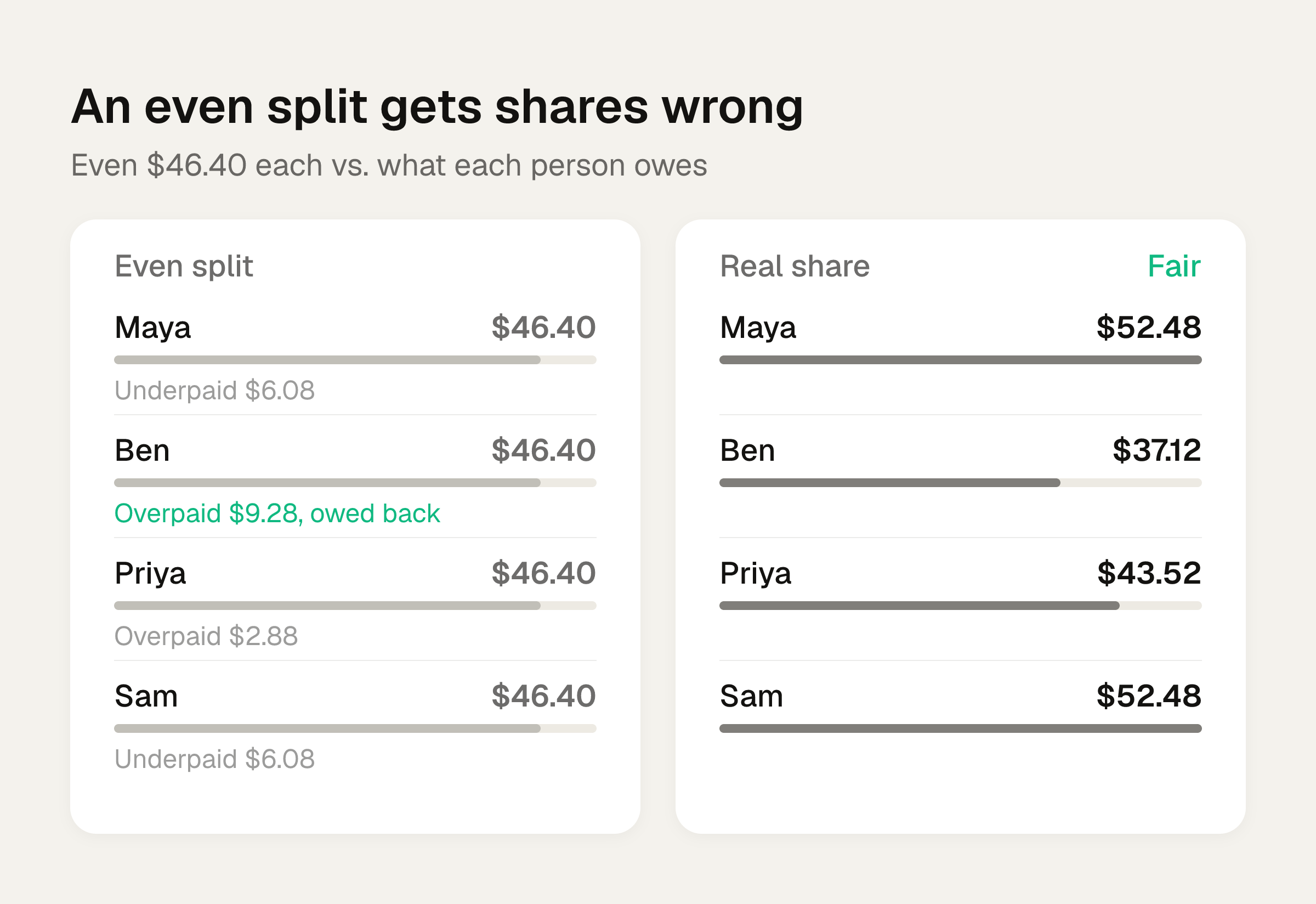
| Maya | $41.00 | $3.28 | $8.20 | $52.48 |
| Ben | $29.00 | $2.32 | $5.80 | $37.12 |
| Priya | $34.00 | $2.72 | $6.80 | $43.52 |
| Sam | $41.00 | $3.28 | $8.20 | $52.48 |
Maya is owed $133.12 in total: $37.12 from Ben, $43.52 from Priya, $52.48 from Sam.
Now the mistake. Ben takes a quick shot at the math, divides $185.60 by four and sends Maya $46.40. His real share is $37.12. He overpaid by $9.28.
An even split would have been wrong for everyone: Priya would overpay by $2.88, and Sam would underpay by $6.08.
Can you request a refund on venmo from a friend? Send a charge request
Ben's payment is Completed, so he can't pull it back. He asks for it back instead.
- Open Venmo and choose Maya's account.
- Enter $9.28.
- Add a note, then tap Request.
Venmo says the money returns to your balance once the other person accepts the request. Tom's Guide suggests a note that owns the error, so it doesn't read like a demand. Something like:
Sent $46.40 by mistake. My share was $37.12, so I overpaid $9.28. Can you send it back?
If Maya hasn't responded after several hours, Ben can send a reminder. Per Tom's Guide, a reminder works only once per request, so don't spend it too early.
Maya can also skip the request and pay Ben $9.28 herself. That's the fastest route when the organizer notices first. The Venmo request guide has the full steps for both directions.
If the wrong amount is a request, cancel it before it's paid
Say Maya sent all three friends a $46.40 request. If nobody has paid yet, she can cancel it from the Me tab and send a new request with the correct figure. For Ben that's $37.12, for Priya $43.52, and for Sam $52.48.
This only works before the other person pays. After that, you're back to the charge request above.
Take Back: the exception for Pending payments
Suppose Ben typed an old phone number for Maya, one that isn't tied to an active Venmo account. The payment shows Pending, and he's still charged. He can cancel it:
- In the app: Me tab, the top of the Transactions feed, then Take Back.
- On the web: account.venmo.com/incomplete.
Take Back isn't available if that phone number or email is linked to an active Venmo account. In that case the money has already gone to someone.
Unclaimed pending payments expire on their own after 30 days, and the money returns to the payment method.
How fast the money comes back depends on where it came from:
| Paid from | Refund timing |
|---|---|
| Venmo balance | Immediate |
| Bank account | Up to 5 business days |
| Credit or debit card | Up to 7 business days |
Venmo can't expedite these timelines.
One more thing that looks like the same problem. A payment funded by a bank account can show Pending for 3 to 5 business days while the bank processes it. That doesn't apply to debit card, credit card or Venmo balance payments, and there's no way to speed it up. If the recipient is a normal Venmo user and you paid from a bank account, a Pending label usually points to the bank's processing time.
If you paid the wrong person
Don't open a dispute. Venmo says it won't resolve this kind of payment that way. Contact Support in the app instead: Me, Settings, Get Help, Chat With Us, then ask for an agent.
Have these ready:
- The recipient's username
- The amount and the date
- The username, phone and email of the person you meant to pay
Venmo says it will "do our best to help" but doesn't guarantee a result.
Tom's Guide describes how this went for its author in July 2019: after support verified the details, the unintended recipient was emailed and had 48 hours before the funds were sent back. The $15 came back just under 48 hours after the call. That's an older account, so treat the timing as a rough guide.
Don't ask your bank to reverse a payment that already shows Completed. That creates a loss on the Venmo account that must be repaid, and the account can be frozen until it is. Lilach Bullock notes a bank stop only makes sense for a payment still Pending with an estimated completion date.
Refunds from a business
If you paid a business through Venmo, contact the business first. It may decline. When a merchant does issue a refund, it usually goes back to the original payment method, and sometimes to the Venmo account. It can take up to 5 business days. If nothing has arrived after that, contact Venmo. You can check the original payment method under Me, then Transactions.
Venmo doesn't guarantee a refund if the business won't resolve it. Business profile refunds can be partial but can't exceed the original payment, and the business's processing fee isn't returned.
Get each share right before anyone pays
Every fix above exists because the first number was wrong. Run the receipt through the bill split calculator before anyone sends money. It splits evenly or by item, with tip. If you're still deciding how to do it on Venmo, the guide to splitting a bill on Venmo covers uneven splits.
Divvy bill splitting is an iPhone app that does the same math from the receipt. Point the camera at the receipt and it reads every line item, the tax and the tip. You tap a name on each item to assign it to whoever had it, and a shared item like the nachos can be split between people. Tax and tip are split by each person's share of the items: whoever ordered more pays more of both. Each person's share becomes a Venmo or Cash App request in one tap, with reminders until it's paid. Friends don't need the app or an account: they open a share link, see what they owe, and pay.
Frequently asked questions
Will Venmo reverse a payment I sent to the wrong person?
Not on its own. A Completed payment generally can't be reversed. Ask the recipient to return it with a charge request, or contact Venmo Support through the app and give them the details. Venmo says it will do its best to help but doesn't promise an outcome.
How long do I have to use Take Back?
Take Back works only while a payment is Pending, meaning it went to a phone number or email without an active Venmo account. If nobody claims it, it expires after 30 days and the money returns to your payment method.
Should I call my bank to undo a Venmo payment?
Not if it shows Completed. A bank reversal creates a loss on your Venmo account that you'd have to repay, and the account can be frozen until you do. A bank stop only makes sense for a payment that's still Pending with an estimated completion date.
Can a business refund only part of a Venmo payment?
Yes. Business profile refunds can be partial, but they can't be more than the original payment. The processing fee the business paid isn't returned.
Where can I reach Venmo Support?
In the app, go to Me, Settings, Get Help, then Chat With Us, and ask for an agent. Have the recipient's username, the amount, the date, and the details of the person you meant to pay ready. Check the app for current support hours.