Divvy
Can You Split Payment on PayPal? Yes, With a $148.48 Example
By The Divvy Team · November 8, 2026 · 8 min read
Can you split payment on PayPal? Yes, though PayPal uses "split" for three different things. You can request money from several people after you front a bill, split one online purchase across two cards at checkout, or break one purchase into installments with Pay in 4.
If you're the friend who paid for dinner, you want the first one. That's where most of this article lives, with a real receipt and real shares. The card and installment options come after, so you know which one you're actually looking at.
The three kinds of "split" on PayPal
| What you want | PayPal feature | Who it's for |
|---|---|---|
| Get friends to pay their share of a bill you fronted | Bill Split or money requests | The organizer |
| Pay one purchase with two cards | Split at checkout, if the merchant allows it | One buyer |
| Spread one purchase over weeks or months | Pay in 4, Pay Monthly | One buyer |
Only the first row involves other people. The other two are about how one person pays one merchant.
How PayPal splits a bill among people
PayPal's Bill Split generates a separate money request for each person you chose. Each person gets an email with a Pay Now button. On partner sites, Fandango.com is PayPal's example, the request goes out after checkout is complete.
If you made the purchase with PayPal, you can also request from the Transaction Details page. You enter the total and PayPal auto-calculates each person's share. You can adjust a share by hand when someone owes more or less. Requests go to several people at once, and each can carry a description of the expense.
If you paid some other way, use the app:
- Choose Send/Request at the bottom of the screen.
- Enter the amount.
- Choose a contact.
- Choose Request Now.
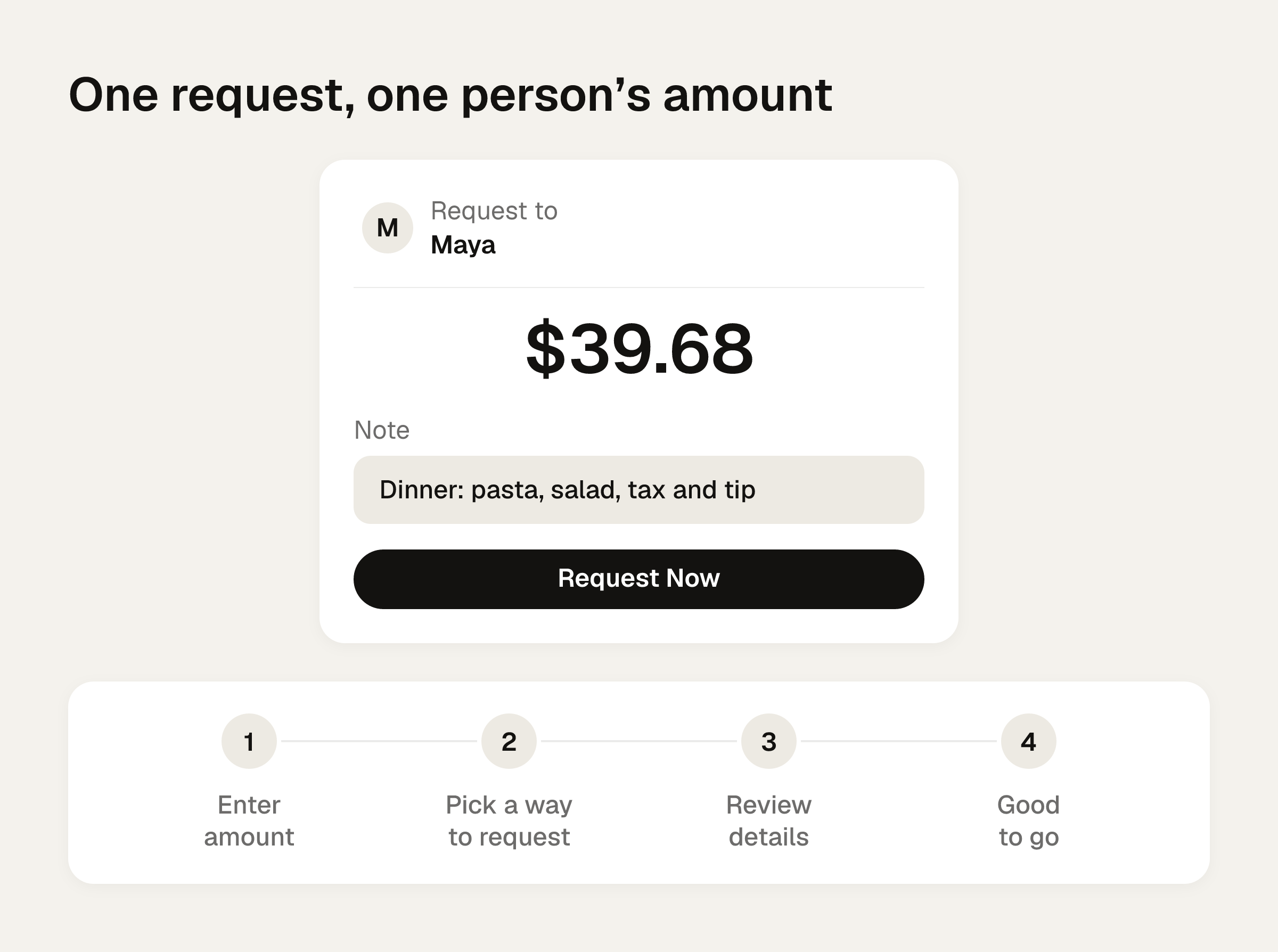
PayPal's request flow runs through four steps: Enter amount, Pick a way to request, Review details, Good to go. You can also share a PayPal link by text, DM or chat. Links have to be created in the PayPal app, and PayPal says they need a PayPal account.
Can you split payment on PayPal when the shares are unequal?
Yes, but you do the math. PayPal's equal split is a division by the number of people. A request records money moving. It doesn't read a receipt or work out who ordered what. When shares differ, you send one request per person, each for that person's own amount.
PayPal also doesn't give you a running group balance across receipts, split rules, pending amounts or refunds. That's per the Spark write-up listed in the sources. Each request stands alone.
Worked example: a $148.48 dinner for four
You front the bill. Here is the receipt, split by what each person ordered.
| Person | Ordered | Items |
|---|---|---|
| You | Salmon $26.00, wine $12.00 | $38.00 |
| Maya | Pasta $22.00, salad $9.00 | $31.00 |
| Jon | Burger $18.00, beer $8.00 | $26.00 |
| Priya | Veggie bowl $17.00, lemonade $4.00 | $21.00 |
Subtotal is $116.00. Tax at 8% is $9.28. A 20% tip on the subtotal is $23.20. The total is $148.48.
Tax and tip together come to $32.48, which is 28% of the subtotal. So each person pays their items times 1.28. Whoever ordered more pays more of both. (The tax and tip guide walks through why this beats splitting them evenly.)
| Person | Items | Tax and tip (28%) | Share by order | Equal split |
|---|---|---|---|---|
| You | $38.00 | $10.64 | $48.64 | $37.12 |
| Maya | $31.00 | $8.68 | $39.68 | $37.12 |
| Jon | $26.00 | $7.28 | $33.28 | $37.12 |
| Priya | $21.00 | $5.88 | $26.88 | $37.12 |
The shares add up to $148.48. An even split is $37.12 each. That has Priya paying $10.24 more than her food cost, and you paying $11.52 less than yours.
If you keep a spreadsheet, the equal version is =C2/4. Spark's weighted version is =C2*(D2/SUM($D$2:$D$5)), where C2 is the total and column D holds each person's items. For you that's 148.48 times 38/116, or $48.64.
Now the PayPal side. You don't request your own share. You send three requests:
| Request to | Amount | Description to type |
|---|---|---|
| Maya | $39.68 | Dinner: pasta, salad, tax and tip |
| Jon | $33.28 | Dinner: burger, beer, tax and tip |
| Priya | $26.88 | Dinner: veggie bowl, lemonade, tax and tip |
That's $99.84 requested, and your $48.64 covers the rest. A line of description saves you the "what's this for?" text later.
For a quick check of your own numbers, the bill split calculator splits evenly or by item, with tip. For rent, where shares may follow income or room size, see apps to split rent payments.
Requirements, fees and where the money lands
PayPal requires an account to send and receive money. A PayPal Balance account is required to hold a balance or create a pool. Money you receive goes to your PayPal balance with immediate access, and you can transfer it to your bank.
PayPal's group trip article (November 11, 2024) says sending to friends and family in the US is free from a PayPal balance or bank account. It also says you can pay friends with a credit card. A card-funded, international or currency-related payment may add a PayPal fee, so check PayPal's fee page before you ask a friend abroad to pay.
Money Pools for group trips
A pool gathers money up front for a group gift or a trip, and it needs a PayPal Balance account. PayPal's trip article suggests collecting funds in advance and deciding early who covers accommodations or pools money for meals.
A pool won't tell you which receipt each contribution covered. If you're the organizer, keep a separate record. The group trip guide shows a way to do that.
Splitting one purchase across two cards
Most online retailers don't allow split payments at checkout. With PayPal, you select PayPal at checkout, toggle Split on if it's offered, pick two linked cards or bank accounts, and set the amount for each. Each merchant decides. It's generally limited to two cards.
NerdWallet lists CVS, Best Buy, Home Depot, Nike and Zappos as examples that allow it. Chewy.com, Kohl's, Macy's, Publix and Tractor Supply Co. are examples that don't. This feature pays one merchant. It doesn't bill your friends.
NerdWallet's caution uses a $2,000 repair on two cards with $1,000 limits each. Splitting isn't prudent if you can't pay both balances off right away. You may pay interest on two cards and hurt your credit utilization.
Pay in 4 and Pay Later
These are installments for one buyer. They're no help in getting friends to cover their shares.
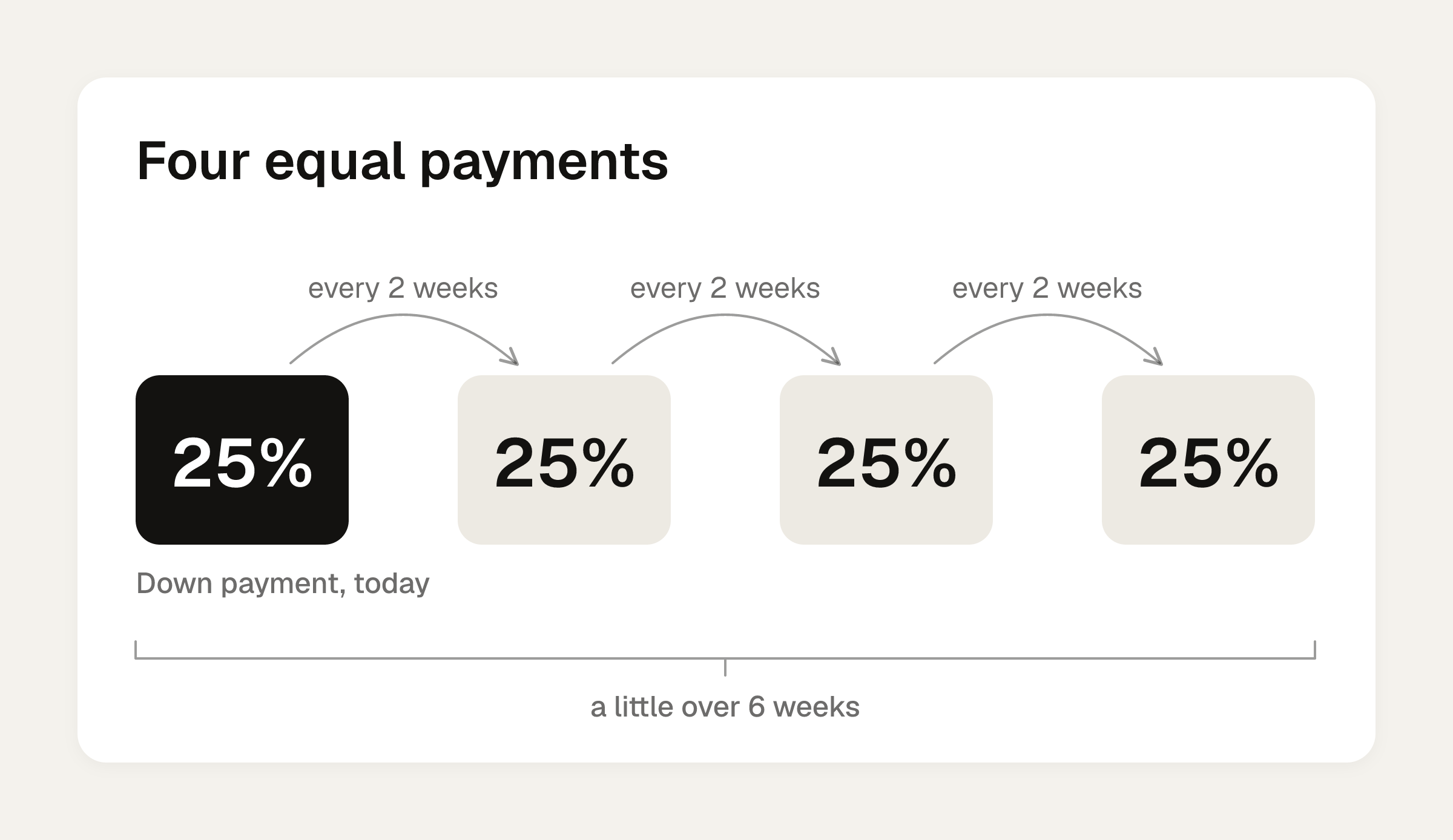
- Pay in 4: four payments, 25% down, then three payments every 2 weeks, over a little over 6 weeks. PayPal's help page says it appears for carts of $10 to $2,000, with no sign-up, application or late fees. PayPal's Pay Later page gives a range of $30 to $1,500. The two pages disagree, so check PayPal for your current range.
- Pay Monthly: 9.99% to 35.99% APR. PayPal's example is $600 at 22% APR over 6 payments of $106.51, which is $39.08 in interest and $639.08 total. It's not available in AK, CT, HI or WA.
Missed payments may affect your credit score.
Work out the shares before you send the requests
PayPal is good at moving money once you know the amounts. The hard part is the line-by-line math above.
Divvy bill splitting is an iPhone app, free to download, that does that step. Point the camera at a receipt and it reads every line item, the tax and the tip. Tap a name on each item to assign it, and a shared item can be split between people. Tax and tip are split by each person's share of the items. Check each person's share against the table above, then type each amount into its own PayPal request.
Before you send the requests, add the three amounts. They plus your own share should match the receipt total to the cent.
Frequently asked questions
Does PayPal charge to request money from friends?
PayPal's group trip article says sending to friends and family in the US is free from a PayPal balance or bank account. A card-funded, international or currency-related payment may add a fee, so check PayPal's fee page for your case.
Do my friends need a PayPal account to pay me?
PayPal says an account is required to send and receive money. With Bill Split, each person gets an email with a Pay Now button. Ask friends to set up an account before the bill, not after.
Can I request money for a bill I paid by card, not PayPal?
Yes. The Transaction Details route works when the purchase was made with PayPal. Otherwise, use Send/Request in the app, enter the amount, choose a contact, and choose Request Now.
Can I split rent with PayPal requests?
Yes. Send one request per roommate, each for their own amount. If rooms differ in size or incomes differ, work out the shares first with a rent split calculator, then enter each amount.
Sources
- How do I split a bill using PayPal?
- Guide to paying back friends after a fall getaway
- Request and Receive Money
- Can you pay with two separate cards online?
- Split Payments: Can I Use 2 or More Credit Cards for a Transaction?
- Pay in 4: Split Purchases into 4 Payments
- Can PayPal Track Shared Expenses? Requests and Pools
- What Is Buy Now, Pay Later: Application Process