Divvy
DivvyDoorDash Customer Receipt: Find It and Split It by Order
By The Divvy Team · October 29, 2026 · 7 min read
To find your DoorDash customer receipt on your phone, open the Orders tab, pick the order, and press Receipt in Order Details. On a computer, go to doordash.com, choose Orders from the menu in the bottom left-hand corner, select the order, click View Receipt, then Download Receipt to save it.
If you fronted the whole order, that receipt is your starting point for getting paid back. Below: what each line means, why the total is higher than the menu, and a worked split for four people.
Where to find the itemized receipt
- Phone: Orders tab, the order, then Receipt in Order Details.
- Desktop: Orders, the order, View Receipt, Download Receipt.
- Checkout email. That email is an order confirmation. According to NeoReceipt, it does not show the fully itemized receipt. The itemized one lives in the app or on the website, with each item, the service and delivery fees, taxes and the tip.
- Still can't find it. DoorDash chat and call support are available 24/7.
What each line on your DoorDash customer receipt means
The receipt breaks down into a subtotal, taxes, fees and gratuity. The fees can include the service fee, the delivery fee, a small order fee, and any mandatory bag, bottle or regulatory fees. These figures come from DoorDash's help page and two cost explainers, checked October 28, 2026. DoorDash began rolling out a new fee structure in late July 2026, so your receipt may differ.
| Line | What it is | Typical amount |
|---|---|---|
| Subtotal | Food at DoorDash menu prices | Whatever you ordered |
| Service fee | Percentage of the subtotal | 15% for most orders in California, Chicago, Colorado, DC, Massachusetts, Minnesota, NYC, Puerto Rico and Seattle; about 5% on eligible DashPass restaurant orders; variable elsewhere |
| Delivery fee | Flat fee per order | $1.99 to $7.99 |
| Small order fee | Added on small carts | $2 to $3 on orders under about $12 |
| Priority add-on | Optional faster delivery, often pre-selected | $1.99 to $2.99 |
| Regulatory fees | Local add-ons | NYC adds $1.99, Seattle adds $4.99 |
| Tax | Local sales tax | 0% (Oregon, Montana) to over 10% (Seattle, Chicago) |
| Tip | Your gratuity | Your choice |
SimplyCodes cites a $4 minimum on the 15% service fee. DashPass costs $9.99 a month or $96 a year, and pickup orders carry no service fee.
SimplyCodes also gives a quick yardstick. A $25 subtotal with standard delivery, a 20% tip and sales tax comes to about $39.96. The same order costs $5.49 more in Seattle than in Austin because of the regulatory fee and the tax rate.
The receipt total runs higher than the restaurant's menu
The receipt shows DoorDash menu prices. SimplyCodes says those are typically marked up 15% to 25% over in-store prices, and the markup never appears as its own line. Gordon Haskett found about 20% over dine-in across 25 brands in spring 2023. If a friend says "that salad is $9 at the restaurant," show them the receipt. The salad cost whatever DoorDash listed.
Can DoorDash split the bill for you?
On a regular order, no. You can't split between two cards or two people at checkout, and there is no split-the-bill button. The organizer usually fronts the whole total. We cover that in can you split payments on DoorDash.
A Group Order with Everyone Pays Separately (Split Billing) gets closer:
- The delivery fee is divided evenly.
- Service fees are split by what each person ordered.
- Tips stay private or are applied per participant.
- Alcohol can't be added.
- The payment setup can't be changed once the cart exists.
- The cart creator checks out.
- Paying a group order with PayPal, Venmo or Apple Pay is currently unavailable.
Most groups skip all that and have one person pay. Fine. Then you split the receipt yourself.
Worked example: one group order, four people
The totals come from splitty's illustrative four-person case: a food subtotal of $57.46 and an order total of $85.10. That puts $27.64 on top of the food. Everything else below is my illustration: the names, the dishes and their prices, and how I carved up the $27.64. I picked them so the columns add back to splitty's totals.
My illustrative $27.64:
- Delivery fee: $4.00
- Service fee: $8.62 (about 15% of the subtotal)
- Tax: $4.02 (about 7%)
- Tip: $11.00
The method:
- Items. Each person's own dishes.
- Delivery fee. One charge, split evenly: $4.00 ÷ 4 = $1.00 each.
- Service fee. Split by each person's share of the subtotal. Maya's $12.00 is about 20.9% of $57.46, so she carries about 20.9% of $8.62.
- Tax. Same share, applied to $4.02.
- Tip. One tip, one line, same share applied to $11.00.
| Person | Order | Items | Delivery (even) | Service fee | Tax | Tip | Total |
|---|---|---|---|---|---|---|---|
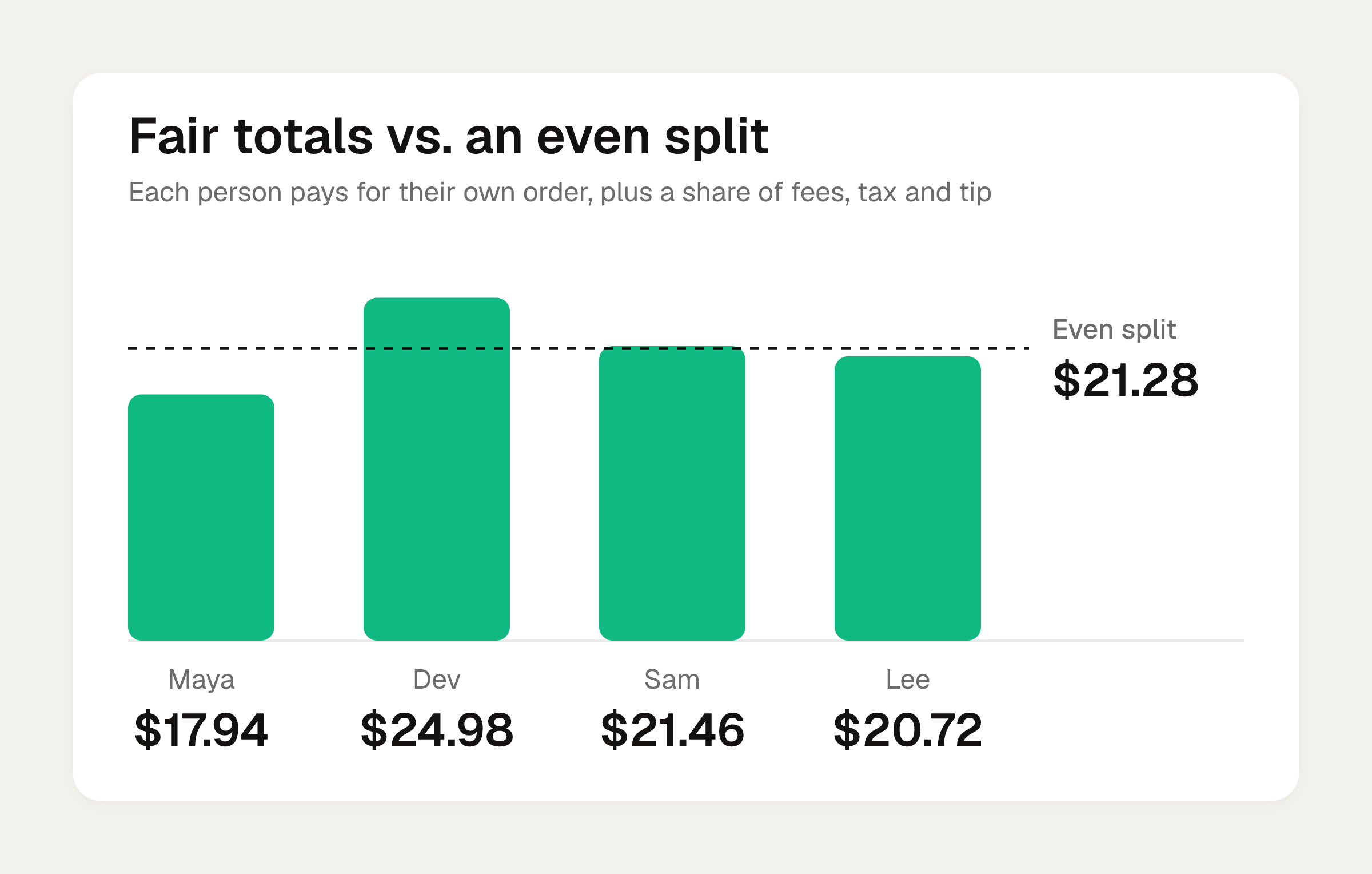
| Maya | Caesar salad | $12.00 | $1.00 | $1.80 | $0.84 | $2.30 | $17.94 |
| Dev | Chicken tikka masala | $16.99 | $1.00 | $2.55 | $1.19 | $3.25 | $24.98 |
| Sam | Burger | $14.50 | $1.00 | $2.17 | $1.01 | $2.78 | $21.46 |
| Lee | Pad thai | $13.97 | $1.00 | $2.10 | $0.98 | $2.67 | $20.72 |
| Total | $57.46 | $4.00 | $8.62 | $4.02 | $11.00 | $85.10 |
I nudged a penny or two between rows so each column adds exactly. If Maya fronted the order, she is owed $67.16 ($24.98 + $21.46 + $20.72).
What an even split would have done
$85.10 ÷ 4 is about $21.28 each. In my illustration, that has Maya paying about $3.34 more than her own order cost, and Dev paying about $3.70 less. In splitty's own case the gaps are $3.51 more for the Caesar salad orderer and $3.88 less for the chicken tikka masala orderer. Even splits are fine when everyone ordered about the same. Here, one person quietly covers another's entrée. For the longer reasoning, see how to split tax and tip fairly.
For your own order, the bill split calculator does this math evenly or by item, with tip.
Getting the numbers off the receipt
Four rows are easy to type. A 14-item order is not. Scanning the receipt saves the typing, and the receipt scanning guide covers how that works.
Once you have each total, send the ask with the amount and a link, not a speech. Scripts for asking someone to pay you back has wording that doesn't make dinner awkward.
Divvy bill splitting is a bill-splitting app for iPhone; its App Store name is "Divvy: Split Bills & Expenses". It's free to download. Point the camera at a receipt and Divvy reads every line item, the tax and the tip. Tap a name on each item to assign it to whoever had it, and a shared item can be split between people. Tax and tip are split by each person's share of the items, not evenly. Each person's share becomes a Venmo or Cash App request in one tap, with reminders until it's paid. Friends don't need the app or an account: they open a share link, see what they owe, and pay.
Frequently asked questions
What if I paid with a backup payment method?
Change the payment method from the receipt page within 3 hours. DoorDash then charges the new method and refunds the backup.
Who gets the tip on a group order, and is the delivery fee charged per person?
DoorDash says 100% of the optional tip goes to the Dasher. The delivery fee is charged once on a group order, so one fee gets divided among everyone.
What if I can't find my receipt at all?
Contact DoorDash chat or call support, which are available 24/7. Check the Orders tab in the app or on doordash.com first, because the checkout email is only an order confirmation.
Does the receipt show the restaurant's markup?
No. Menu prices are typically marked up 15% to 25% over in-store prices, according to SimplyCodes, and that markup is built into the item prices rather than shown as a line.
Sources
- How do I receive a receipt for my order?
- What fees do I pay on Caviar and DoorDash?
- How to Place a DoorDash Group Order for Your Team at Work
- How to Find a DoorDash Receipt (Orders & Dasher Taxes, 2026) · NeoReceipt
- Can you split payment on DoorDash or use two cards?
- How much does DoorDash cost? Every 2026 fee, added up
- How Much Does DoorDash Really Cost? Fees Explained