Divvy
Split Bill Revolut: Steps, Costs, and Splitting by Item
By The Divvy Team · November 2, 2026 · 9 min read
Yes, you can do a split bill revolut request: open the transactions list, tap the payment, tap "Split bill", pick the contact, tap "Continue", then split evenly or adjust each amount. Revolut's help pages describe splitting by amount only, so there is no by-item split and no receipt scan.
That is fine for a pizza between two friends. It gets lumpy when one person had the steak and another had a side salad. Below are the exact steps, what it costs, and a worked dinner showing how to do the by-item math yourself and type it into Revolut.
How a split bill revolut request works, tap by tap
You paid the bill with your Revolut card. Now you want some of it back.
- Open the transactions list and tap the payment.
- Tap "Split bill".
- Select the Revolut friend or contact.
- Tap "Continue".
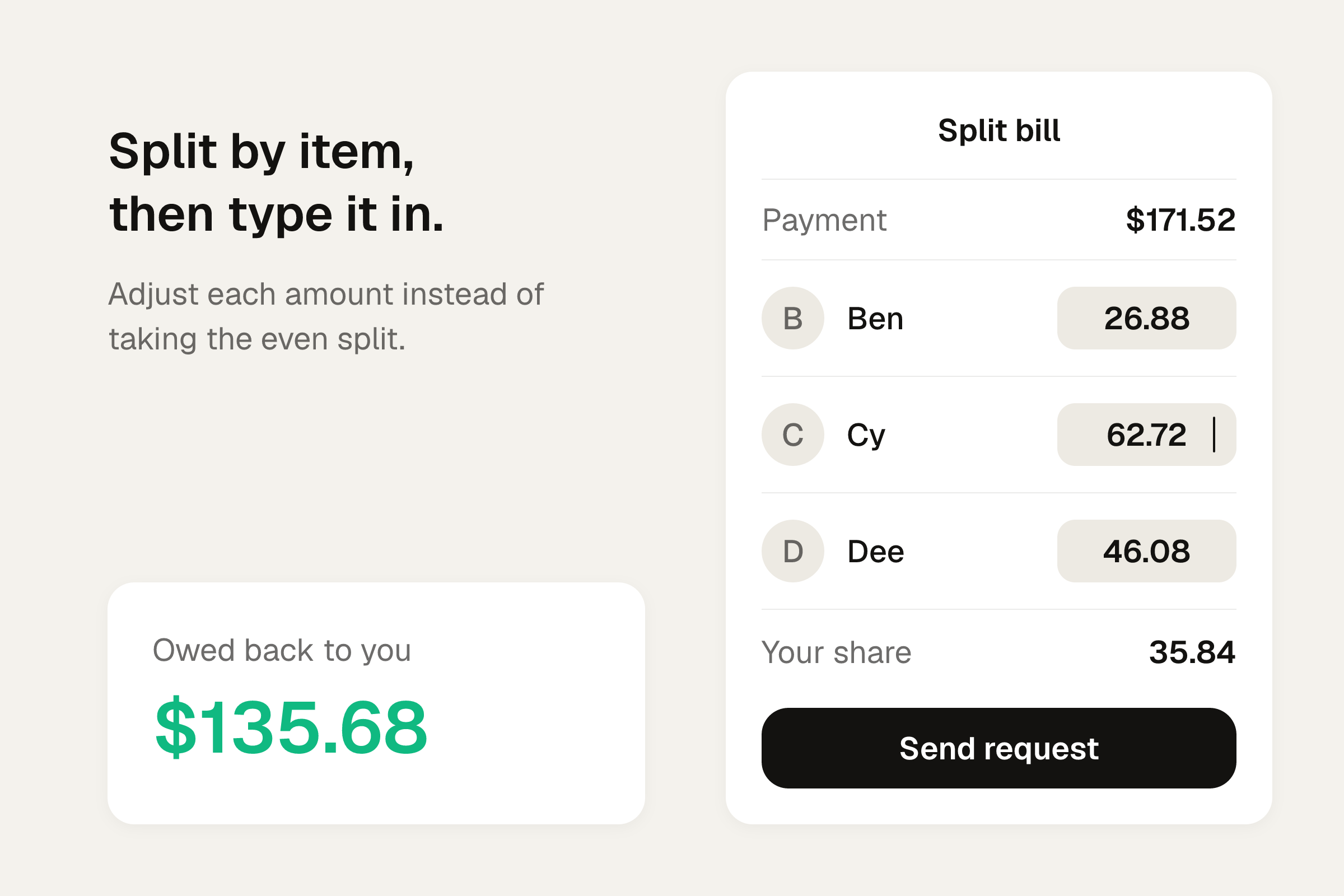
- Tap "Split bill" again for an even split, or adjust the individual amounts.
Your contacts get a notification. They can accept or cancel. Once they accept, the money arrives in your account. Nothing moves until they do, so a request is a polite nudge.
What splitting a bill on Revolut costs
Revolut applies no charges for splitting bills. Splits can be settled in Revolut's supported currencies.
Plan prices on Revolut's US help page, as checked in November 2026: Standard is $0.00 a month, Premium is $9.99 a month, and Metal is $16.99 a month. You don't need a paid plan to send a split request.
Currency is where fees can show up. Wise's guide to Revolut splitting (the Ireland version, so plans and limits vary by country) says:
- There is no Revolut fee when you request money in a currency the payer holds a balance in.
- Standard plans convert 1,000 EUR on weekdays with no extra fee. Plus converts 3,000 EUR.
- Weekend conversion can cost 1% on Standard and 0.5% on Plus.
- Payments from outside Revolut in another currency can carry a bank transfer fee, an exchange rate markup, and SWIFT intermediary fees.
On a trip, ask friends to pay in the currency they hold. Check the screen before you send.
Do your friends need Revolut to pay you back?
No, but it is smoother if they have it. Wise says split bills work with Revolut users and non-users. A Revolut user reviews the request and taps to pay. A person without Revolut has to start the transfer from their bank or another account.
Revolut's terms also say customers can generate payment links to request money from non-Revolut users. Those friends can pay a link by entering bank or card details.
Worked example: one dinner, two splits
Here is a dinner for four. Ana paid the whole bill on her Revolut card. The receipt is an example I built so every number is easy to check, with 8% tax and a 20% tip calculated on the subtotal.
| Who | What they had | Item total |
|---|---|---|
| Ana | Burger 18.00, beer 7.00 | 25.00 |
| Ben | Salad 14.00, sparkling water 4.00 | 18.00 |
| Cy | Steak 34.00, glass of wine 12.00 | 46.00 |
| Dee | Pasta 20.00, cocktail 13.00 | 33.00 |
| Shared | Nachos | 12.00 |
Subtotal is $134.00. Tax is $10.72. Tip is $26.80. Total is $171.52.
Way one: the even split
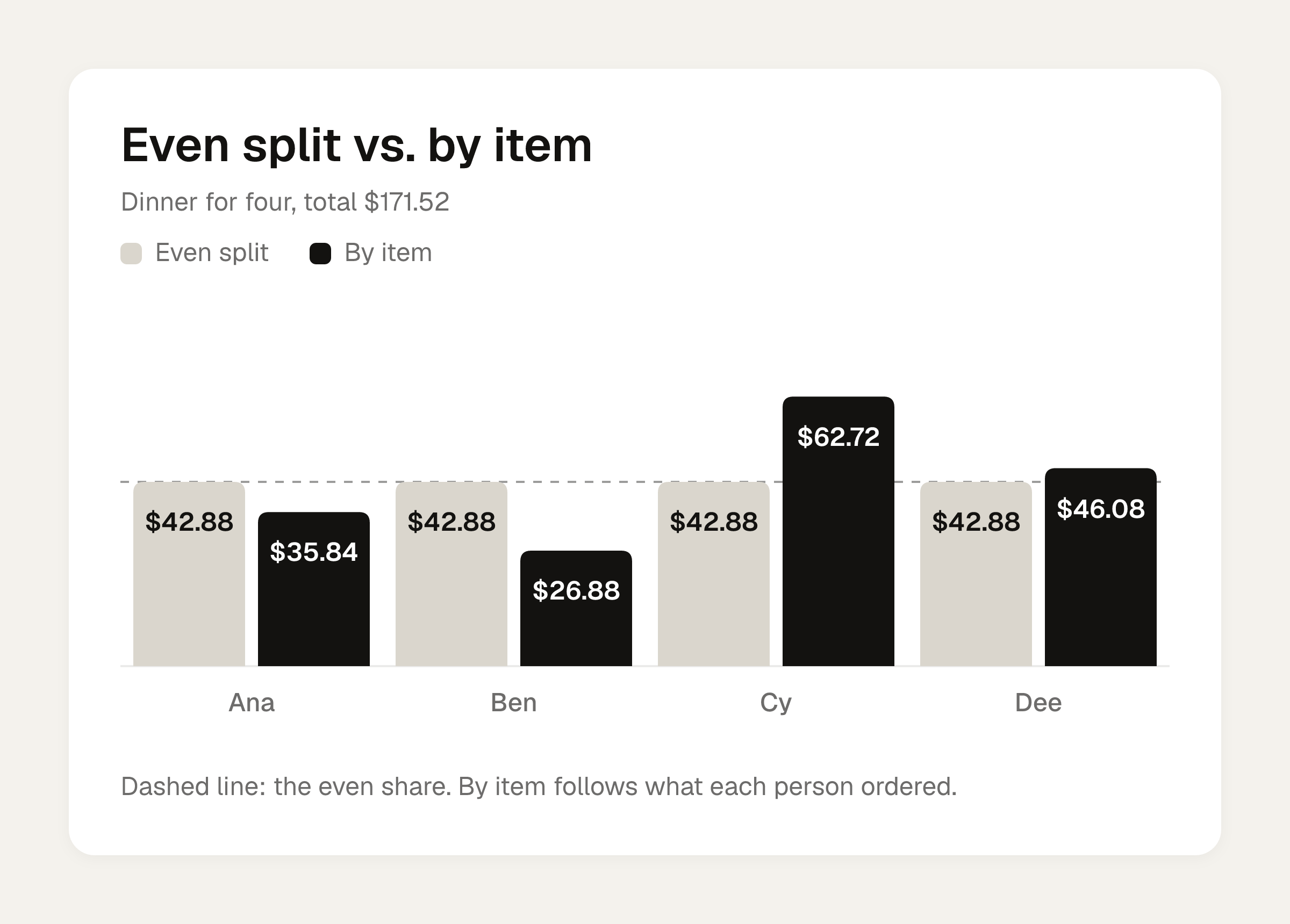
Revolut's even split divides $171.52 by four. That is $42.88 each. Ana collects $128.64 from three friends and covers her own $42.88.
It takes ten seconds. It also means Ben, who had a salad and sparkling water, pays $42.88 for a meal that came to $26.88 with tax and tip.
Way two: by item, with tax and tip by what each person ordered
First, split the nachos four ways: $3.00 each. That puts Ana at $28.00, Ben at $21.00, Cy at $49.00 and Dee at $36.00.
Tax and tip then follow each person's share of the items. Here that works out to 28% on top of the item total (8% tax plus 20% tip). Multiply each person's items by 1.28.
| Who | Items plus nachos | Tax (8%) | Tip (20%) | Share |
|---|---|---|---|---|
| Ana | 28.00 | 2.24 | 5.60 | 35.84 |
| Ben | 21.00 | 1.68 | 4.20 | 26.88 |
| Cy | 49.00 | 3.92 | 9.80 | 62.72 |
| Dee | 36.00 | 2.88 | 7.20 | 46.08 |
The four shares add up to $171.52. If yours don't add up to the receipt total, something slipped. You can check your numbers against the free bill split calculator, which splits a bill evenly or by item, with tip. For the method behind it, see how to split tax and tip fairly.
Even versus by item
| Who | Even split | By item | Difference |
|---|---|---|---|
| Ana | 42.88 | 35.84 | 7.04 less |
| Ben | 42.88 | 26.88 | 16.00 less |
| Cy | 42.88 | 62.72 | 19.84 more |
| Dee | 42.88 | 46.08 | 3.20 more |
Cy's steak and wine means he underpays by $19.84 on an even split. Ben covers $16.00 of it. This is the kind of gap that makes someone quietly resent the next dinner.
Entering the by-item amounts in Revolut
Revolut will not read the receipt, but it will take amounts you type in.
- Tap the $171.52 payment in the transactions list, then tap "Split bill".
- Select Ben, Cy and Dee, then tap "Continue".
- Adjust the individual amounts instead of taking the even split: Ben $26.88, Cy $62.72, Dee $46.08.
- Send the request.
The three amounts add up to $135.68. Your own $35.84 stays with you. Check that sum before you send, because a typo in one name is the easiest way to end up short.
If you like to see how people behave at the table: in a Gneezy, Haruvy and Yafe restaurant experiment cited by splittyapp.com, 19 of 24 subjects (roughly 80%) asked before ordering chose to pay individually. Most people would rather pay for what they ate, and a typed-in amount saves anyone from having to ask. For more on that, see how to split a bill by item.
Rent, utilities and other recurring bills
Revolut can auto-split card mandates, Direct Debits and scheduled transfers. Choose "This and future payments" and a request goes to your contacts automatically after each payment. For an even rent or internet split, that is a real time saver. Uneven splits still mean you type the amounts yourself.
Group Bills for trips and flatmates
For a running tab across many purchases, Revolut has Group Bills.
- Go to Payments and tap "+".
- Tap "Group", name it, and pick a currency.
- Tap "Create group".
- Add members directly, or share a QR code or invite link.
- Tap "Add a bill" and choose transactions, or tap "Create a custom bill".
Anyone can join, including people without Revolut.
Two limits from Revolut's Group Bills terms. I read the Brazil version, so check the US terms before relying on them:
- Group Bills tracks who owes what. It does not move money. You settle outside the tool and use "Mark as paid".
- Entries are informal records. You must be 18 or older, and you can only leave a group if you owe nothing and are owed nothing.
Revolut also says it does not currently charge a fee, and it keeps data for three years after your last login.
How the group settles up
One Medium author describes Revolut's "smart settle" as a way to minimize the number of transactions, and says no AI is involved. Only each person's net balance matters. On the author's six-person Santiago trip, the balances in euros were:
| Person | Net balance (EUR) |
|---|---|
| Me | -40.89 |
| Francisco | -200.09 |
| Diogo | +182.83 |
| David | +98.26 |
| Manuel | -15.46 |
| Vasco | -24.65 |
Those settled in 5 transactions. Six people never need more than five payments, and Tricount's plan for the same trip had a different structure but the same count. This is the author's account, not an official Revolut description.
Where the Revolut split stops
Revolut handles the request and the payment well. It does not handle the dividing. No item assignment, no tax-and-tip proportions, no scan. If your group is a mix of Revolut and non-Revolut people, or you use several apps, you can compare options in 7 best split pay app options.
Working out the by-item split before you send the request
If you would rather not do the multiplication on a napkin, Divvy bill splitting is an iPhone app that does it from the receipt. Point the camera at a receipt and Divvy reads every line item, the tax and the tip. Tap a name on each item to assign it, and a shared item can be split between people. Tax and tip are split by each person's share of the items, so whoever ordered more pays more of both. Divvy is free to download.
Friends don't need the app or an account: they open a share link, see what they owe, and pay. Each person's share becomes a Venmo or Cash App request in one tap, with reminders until it's paid. The amount can also be copied to pay another way: a bank transfer, Wise, Revolut, or a chat.
Frequently asked questions
Can Revolut split a bill by item or scan a receipt?
Revolut's help pages describe splitting by amount only: an even split or amounts you adjust yourself. If you want item-by-item shares, work them out first and type the amounts in.
Does it cost anything to send a split request on Revolut?
Revolut applies no charges for splitting bills. Currency conversion is the place fees can appear, especially on weekends or for payments from outside Revolut, so check the screen before you send.
What if my friend doesn't have Revolut?
Revolut's terms say customers can generate payment links to request money from non-Revolut users. They can pay the link with bank or card details, or start a transfer from their own bank.
Does Revolut Group Bills actually move the money?
No. Per the Brazil version of Revolut's terms, it is a tracking tool that does not move money. Settle outside the tool, then use "Mark as paid". Check the US terms before relying on this.
Does Divvy bill splitting work on Android?
Divvy is a bill-splitting app for iPhone and needs iOS 17 or later. Friends you send a share link to don't need the app or an account.
Sources
- How to split a bill with another Revolut customer (Revolut Help, US)
- What is Group Bills? (Revolut Help, US)
- Group Bills (Revolut legal terms, BR)
- Can you split the bill on Revolut? Yes, but not by item
- How does split bill feature work on Revolut? (Wise)
- The algorithm behind group bill splitting apps: a personal journey