Divvy
Divvy7 Best Split Pay App Options for Group Bills
By The Divvy Team · October 5, 2026 · 17 min read
One person paid the restaurant bill, but nobody ordered the same meal. One guest had a shared appetizer, another skipped dessert, and the tax and tip apply to the whole check. By the time the group chat starts calculating reimbursements, an “even split” feels simple but may leave some people paying for food they didn't eat.
The right split pay app depends on whether you need to settle one detailed receipt or manage shared costs over time. This comparison looks at receipt OCR, per-item assignment, proportional tax and tip, payment integrations, platform compatibility, pricing signals, and ledger depth. Divvy is the strongest fit for iPhone users who want AI-assisted, item-level settlement, while ledger-focused alternatives may work better for trips, roommates, and recurring expenses.
Table of Contents
- 1. Divvy
- 2. Splitwise
- 3. Tricount
- 4. Settle Up
- 5. Splid
- 6. Tab
- 7. Venmo
- Top 7 Split Pay Apps Comparison
- Choose by Settlement Style, Not App Popularity
1. Divvy
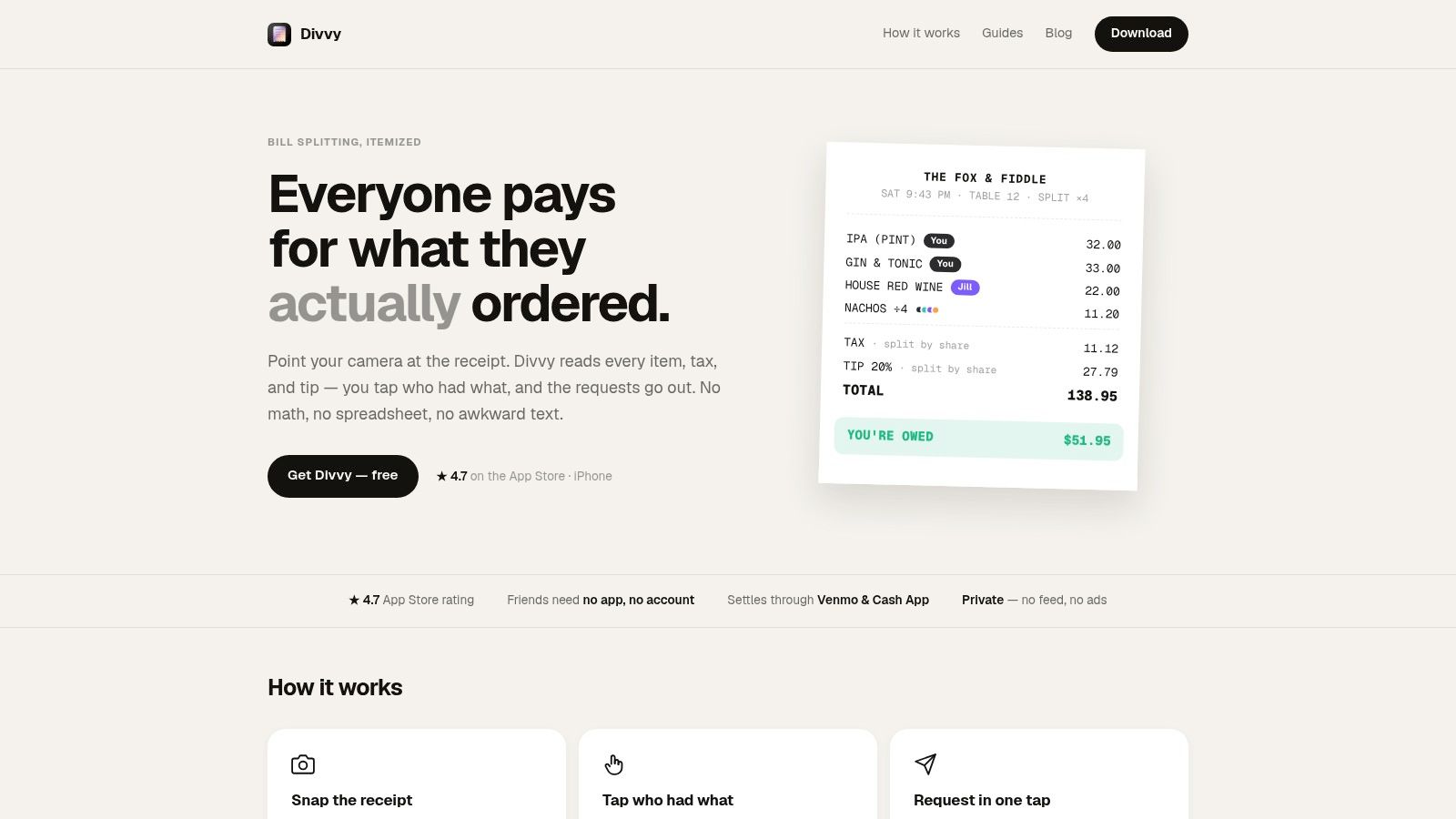
A group finishing one restaurant bill needs a different tool from roommates tracking expenses for months. Divvy targets the first problem: photograph a receipt, assign each line item, calculate each person's share, and request payment without building a continuing expense ledger. Its iPhone-first workflow supports individual meals and evenly shared dishes.
The key distinction is settlement. Divvy can generate payment requests through Venmo, Cash App, or Apple Pay, and recipients can pay without installing Divvy or creating an account. That reduces adoption friction when several diners will not download another app for a single reimbursement. It also means Divvy is better suited to immediate collection than to maintaining a detailed history of shared costs.
Best for item-level restaurant settlement
Divvy's AI receipt scanning is designed to read line items, tax, and tip. Users can assign meals to specific people, divide shared plates evenly, and allocate tax and tip in proportion to each person's subtotal. This handles a common source of unfairness: diners ordering very different amounts while splitting one check.
OCR remains a control point. A misread item or price can change every later calculation. An independent receipt-scanning review reported character error rates of 15.56% for Tesseract, 7.83% for one receipt-tuned model, and 6.39% for another receipt-tuned model (receipt OCR benchmark and bill-splitting system review). Those figures describe reviewed OCR systems, not a guaranteed Divvy result. Users should still check faded receipts, poor photos, and unusual formatting before sending requests.
Automated reminders address collection after the calculation. The organizer can send structured requests rather than maintain a separate list of unpaid shares.
Practical rule: Choose Divvy for a specific bill that needs settling now. Choose a ledger-focused app when the group needs expense history across a trip, household, or recurring arrangement.
Divvy is free to download, while Divvy Pro adds unlimited AI scans and more advanced group expense tracking. Its web tools include a Bill Split Calculator and Rent Split Calculator, but the native app is currently iPhone-only. Android users can still pay through connected requests, though they cannot use the same native workflow.
Pros
- Item-level control: Assign meals, shared dishes, tax, and tip before requesting payment.
- Settlement integrations: Venmo, Cash App, and Apple Pay connect the calculation to collection.
- Low adoption friction: Recipients do not need a Divvy account or installation.
- Collection support: Automated reminders reduce manual follow-up after the meal.
- Useful scope: The workflow also fits groceries, rent calculations, and other one-off group expenses.
Cons
- Limited platform reach: The native experience is currently for iPhone users.
- Paid advanced usage: Unlimited AI scans and some group-tracking functions require Divvy Pro.
- OCR oversight: Users should review scanned items and amounts before sending requests.
- Shallow long-term ledger: It settles individual expenses efficiently, but it is less suitable for a multi-week record of shared balances.
Divvy fits groups that prioritize item-level accuracy and immediate payment over a persistent shared ledger.
2. Splitwise
Splitwise solves a different problem from Divvy. It works best when a group expects expenses to accumulate over days, weeks, or months and wants a running balance rather than a separate payment request after every purchase.
That makes it a natural choice for roommates, shared vacations, and recurring household costs. One person can record rent, another can add groceries, and the group can review who owes whom without immediately settling every individual transaction.
Best for ongoing balances
Splitwise supports groups, friend lists, running balances, and debt simplification. Debt simplification is particularly useful when several people owe one another, because the app can reduce a complicated web of reimbursements into a clearer settlement plan.
The free version handles basic expense splitting, while Splitwise Pro adds receipt scanning, itemization, charts, currency conversion, search, and expanded usage. The distinction is important for restaurant groups. Splitwise can support itemized receipts, but users who want that workflow need the paid tier rather than assuming every receipt feature is available at no cost.
Splitwise has an advantage in platform compatibility because it supports web, iOS, and Android. That makes it easier to keep a long-running group together when members use different devices.
A ledger is valuable when the expense is still evolving. It can be unnecessary friction when everyone simply wants to pay back one restaurant bill.
The trade-off is settlement speed. Splitwise is primarily an expense record and balance-management tool, not a receipt-first payment-request workflow. Users may still need Venmo, Cash App, bank transfers, or another payment service to complete the reimbursement.
For a full comparison with a receipt-driven alternative, see these Splitwise alternatives for different group-expense needs.
Best fit: roommates, travelers, and recurring groups that value debt simplification and history more than instant item-level settlement.
3. Tricount
Tricount is a straightforward choice for groups that want a shared expense ledger without adding a subscription or advertising-heavy experience to the process. It suits trips, households, and casual groups that expect costs to accumulate but don't need receipt OCR.
The app's strength is low-friction logging. Members can add expenses, record who paid, and see how the shared balance changes. Multi-currency support makes it useful for travel, while offline-friendly operation helps when the group isn't consistently connected.
Best for simple group tracking
Tricount is better at recording expenses than interpreting a restaurant receipt. If one person paid for a meal containing individual entrées, shared dishes, tax, and tip, someone will generally need to enter the relevant amounts manually. That takes more effort than a receipt-scanning workflow, but it can be perfectly adequate when the group prefers a simple ledger.
The absence of itemized receipt scanning is the key trade-off. Tricount doesn't compete directly with Divvy or Tab on automated per-item assignment. Instead, it keeps the group focused on the total contribution and the eventual balance.
Its free, ad-free positioning lowers the barrier for groups that don't want to evaluate paid feature tiers. Feature availability and rollout can vary by region or app store, so users should check the version available to them before relying on a particular capability.
A trip organizer may prefer Tricount when the group has several small shared purchases, such as transport, accommodation contributions, and groceries. The ledger preserves those entries instead of forcing the organizer to settle each cost immediately.
Best fit: groups that need an uncomplicated, free expense ledger and can accept manual entry for restaurant or household details.
Watch for: Tricount's simplicity becomes a limitation when fairness depends on assigning individual receipt line items rather than dividing broader expenses.
4. Settle Up
Settle Up is built around a practical question: after a group has recorded its expenses, how can it reduce the number of payments needed to clear the balance? It supports equal, share-based, and exact-amount splits, then creates settlement plans for travelers, roommates, clubs, and other ongoing groups.
That makes it more capable than a single-bill calculator but more ledger-oriented than a restaurant-first app. Users can record costs over time, work offline, and synchronize later. Read-only web links also help when a participant wants to view the group balance without installing the application.
Best for complex and recurring group expenses
Settle Up is useful when the same group has different kinds of obligations. A traveler might pay for transport, another person might cover accommodation, and a third might handle groceries. Equal shares can cover one expense, while exact amounts or custom shares can handle another.
Premium features add recurring and future expenses, receipt photos, custom categories, statistics, and Excel export. Those tools give organizers more control over long-running records, but they also mean users should check which capabilities sit behind the Premium paywall.
The app supports iOS, Android, web, and Windows, giving it broader platform reach than an iPhone-only solution. Offline support is another advantage for travel groups, where users may need to record expenses before they regain a reliable connection.
Settlement insight: Settle Up is strongest when the group wants to minimize the final payment chain, not when each diner needs an immediate, itemized request at the table.
Built-in payment options can vary by region, so many groups will still use a separate payment app after Settle Up calculates the final obligations. That separation is acceptable for a trip ledger, but it adds a step compared with a tool that creates payment requests directly from a restaurant split.
Best fit: travelers, clubs, and households with recurring or varied expenses that need debt minimization and cross-platform access.
5. Splid
Splid takes a deliberately simple approach to group expenses. Participants can use it without mandatory signup, and groups can work online or offline, which makes it suitable for travel companions or one-off events where nobody wants to establish a permanent account structure.
The app focuses on keeping a clear running total. It supports multiple currencies with automatic conversion and lets users export trip summaries to PDF or Excel. Those exports are useful when the organizer wants a record outside the app or needs to share a final summary with the group.
Best for low-friction travel groups
Splid works well when the expense model is easy to explain. One person records a hotel contribution, another adds a taxi, and the group reviews the resulting balances at the end. Participants don't need to adopt a complex workflow before they can start logging costs.
The limitation is the same feature that defines its simplicity. Splid doesn't provide built-in itemized receipt scanning, so it isn't the best choice for a restaurant group that wants the camera to identify line items and let diners claim their own food.
That distinction matters because a ledger and an instant settlement tool measure success differently. Splid helps the organizer preserve a transparent record across many purchases. Divvy and Tab are more focused on reducing the time between receiving one receipt and sending each person's request.
Splid's export capabilities give it an advantage over tools that keep the group history inside a single interface. If a trip organizer expects questions later, a PDF or Excel summary can make the final allocation easier to review.
Best fit: travel groups and one-off events that value no-signup participation, offline use, and clean expense summaries.
Watch for: manual restaurant entry can undermine the convenience of Splid when a receipt contains many individual items or shared dishes.
6. Tab
Tab is one of the closest alternatives to Divvy for restaurant-specific splitting. The basic workflow is visual and immediate. Someone photographs the receipt, diners claim their items, and the group can account for shared food rather than forcing everyone into an equal division.
Best for collaborative meal splitting
Tab's per-meal design reduces the organizer's workload because multiple people can join the tab and claim items from their own phones. Real-time synchronization helps the group see which items have already been assigned, while proportional tax and tip allocation keeps the final totals connected to each person's consumption.
That makes Tab a strong fit for a dinner where the group wants to settle before leaving the venue. It doesn't try to become a complete household ledger, so users shouldn't choose it expecting to track rent, recurring groceries, or a multi-day trip in the same depth as Splitwise or Settle Up.
The app supports shared items and preserves bill history for later reference. Those features are useful when someone needs to check how a shared appetizer was handled, but the product's center of gravity remains the individual meal.
Tab's Android availability is officially limited to the U.S. Play Store because receipt and OCR behavior can vary by market. Groups should confirm availability before choosing it for an international or mixed-device event.
If the main dispute is “who had what,” Tab's collaborative claim flow addresses the problem directly. If the main dispute is “who has paid for what across the trip,” choose a ledger.
Best fit: restaurant groups that want everyone to claim items and divide tax and tip during one meal.
Trade-off: Tab is less suitable for recurring expenses because it prioritizes quick per-receipt settlement over long-term balance management.
7. Venmo
Venmo is the practical choice when the group already uses Venmo and immediate payment matters more than detailed receipt analysis. Its split workflow lets one payer request money from multiple contacts, while Venmo Groups can help track shared costs.
The platform's advantage is familiarity, particularly for U.S. groups. Friends who already have accounts can pay inside the same app, which removes the need to explain a new ledger or coordinate a second payment platform.
Best for instant requests without itemization
Venmo works well after a simple meal, event, or purchase where the organizer already knows what each person owes. It supports fast peer-to-peer payments, activity tracking, and reminders, so the payment step itself is straightforward.
It doesn't offer itemized receipt scanning or per-item assignment. That means the payer must calculate the shares elsewhere when the check includes different meals, shared dishes, tax, and tip. Venmo can then transmit the request, but it doesn't solve the underlying allocation problem.
Venmo Groups add more structure than a single request, but the platform isn't designed as a deep long-term ledger for complex trips or households. Users managing many expenses may prefer Splitwise or Settle Up, then use Venmo as the payment channel.
For a practical walkthrough of the payment flow, see this guide to splitting a bill on Venmo.
Best fit: U.S. groups that already use Venmo and want fast reimbursement after a relatively simple shared purchase.
Trade-off: Venmo removes payment friction, not receipt-allocation friction. It can't tell whether a diner ordered the expensive entrée or only shared the appetizer.
Top 7 Split Pay Apps Comparison
| App | 🔄 Implementation complexity | 💡 Resource requirements | ⭐ Expected outcomes / Quality | ⚡ Speed / Efficiency | 📊 Ideal use cases |
|---|---|---|---|---|---|
| Divvy | Medium, AI receipt OCR + tax/tip allocation; iPhone-first | iPhone app; free tier; Divvy Pro for unlimited scans (paid) | ⭐⭐⭐⭐, accurate itemized splits; fewer disputes | ⚡⚡⚡, one‑tap payments, automated reminders | Dining checks, roommates, trips needing per-receipt fairness |
| Splitwise | Low–Medium, ledger + debt‑simplification logic | iOS/Android/Web; free tier; Pro for OCR, charts, multicurrency | ⭐⭐⭐, excellent long‑running tracking and simplification | ⚡⚡, good for periodic settlement, not instant per-item pay | Ongoing roommates, long trips, shared household expenses |
| Tricount | Low, simple expense logging and totals | Cross‑platform; fully free; offline support | ⭐⭐, reliable cumulative balances; manual item entry | ⚡⚡, manual entry limits per-receipt speed | Trips and casual groups wanting unlimited free logging |
| Settle Up | Medium, multiple split modes + debt minimization | Cross‑platform; offline; premium for advanced exports/features | ⭐⭐⭐, strong for complex/group accounting and recurring costs | ⚡⚡, optimizes who pays whom but uses external payments | Complex group balances, recurring bills, clubs |
| Splid | Low, lightweight ledger, offline‑first | iOS/Android; optional sync; free download | ⭐⭐, clear reports and exports; no itemized OCR | ⚡⚡⚡, fast to adopt and settle at trip end | Travel groups, one‑off events, quick settle‑ups |
| Tab | Medium, receipt photo + tap claiming workflow | Mobile app; free; Android availability limited by region | ⭐⭐⭐⭐, high per-meal fairness; reduces disputes | ⚡⚡⚡⚡, very fast real‑time restaurant splits | Dining out where each person claims their items |
| Venmo | Low, payment‑centric split requests and groups | iOS/Android; U.S.-centric; account required; widely used | ⭐⭐, excellent for instant settlement; limited ledger features | ⚡⚡⚡⚡, instant in‑app payments and reminders | Immediate post‑meal settlement, U.S. peer‑to‑peer payments |
Choose by Settlement Style, Not App Popularity
The best split pay app isn't automatically the one with the broadest name recognition. Start with the shape of the problem. A single restaurant receipt requires accurate parsing, item assignment, proportional tax and tip, and a payment request. A group trip or shared household requires a ledger, repeated expense entry, debt simplification, and a way to preserve balances over time.
Choose Divvy or Tab when the group is splitting a detailed restaurant bill. Divvy is the better fit when the organizer wants an AI-assisted iPhone workflow, direct requests through familiar payment services, and automated reminders after the receipt is processed. Tab is compelling when multiple diners should claim their own items during the meal and the group doesn't need a broader expense ledger.
Choose Splitwise or Settle Up for ongoing balances. Splitwise is particularly suitable for groups that want a familiar, cross-platform ledger with debt simplification and optional paid receipt features. Settle Up is a strong alternative when offline access, recurring expenses, read-only links, or export capabilities matter.
Choose Tricount or Splid when free, low-friction group tracking matters more than automated receipt interpretation. Tricount suits a simple shared ledger, while Splid is well suited to travelers who want no mandatory signup, offline use, currency conversion, and exportable summaries. Both require more manual work for item-level restaurant allocation.
Choose Venmo when the payment request is the main requirement. It can be the fastest option for a familiar U.S. group, but it won't replace a receipt scanner when everyone ordered differently.
Before committing, verify the details that can change the experience: platform compatibility, regional payment availability, OCR performance on your receipts, whether recipients need accounts, and which features require a paid tier. The bill-splitting category is expanding, with one market estimate projecting growth from USD 0.72 billion in 2026 to USD 1.32 billion by 2035 at a 7% CAGR, while another projects growth from USD 2.58 billion in 2023 to USD 12.0 billion by 2032 (bill-splitting app market estimates). Those projections indicate growing interest, but they don't make every tool interchangeable.
Social context matters as much as arithmetic. Survey data reported that 26% of female Venmo users considered requesting half the bill after a date appropriate, compared with 41% of male users, and 66% said sending a request afterward without discussing it first was uncool (Venmo etiquette survey coverage). A precise request can still feel wrong if the group hasn't agreed on the splitting method or payment timing.
The practical answer is simple. Use an OCR-first tool when you're settling one detailed bill, and use a ledger when shared costs will continue. The best app is the one that matches that settlement style, rather than the one that happens to be most popular in your group chat.
Divvy turns a restaurant receipt into item-level shares, allocates tax and tip proportionally, and sends payment requests through services your friends already use. If you want faster, clearer settlement without asking everyone to join another ledger, visit Divvy and try its iPhone-first bill-splitting workflow.