Divvy
DivvyTab App: How It Splits a Dinner Bill (With a $138.24 Example)
By The Divvy Team · October 27, 2026 · 8 min read
Tab is a bill splitter built for one restaurant check: you get the items into the app, assign each person what they ate, and tax and tip are divided in proportion. If you searched tab app, that is the whole pitch. The App Store calls it "the simple way to split a bill amongst friends", and the Google Play listing calls it "the simplest way".
What it does less well is get you paid back. That part matters most if you are the one who put the card down. Below: how Tab works, what it costs (the sources disagree), and a worked example with real arithmetic.
What Tab does on a restaurant check
Per the App Store and Google Play listings, the flow goes like this:
- Take a picture of an itemized receipt. Tab detects the items and prices.
- Anyone with Tab on their phone can join the bill and pick their own items, synced in real time.
- Several people can pick the same shared item.
- Tax and tip are divided proportionally.
- A birthday mode splits the birthday person's total evenly among everyone else.
A second description, on trytab.app, adds details: an even split in one tap, itemized splitting, tip presets of 15%, 18% and 20% or a custom amount, and automatic tax. You can type a bill in, scan it, or add it item by item. The per-person breakdown shows items, share of tax and tip, and the final amount owed. You can share the split as text or an image through Messages or WhatsApp. That page says it handled a table of twelve with separate appetizers.
Check which Tab you are installing
The two descriptions do not match. The App Store and Google Play listing (developer bring10, LLC, 49.1 MB, iOS 12.0 or later) describes friends joining the bill on their own phones. The trytab.app page describes a free iPhone app that needs iOS 16 or later, runs entirely on the device, needs no sign-up, no servers and no accounts, works with no internet, and does not sync with other people's phones.
Do not assume they are the same app. Look at the developer name and the screenshots on the listing before you install.
What Tab costs depends on who you ask
Pricing differs by source, so check the listing before you pay anything.
- The App Store lists Tab as free to download.
- trytab.app lists Tab Pro as a one-time $2.99 purchase with no subscription. It unlocks receipt scanning, unlimited saved history, saved regular groups like roommates, and a settle-up tracker across multiple meals.
- Splittyapp says Tab's receipt photo upload is free.
- SplitterUp says Tab does not publish its pricing on its site.
Ratings also vary by store. The App Store shows 4.2 from 1.2K ratings, in Utilities, rated 4+, in English and Spanish. The Google Play listing shows 3.2 stars from 716 reviews and 100K+ downloads. It is available only in the US Play Store and was last updated May 23, 2023. All of this is as of the listings we checked on October 27, 2026.
Worked example: one dinner, two splits
Here is a made-up dinner for four. The receipt is invented, but the math is exactly what a by-item splitter does. Ana, Ben, Cam and Dee share one $12 plate of nachos. Ben, Cam and Dee split it three ways, so $4 each. Tax is 8% and the tip is 20%, both on the $108.00 subtotal.
| Item | Who | Price |
|---|---|---|
| Salmon | Ana | $26.00 |
| Wine | Ana | $14.00 |
| Burger | Ben | $17.00 |
| Beer | Ben | $6.00 |
| Pasta | Cam | $15.00 |
| Soda | Cam | $3.00 |
| Salad | Dee | $11.00 |
| Lemonade | Dee | $4.00 |
| Nachos | Ben, Cam, Dee | $12.00 |
| Subtotal | $108.00 | |
| Tax (8%) | $8.64 | |
| Tip (20%) | $21.60 | |
| Total | $138.24 |
Split by item, tax and tip in proportion
Each person's tax and tip follow their share of the food. Tax plus tip adds up to 28% of the subtotal, so each person's total is their items times 1.28.
| Person | Items | Tax | Tip | Total |
|---|---|---|---|---|
| Ana | $40.00 | $3.20 | $8.00 | $51.20 |
| Ben | $27.00 | $2.16 | $5.40 | $34.56 |
| Cam | $22.00 | $1.76 | $4.40 | $28.16 |
| Dee | $19.00 | $1.52 | $3.80 | $24.32 |
| Sum | $108.00 | $8.64 | $21.60 | $138.24 |
Split evenly per head
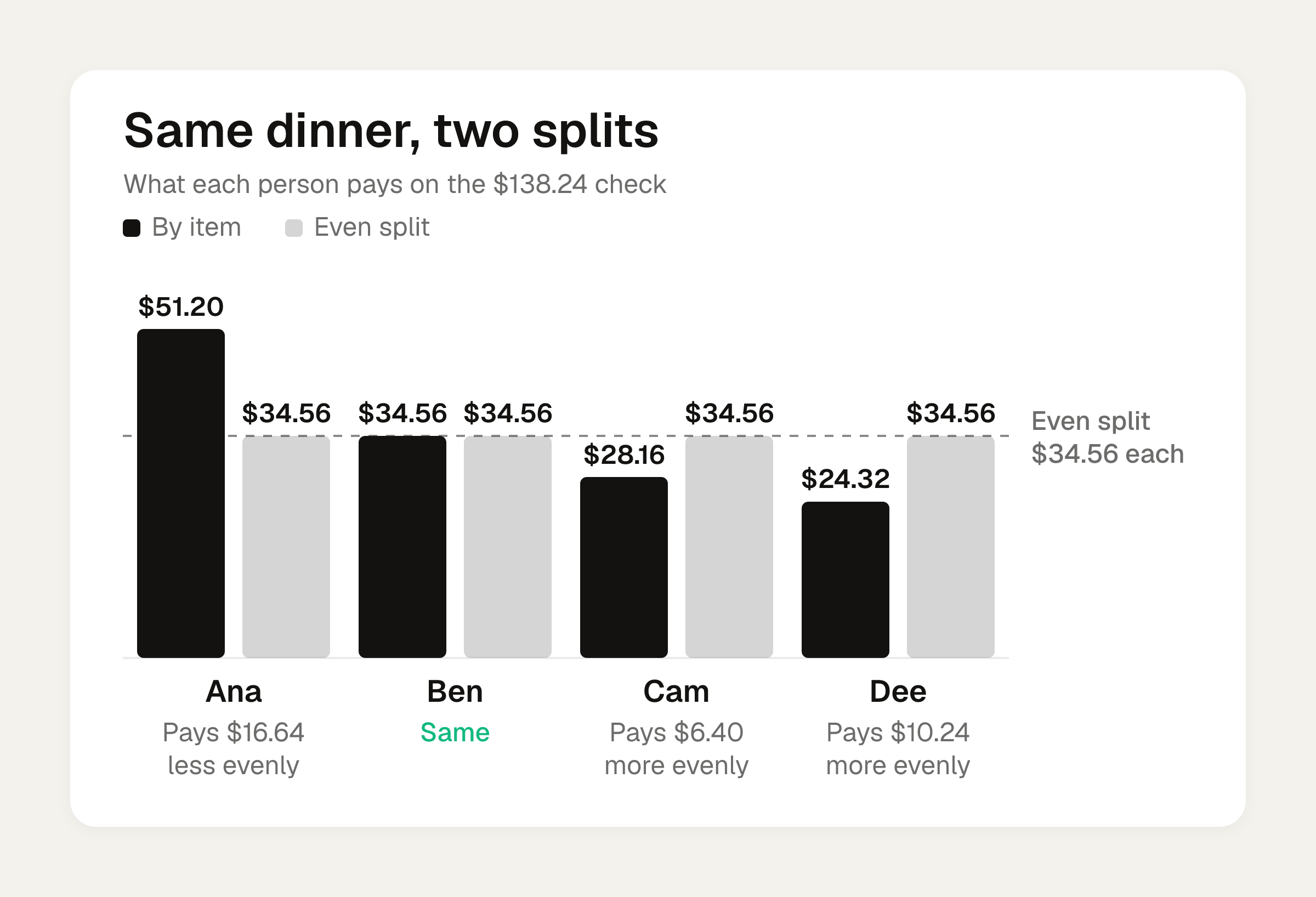
$138.24 divided by 4 is $34.56 each.
| Person | By item | Evenly | Difference |
|---|---|---|---|
| Ana | $51.20 | $34.56 | Pays $16.64 less |
| Ben | $34.56 | $34.56 | Same |
| Cam | $28.16 | $34.56 | Pays $6.40 more |
| Dee | $24.32 | $34.56 | Pays $10.24 more |
Ana had the salmon and the wine, and the even split hands $16.64 of her dinner to the other three. Ben lands on the same number either way, which is luck. If you split the items but divide tax and tip evenly, each person adds $7.56 (that is $30.24 divided by 4), and Ana pays $47.56, Cam $29.56, Dee $26.56. That is closer, but still off from what each person's food generated in tax and tip.
SplitterUp makes the same argument: an equal tax and tip split brings unfairness back, because tax was charged on the more expensive items. Our numbers show it. To run your own bill, use the bill split calculator, and the guide to splitting tax and tip walks through the proportional method. For the by-item side, see how to split a bill by item.
Who the tab app fits
Splittyapp calls Tab best for simple restaurant splits where everyone ordered distinct items and you want a free, receipt-based solution. That matches the example above.
It does not fit rent or trips. Per SplitterUp, Tab has no running balances across months, because it splits bills rather than keeping a running record. trytab.app's Pro tier lists a settle-up tracker across multiple meals, so read that listing carefully if you need it.
Limits reviewers report
These come from Play Store reviewers and comparison pages, so read them as reports that we did not test:
- Play Store reviewers say they cannot upload a bill photo from the gallery. The photo has to be taken inside the app.
- Reviewers say bills can't be named, only labeled by date.
- Reviewers ask for tip calculated on subtotal plus tax, and for a Venmo friends list.
- SplitterUp's table says Tab does not let others claim their own items and does not work without the app.
That last point contradicts the store listings, which say others can join and pick their own items. Both are reported here, with attribution. This is one more reason to test it on a small bill before you rely on it for a $400 dinner.
Getting paid back is the weak spot
The sources disagree here too. The Play Store listing and Splittyapp say Tab settles through integrated Venmo or a recorded cash payment. trytab.app says payment is settled outside the app, in each person's own app. Tab Tender's page says Tab does not generate payment links.
If you fronted the $138.24, that gap is yours to fill. You read the total off a screen, then open Venmo and type four requests by hand.
Divvy bill splitting is a bill-splitting app for iPhone. You point the camera at the receipt and it reads every line item, the tax and the tip. You tap a name on each item and split the nachos between people. Tax and tip are split by each person's share of the items. Each person's share becomes a Venmo or Cash App request in one tap, with reminders until it's paid. Friends don't need the app or an account: they open a share link, see what they owe, and pay. Divvy is free to download and needs iOS 17 or later.
For the full pay-back workflow, and how other apps handle it, see 7 best split pay app options for group bills.
Frequently asked questions
Does Tab work without internet?
The trytab.app description says it runs entirely on the device with no sign-up, no servers, no accounts and no analytics, and works with no internet. The App Store and Play Store listing describes real-time joining from other phones, which would need a connection. These look like different descriptions, so check your listing.
Can Tab split a bill for a birthday dinner?
The App Store and Play Store listings describe a birthday mode. It splits the birthday person's total evenly among everyone else, so the guest of honor pays nothing.
Is Tab good for splitting rent or a trip?
Splittyapp says Tab does not fit rent or trips, and SplitterUp says it has no running balances across months. It is built for one restaurant check at a time. For recurring costs, try the rent split calculator or a group-based app.
Why does the even split cost some people more?
Because tax and tip scale with what each person ordered. In the $138.24 example, Dee's items were $19.00 and she would pay $10.24 extra under an even split, while Ana with $40.00 of items would pay $16.64 less.
Sources
- Tab - The simple bill splitter - App Store - Apple
- Tab - The simple bill splitter - Apps on Google Play
- Tab — Bill Splitting App for iPhone
- The Best Receipt Scanning Apps for Splitting the Bill in 2026
- The 7 best bill splitting apps of 2026, ranked by use case
- 7 Best Bill-Splitting Apps (2026) · Tab Tender