Divvy
Venmo Incomplete Request Reminder: Find It, Send It, Time It
By The Divvy Team · November 10, 2026 · 7 min read
To send a venmo incomplete request reminder, open the menu (the three bars) in the Venmo app, tap Incomplete, find the unpaid request under Requests, and tap Remind below the request line. The button then changes to Reminded, which tells you the nudge went out (Stilt, updated June 8, 2024; WalletSetupHub).
That only works if you already sent a request for a specific amount. Venmo doesn't start one for you, and it doesn't send automatic reminders for a request nobody has accepted. So the first request matters most: the right amount, with a note that explains itself. Below is one fronted dinner, split to the cent, then the reminder flow and a timeline for the person who hasn't paid. For the basics of sending a request in the first place, see how to request money on Venmo.
Where to find unpaid requests under Incomplete
Menu labels shift a little between app versions. The path reported by Stilt and WalletSetupHub looks like this:
- Open Venmo and tap the menu (three bars).
- Tap Incomplete.
- Look under Requests for the one that's still open.
- Tap Remind under that request.
- Check that the button now says Reminded.
If a request doesn't show up under Incomplete, it was probably never sent, or the person already paid. Check your payment history before you chase anyone.
Worked example: one $172.80 dinner, four people
You fronted Thursday's dinner for four on your card. The receipt:
| Person | What they had | Items |
|---|---|---|
| You | Burger $18.00, beer $8.00 | $26.00 |
| Maya | Salmon $27.00, wine $12.00 | $39.00 |
| Dev | Pasta $21.00, soda $4.00 | $25.00 |
| Priya | Salad $15.00, cocktail $14.00 | $29.00 |
| Everyone | Nachos $16.00, split 4 ways | $4.00 each |
Item subtotal: $135.00. Tax at 8% is $10.80. A 20% tip on the pre-tax subtotal is $27.00. The card was charged $172.80.
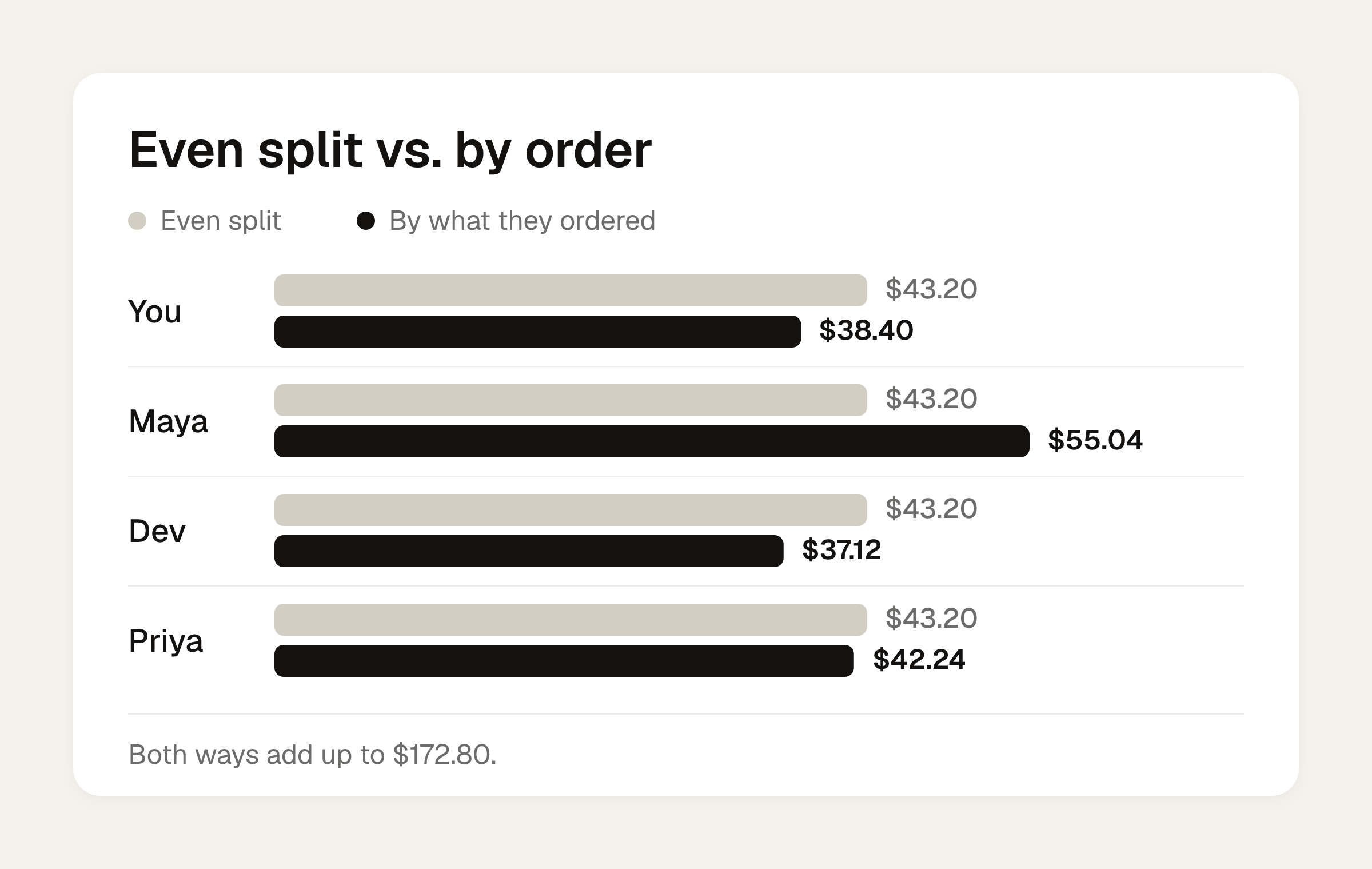
An even split is $43.20 each. That's fine for Maya, who ordered the most. It overcharges Dev by $6.08 and Priya by $0.96. Tax and tip are cheaper to split by what each person ordered. Add the nachos to each person's items, then add the same 28% (8% tax plus 20% tip) on top. The split tax and tip guide explains why that works.
| Person | Items + nachos | Tax | Tip | Share |
|---|---|---|---|---|
| You | $30.00 | $2.40 | $6.00 | $38.40 |
| Maya | $43.00 | $3.44 | $8.60 | $55.04 |
| Dev | $29.00 | $2.32 | $5.80 | $37.12 |
| Priya | $33.00 | $2.64 | $6.60 | $42.24 |
The shares add up to $172.80. You keep $38.40 as your own. That leaves $134.40 to collect, in three requests:
- Maya: $55.04
- Dev: $37.12
- Priya: $42.24
You can check your own numbers in the bill split calculator, which splits evenly or by item, with tip.
Write the note for the first request
A reminder reuses the original request's details: your name, the amount and the note. Venmo adds nothing. So the note you write today is the note they see in the reminder. AOL/GOBankingRates also advises naming the reason and requesting soon after the expense.
A note that does the job:
- To Dev: "Thursday dinner: pasta, soda, 1/4 nachos, tax and tip. $37.12"
- To Maya: "Thursday dinner: salmon, wine, 1/4 nachos, tax and tip. $55.04"
- To Priya: "Thursday dinner: salad, cocktail, 1/4 nachos, tax and tip. $42.24"
Nobody has to ask you what the amount is for. That removes the most common reason a request sits unpaid.
Set each request to Private. WalletSetupHub recommends Private for requests and reminders so nobody gets embarrassed, and AOL suggests it for sensitive or personal expenses.
The venmo incomplete request reminder timeline
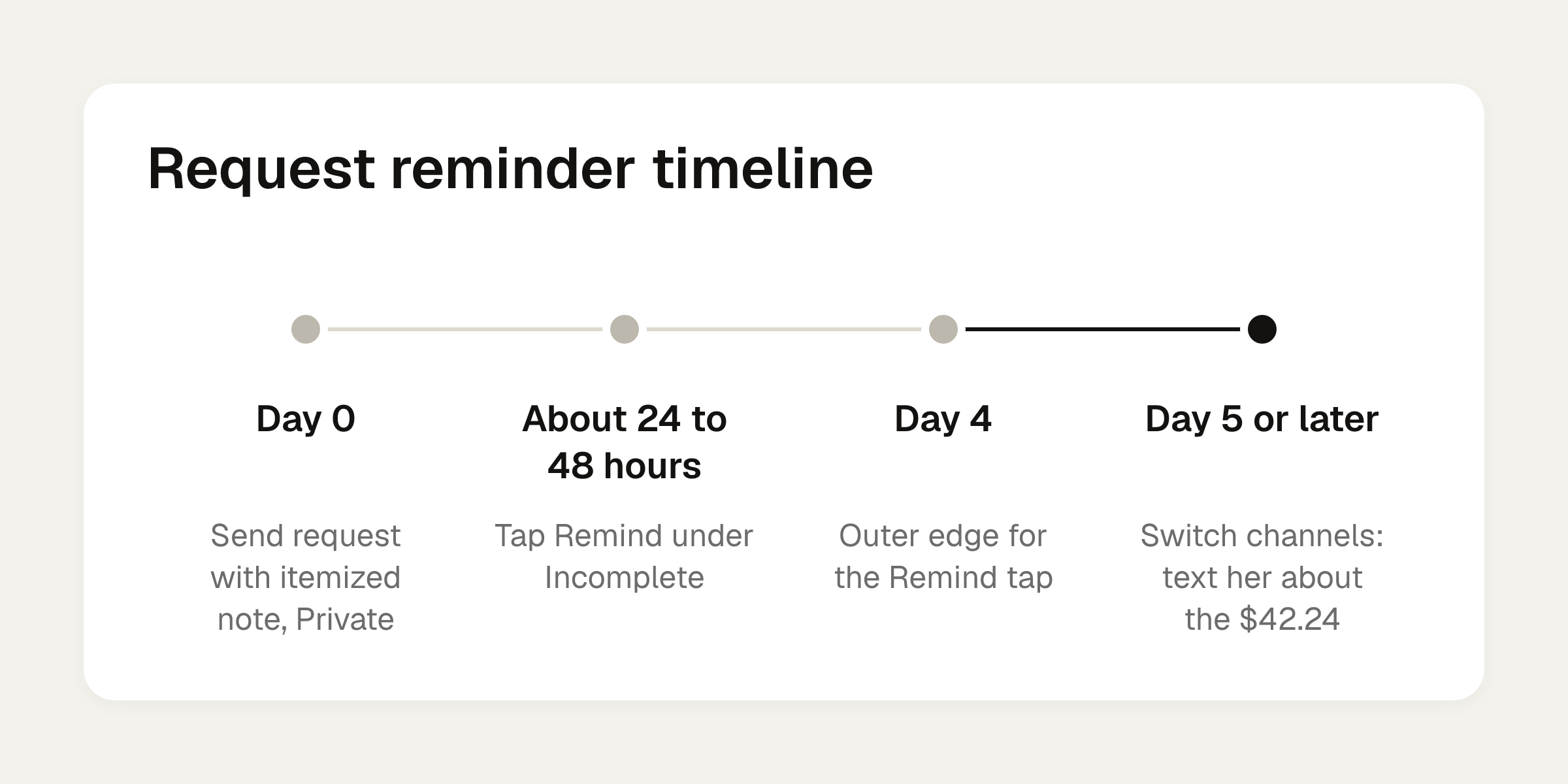
Say Maya and Dev pay within the hour. Priya doesn't. Here's a schedule that stays friendly:
| When | What to do |
|---|---|
| Day 0 | Send the request with the itemized note, set to Private. |
| About 24 to 48 hours | Open Incomplete and tap Remind. Many users say 24 hours is fine, and a 48-hour gap was the most common suggestion in WalletSetupHub's survey. |
| Day 4 | Venmo recommends reminding within four days of the first request, so treat this as the outer edge for the Remind tap. |
| Day 5 or later | Switch channels. Text her: "Hey, the $42.24 for Thursday is still open on Venmo. Want me to resend it?" |
Tom's Guide suggests a reminder after several hours of silence, which is on the eager side for a dinner. For a $42.24 dinner, a day is plenty.
Can you keep tapping Remind?
The sources disagree. WalletSetupHub says you can follow up daily or every two days until the person acts. A 2019 Tom's Guide piece (July 3, 2019) says the remind feature can be used once per request. Venmo may have changed since then, and I can't tell you which one your app follows today. Tap Remind once and see whether the button reads Reminded. If you can't tap it again, use the fallback below.
If Remind doesn't work: cancel and resend
Tom's Guide suggests that if there's no response after a day, you cancel the request and send a new one. A new request lands as a fresh notification, so write a short, light note on it: "Resending the Thursday dinner share, $42.24, in case the first one got buried."
A request can be cancelled. A payment sent to an existing Venmo account can't be cancelled or reversed at the sender's request (MakeUseOf; Stilt). That matters in the other direction too: double-check the amount before you hit Request. Payments sent to a phone number or email with no Venmo account sit in Pending and can be cancelled (Stilt).
Etiquette numbers
- AOL/GOBankingRates says requests under $4 or $5 can seem petty. If Priya owes $3.50 for a coffee, let it go or fold it into the next bill.
- Following up on a larger amount after a reasonable wait is fine. Priya owes $42.24, so a reminder is reasonable.
- Venmo's terms say it's for personal use only, so keep it to friends and shared costs.
For wording beyond Venmo, the split a bill on Venmo guide covers unequal and by-item requests.
Recurring costs: scheduled requests for rent
If you front the same cost every month, such as rent or the internet, Venmo announced scheduled requests on October 9, 2024 (PayPal Newsroom). You can choose weekly, bi-weekly or monthly. The steps:
- Tap Pay/Request and confirm the recipient.
- Confirm the frequency and dates, then tap Save.
- Confirm the amount and tap Request.
- Tap Schedule Request.
The recipient gets an email and a push reminder a day before the request date, and you can cancel in settings. A scheduled request queues reminders and doesn't collect automatically. Per ecashinsight, edits or cancellations must be made before 11:59 PM PT the day before, there is no pause option, and setup is in the mobile app only. To get the monthly amounts right first, use the rent split calculator, which splits evenly, by income, or by room size.
Get the per-person numbers before you request
The step that goes wrong most often is the first one: the amount. Divvy bill splitting can do the receipt math for you. Point the camera at a receipt and Divvy reads every line item, the tax and the tip. Tap a name on each item to assign it to whoever had it, and a shared item can be split between people. Tax and tip are split by each person's share of the items, so whoever ordered more pays more of both.
Divvy is free to download. Each person's share becomes a Venmo or Cash App request in one tap, with reminders until it's paid. Friends don't need the app or an account. They open a share link, see what they owe, and pay.
Frequently asked questions
Does Venmo remind people automatically about a request?
No. Venmo doesn't send automatic reminders for a request that hasn't been accepted. You have to open Incomplete and tap Remind yourself, after you've sent the original request.
What does the person see when I remind them on Venmo?
It looks like a regular payment request with your name, the amount and the note from your first request. Venmo doesn't add any extra message, so put the detail in the original note.
Should my Venmo requests be public, friends-only or private?
Venmo offers Private, Friends and Public settings. For money owed, Private is the safer pick, since a reminder visible to others can embarrass the person who hasn't paid yet.
Is it rude to remind someone about a small amount?
AOL/GOBankingRates says requests under about $4 or $5 can come across as petty. For larger shares, such as a $37 dinner or a $55 share of an Airbnb, following up after a reasonable wait is fine.
Can I stop a scheduled Venmo request for rent?
Yes, you can cancel it in settings. Per ecashinsight, you need to edit or cancel before 11:59 PM PT the day before the request date, and there is no pause option.
Sources
- How to Undo a Venmo Payment to the Wrong User (Tom's Guide)
- Press Release: Venmo Introduces the Ability to Schedule Payments and Requests (PayPal Newsroom)
- THIS is how to easily cancel a Venmo payment [2024] (Stilt)
- How to Cancel a Venmo Payment (MakeUseOf)
- What Happens When You Remind Someone on Venmo Notification
- 8 Dos and Don'ts When It Comes To Venmo Requests (AOL / GOBankingRates)
- Can You Set Up Recurring Payments on Venmo? (2026 Guide)