Divvy
DoorDash Receipt PDF: How to Download It and Split the Order
By The Divvy Team · November 2, 2026 · 7 min read
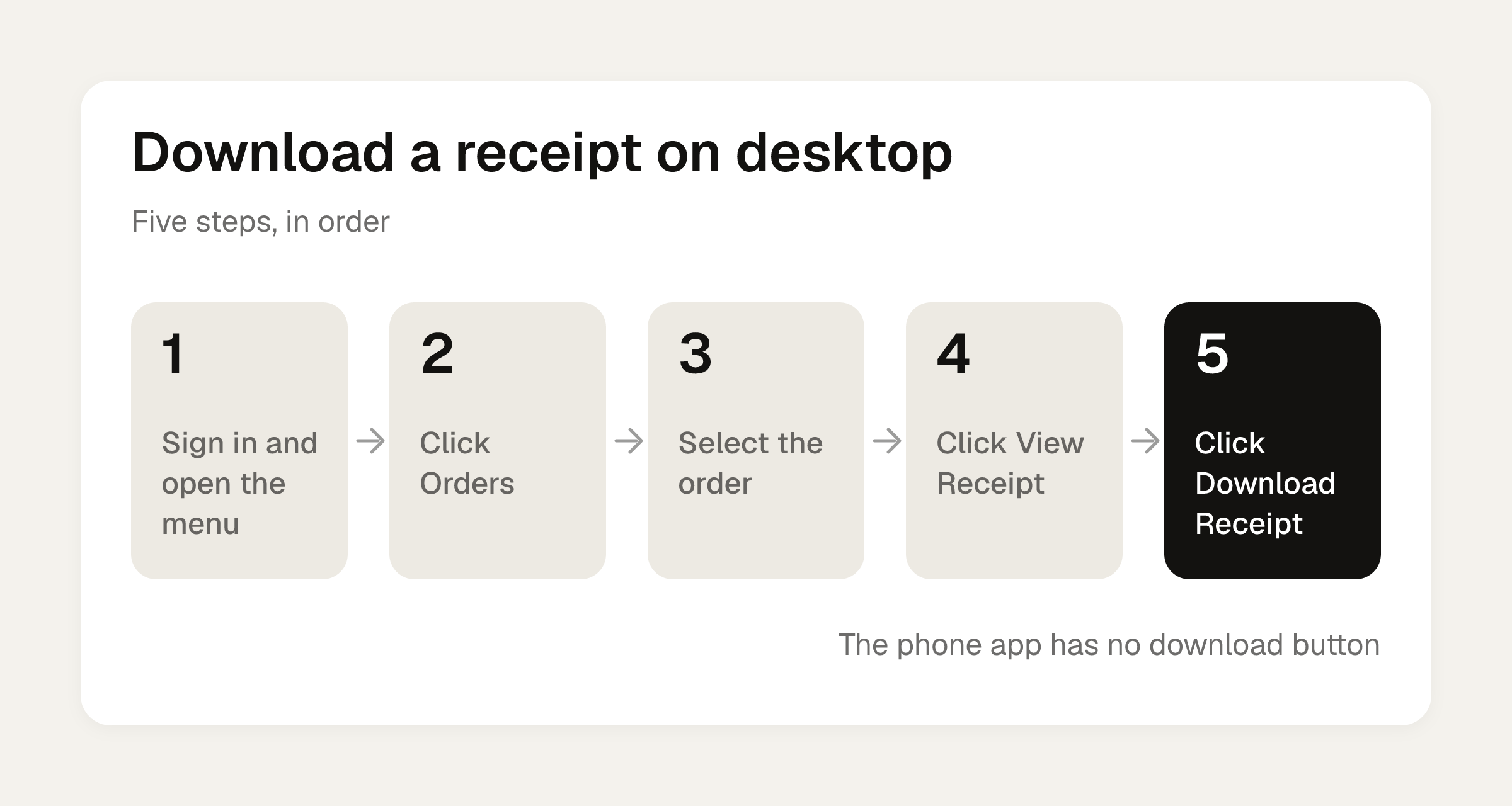
To get a DoorDash receipt PDF, open DoorDash in a desktop browser, go to Orders (in the menu, bottom left), select the order, click View Receipt, then click Download Receipt. The mobile app shows the receipt under the Orders tab, in the order's details, but it has no download button, so on a phone use the emailed receipt or your browser's Print > Save as PDF.
Once you have the file, you probably want one of two things: to expense it, or to work out who owes you what. The second half of this article does the math on a real $39.96 receipt.
How to get a DoorDash receipt PDF
On desktop:
- Sign in at doordash.com and open the menu.
- Click Orders.
- Select the order.
- Click View Receipt.
- Click Download Receipt.
On the mobile app: open the Orders tab, tap the order, and look for the receipt in Order Details. You can read it there. You can't download it from there.
Phone workarounds:
- DoorDash emails a receipt automatically when an order is placed. Search your inbox for it.
- Open the receipt in a browser and use Print > Save as PDF.
- For older orders, scroll down the Orders tab until you find the one you want.
If you also want the layout of the customer receipt itself, we cover it in DoorDash Customer Receipt: Find It and Split It by Order.
Business Profile receipts for expensing
If you ordered with a Business Profile, a "Business receipt" email arrives after delivery. It has a link and a PDF attachment. Look for "Business receipt" in the subject line. The receipt lists the restaurant name, not "Doordash", which some finance teams prefer.
A few limits to know before you rely on it:
- Receipts go to your DoorDash account email unless you enter a different one.
- If you pick the wrong profile at checkout, you can't reverse it.
- There is no expense code or memo field.
- Turning on a Business Profile does not sign your company up for DoorDash for Business.
The receipt shows the itemized subtotal, tax, fees and tip. It doesn't show the business purpose or attendee names that expense systems often ask for, so you'll add those yourself. The IRS generally requires documentary evidence for expenses of $75 or more (Publication 463), according to the Splitty guide, so keep the PDF.
What the lines on a DoorDash receipt mean
Here is the receipt we'll work with. It's a $25 order in a city with 8.875% sales tax:
| Line | Amount |
|---|---|
| Subtotal (food) | $25.00 |
| Delivery fee | $3.99 |
| Service fee (15%) | $3.75 |
| Sales tax (8.875%) | $2.22 |
| Dasher tip (20%) | $5.00 |
| Total | $39.96 |
How the fee lines work, per DoorDash's help page (checked October 2026):
- The service fee is 15% of the subtotal for most orders in markets without the fee update (California, Chicago, NYC, Seattle). It's about 5% for most eligible DashPass restaurant orders.
- The delivery fee is a flat amount per order and varies by merchant.
- A small order fee applies when the subtotal is under a threshold.
- Tips go entirely to the Dasher.
- Pickup orders have no service fees.
- DashPass is $9.99 a month.
Totals swing by city. SimplyCodes puts a $25 order at $33 to $39 all in. City-by-city estimates for the same $25 order run $39.80 in Austin, $41.95 in New York and $45.29 in Seattle.
The fronting problem on group orders
Unless the organizer turns on split payment, the final receipt with all fees, tax and tip lands on one person's card. A regular order has no "split the bill" button. So you pay $39.96 and then you're the one asking for money.
DoorDash's Split Billing option (Everyone Pays Separately) exists for this. The delivery fee is split evenly, service fees are split by what each person ordered, and the Dasher tip is per participant. Know the catches: the setting can't be changed after the cart is created, alcohol can't be added, and only the person who created the cart checks out. If the order is already placed, you're back to splitting the receipt by hand. We go deeper on the payment side in Can You Split Payments on DoorDash? A $106.14 Example.
Worked example: splitting the $39.96 receipt three ways
Say three of you ordered, and you (Maya) put it on your card. Here's what each person had:
- Maya: burrito bowl, $11.00
- Sam: chicken sandwich, $8.00
- Jo: fries and a salad, $6.00
Food adds up to $25.00. Now allocate the rest:
- Delivery fee, $3.99: split evenly. It costs the same to carry one bag as three, so $1.33 each.
- Service fee, $3.75: in proportion to food. Maya's food is 44% of the subtotal ($11 of $25), Sam's is 32%, Jo's is 24%.
- Tax, $2.22: same proportions.
- Tip, $5.00: same proportions.
| Maya | Sam | Jo | Total | |
|---|---|---|---|---|
| Food | $11.00 | $8.00 | $6.00 | $25.00 |
| Delivery (even) | $1.33 | $1.33 | $1.33 | $3.99 |
| Service fee | $1.65 | $1.20 | $0.90 | $3.75 |
| Tax | $0.98 | $0.71 | $0.53 | $2.22 |
| Tip | $2.20 | $1.60 | $1.20 | $5.00 |
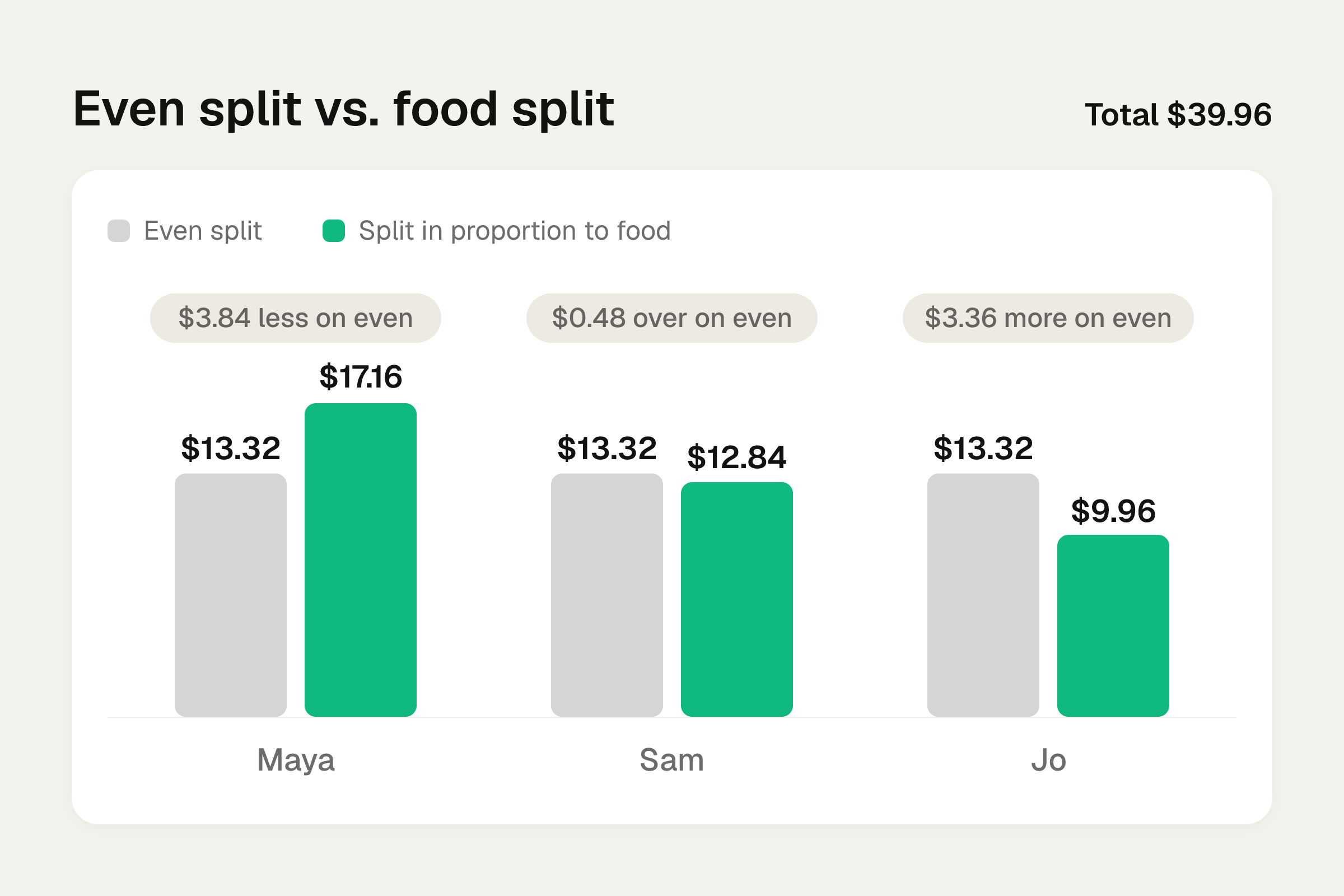
| Share | $17.16 | $12.84 | $9.96 | $39.96 |
The shares add up to the receipt total, to the penny. Sam sends you $12.84 and Jo sends $9.96. That's $22.80 back to you, and your own share is $17.16.
An even split would be $13.32 each. Maya would pay $3.84 less than her food justifies, and Jo would pay $3.36 more than hers. Sam is close either way, at $0.48 over.
The gap grows on bigger orders. In the Splitty four-person example, the order total is $85.10 and the fees and tip add $27.64 on top of the food. The person who ordered a Caesar salad pays $3.51 more on an even split than on a split in proportion to food.
To check your own receipt, put the items through the bill split calculator and add the fee lines on top. For the reasoning behind the tax and tip step, see How to Split Tax and Tip Fairly.
Two checks before you ask anyone to pay
- Look for two charges from the same restaurant on the same date. That can be a duplicate and is worth investigating.
- If something arrived wrong and you plan to dispute it, take a photo of the delivered order first.
Turning the receipt into shares
If you'd rather not do the table by hand, Divvy bill splitting can do the item part. Point the camera at a receipt and Divvy reads every line item, the tax and the tip. Tap a name on each item to assign it, and tax and tip are split by each person's share of the items. Each share becomes a Venmo or Cash App request in one tap, with reminders until it's paid, and your friends don't need the app or an account: they open a share link, see what they owe, and pay. Divvy is a free download for iPhone. The delivery fee is a quick divide-by-three you can do on top. There's more on how scanning works in the receipt scanning app guide.
Frequently asked questions
Why is my DoorDash total so much higher than the menu prices?
Delivery, service fee, tax and tip all sit on top of the subtotal. On a $25 order that was $14.96 extra in our example, and SimplyCodes puts typical $25 orders at $33 to $39 in total.
Does the Dasher get the whole tip?
Yes. Per DoorDash's help page, tips go entirely to the Dasher. The service fee and delivery fee are separate from the tip.
Can I pay with two cards or split the cost on a normal DoorDash order?
A regular order has no split the bill button, so the full total goes on one card unless the organizer sets up Split Billing (Everyone Pays Separately) when creating the cart. That setting can't be changed afterward.
How do I know a receipt email is the Business Profile one?
The subject line contains Business receipt, and the receipt lists the restaurant name instead of Doordash. It arrives after delivery with a link and a PDF attachment.
Is the delivery fee the same for everyone on a split?
In the worked example we divided it evenly, since one trip carries all the bags. DoorDash's own Split Billing does the same, while service fees follow what each person ordered.
Sources
- How do I receive a receipt for my order?
- What fees do I pay on Caviar and DoorDash?
- How to Place a DoorDash Group Order for Your Team at Work
- DoorDash receipt: how to find, print, or save it as a PDF
- How Much Does DoorDash Really Cost? Fees Explained
- Can you split payment on DoorDash or use two cards?
- Setting Your Business Profile for Easier Expensing