Divvy
How to Cancel a Venmo Request (and Resend the Right Amount)
By The Divvy Team · November 18, 2026 · 8 min read
You can cancel a Venmo request any time before the other person pays it. Open the Wallet tab (some guides call it Me), tap Transactions, find the request under Pending, and choose cancel. That's how to cancel venmo request in about ten seconds. The harder part is the cleanup when the amount was wrong, one person already paid, or the request went to the wrong name.
Here is the whole thing on one dinner, with every dollar shown.
The steps to cancel a pending Venmo request
Unpaid requests sit at the top of your transactions feed and under Pending. Per Venmo's help page on Splitting & Sharing Purchases:
- Open the Wallet tab. If your version says Me, it's the same spot.
- Tap Transactions.
- Find the request under Pending.
- Choose cancel.
From the same Pending view you can also send a reminder instead. More on that below.
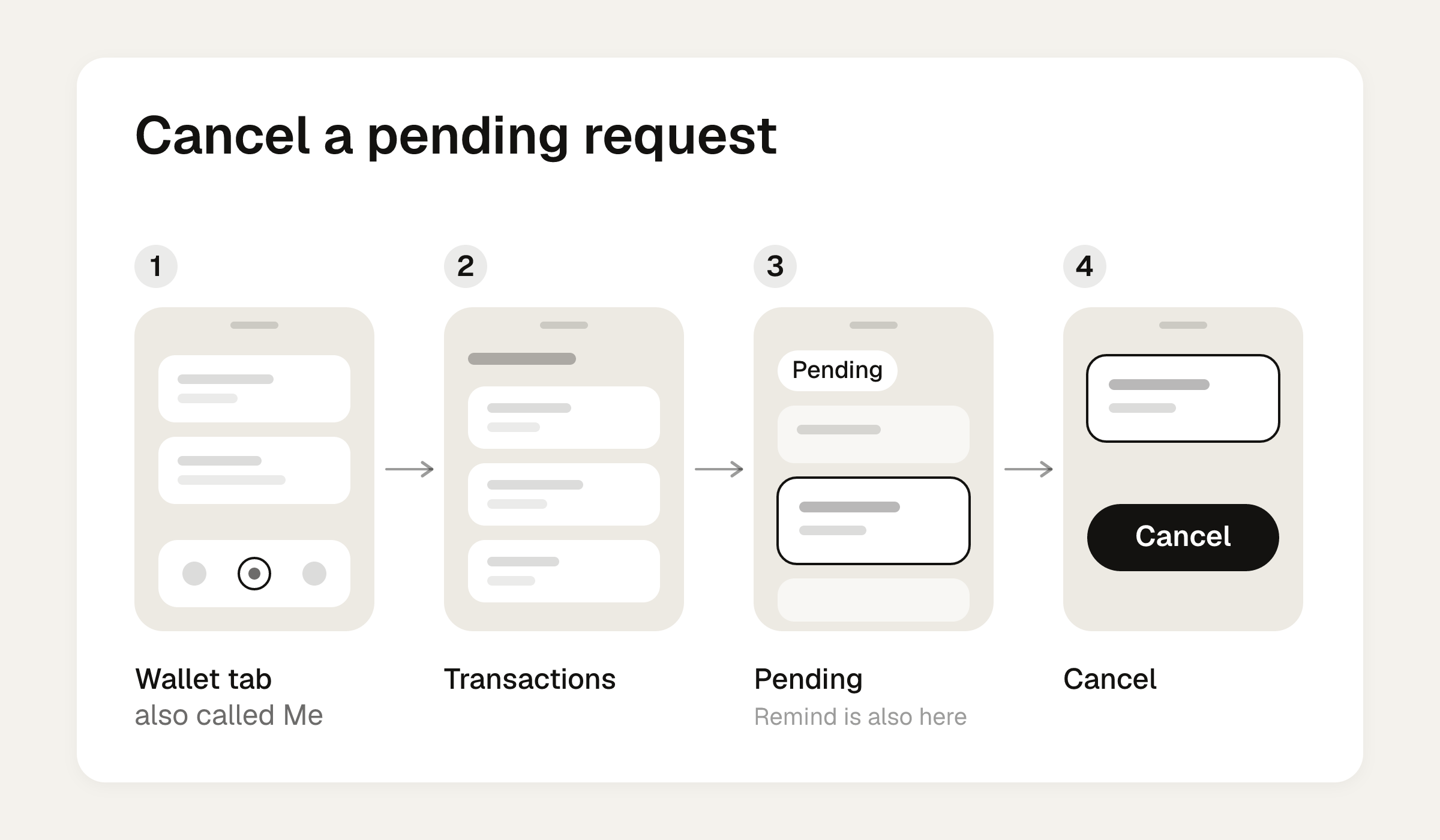
One honest gap: Venmo's Cancel Payment and Pending Payment pages cover payments you've already sent. They don't mention cancelling requests. The request steps above come from the Splitting & Sharing Purchases page.
Worked example: cancel the wrong requests and resend the right ones
Sam fronted a dinner for four on one card. Rather than do the math at the table, Sam split the total evenly in Venmo and sent three requests. Then Priya pointed out she had a salad and a soda while everyone else had a drink and an entree.
Here is the receipt.
| Person | Items | Their items | Share of the $16 appetizer | Subtotal |
|---|---|---|---|---|
| Sam | Ribeye $34, Old Fashioned $13 | $47 | $4 | $51 |
| Jess | Pasta $22, wine $12 | $34 | $4 | $38 |
| Marcus | Salmon $28, beer $8 | $36 | $4 | $40 |
| Priya | Salad $16, soda $4 | $20 | $4 | $24 |
| Table | $137 | $16 | $153 |
Tax is 8% of $153, which is $12.24. A 20% tip on the pre-tax $153 is $30.60. The card total is $195.84.
What the equal split sent
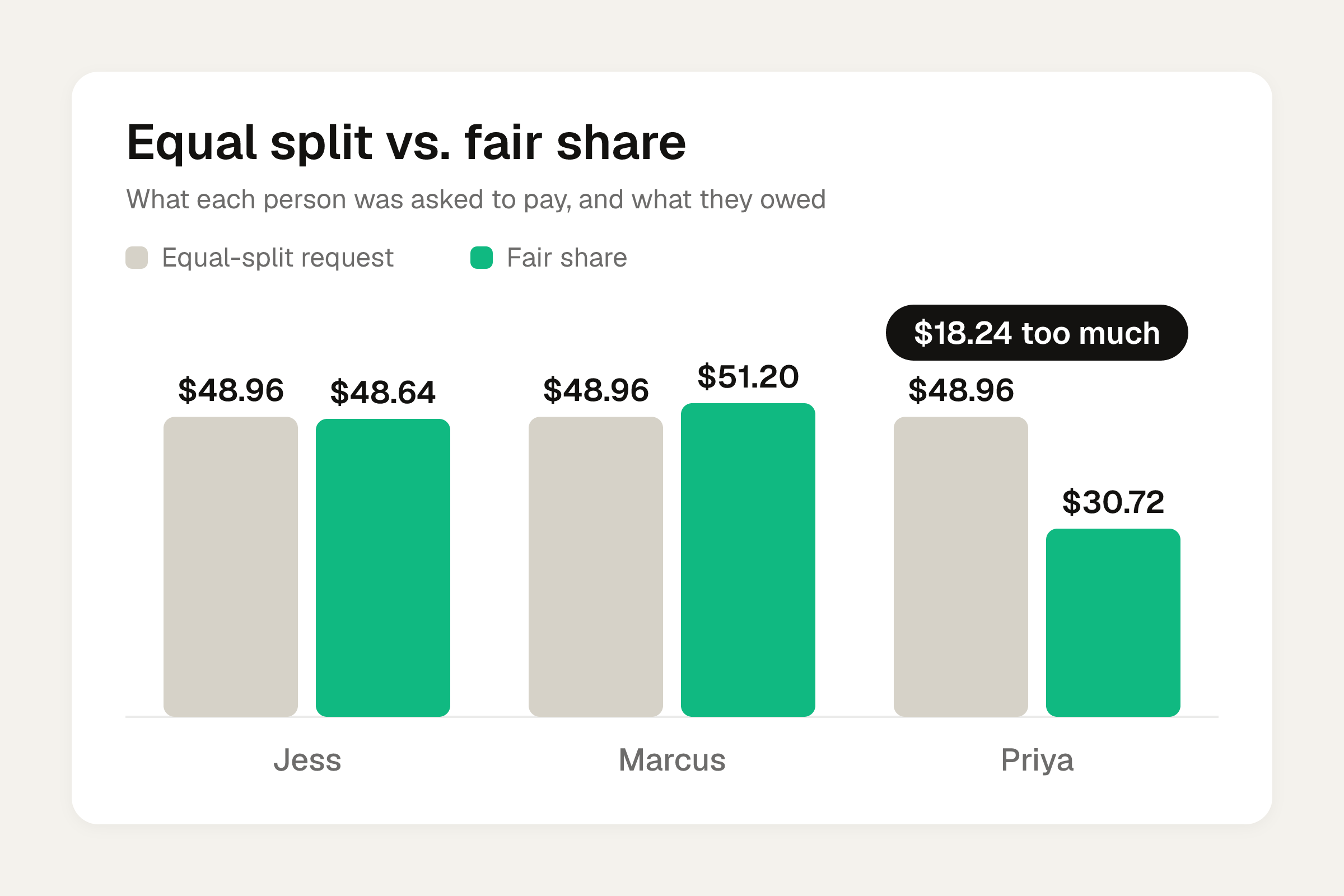
$195.84 divided by 4 is $48.96 per person. Sam sent three requests for $48.96.
- Jess: $48.96 (fair share is $48.64)
- Marcus: $48.96 (fair share is $51.20)
- Priya: $48.96 (fair share is $30.72)
Priya was being asked to cover $18.24 of other people's food. Sam was quietly covering $16.32 of his own ribeye. That's the moment to cancel.
The correct shares
Tax and tip follow each person's items. Everyone's subtotal gets 8% tax and 20% tip, so each share is the subtotal times 1.28.
| Person | Subtotal | Tax (8%) | Tip (20%) | Share |
|---|---|---|---|---|
| Sam | $51.00 | $4.08 | $10.20 | $65.28 |
| Jess | $38.00 | $3.04 | $7.60 | $48.64 |
| Marcus | $40.00 | $3.20 | $8.00 | $51.20 |
| Priya | $24.00 | $1.92 | $4.80 | $30.72 |
| Total | $153.00 | $12.24 | $30.60 | $195.84 |
The shares add back to the card total to the cent. If yours don't, something is off before you send anything. The tax and tip guide shows why this method works.
Fixing the requests
Sam checked Pending and found two of the three requests were still unpaid.
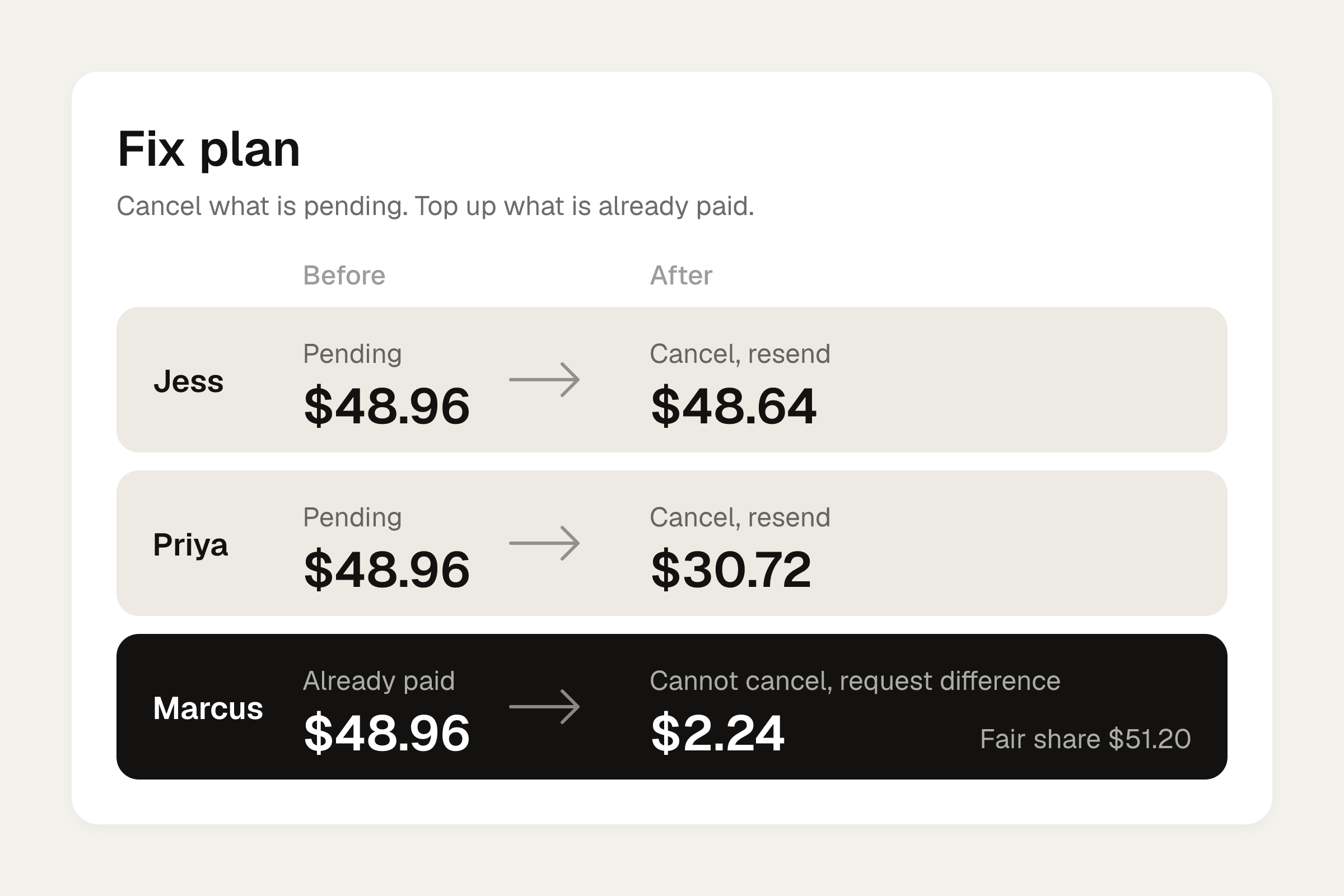
- Jess and Priya: still pending. Sam cancelled both, then sent new requests: $48.64 to Jess and $30.72 to Priya, each with a note like "Dinner, your items plus tax and tip."
- Marcus: already paid $48.96. A paid request can't be cancelled. His real share is $51.20, so Sam sent a new request for the $2.24 difference, with a note saying what it covers.
Cancelling before payment is the clean fix. Once the money has moved, a small follow-up request for the difference is the next best thing.
When you split a bill in Venmo, each person gets their own request for their share, and splitting doesn't change your original payment amount. Recipients have to accept or pay for the money to reach you. Venmo can split evenly, with custom amounts, or by scanning a receipt to split by item. The full flow is in how to request money on Venmo.
Cancel or remind?
Sometimes the amount is right and the person is just slow. Then don't cancel. Remind.
Venmo doesn't send reminders on its own for a normal request. You tap Remind on each pending request, one at a time, and that sends a new notification. Team Nudge reports that Venmo says its users agree a reminder is appropriate within four days of the original request. If you want timing and wording, see the Venmo incomplete request reminder post.
Scheduled requests
A request you scheduled for later can go out on a chosen date or repeat weekly, every two weeks or monthly. You can change or cancel it until 11:59 PM Pacific the day before it goes out. Venmo notifies the other person the day before, so a wrong amount is worth catching early.
If the request was already paid
Venmo says there's no way to cancel a payment once it's sent, because the money goes to the recipient right away. If someone paid the wrong amount, ask them to pay it back, or send a new request for the difference as Sam did with Marcus.
If someone paid twice by accident, Tom's Guide suggests sending a request for one payment's amount, with a note explaining it. On a $48.96 dinner share paid twice, that's a request for $48.96 and a line like "Paid this one twice, can you send one back?" There's a longer walkthrough in can you request a refund on Venmo.
Requests and payments are two different things
Take Back belongs to payments, not requests. In the Me tab, you tap Take Back under the payment. It only works on a pending payment when the recipient's phone number or email isn't tied to an active Venmo account. If nobody claims it, it expires after 30 days. Refunds show immediately in a Venmo balance, within up to 5 business days to a bank, and within up to 7 business days to a card.
The bank route is riskier. Venmo's help says that if you ask your bank to stop a payment that shows Completed, it creates a loss on your Venmo account that you'd have to pay back. Lilach Bullock adds that the account can be frozen until it's repaid. Cancelling through the bank only applies to payments showing Pending with an estimated completion date. Bank-funded payments typically take 3-5 business days.
Wrong person, or money from a stranger
If you paid or requested the wrong person, contact Support at Me > Settings > Get Help > Chat With Us. Have these ready:
- The recipient's username
- The amount and date
- The username, phone number and email of the person you meant to pay
If a stranger sends you money by mistake, don't send it back yourself. Contact Support and let them sort it out.
Get the shares right before you send
Most cancel-and-resend rounds start with the equal split at the table. Sam's mistake cost Priya $18.24 on paper and cost Sam three extra requests.
Do the math first. The free bill split calculator splits a bill evenly or by item, with tip, so you can see each person's share before any request goes out.
If you front dinners often, Divvy bill splitting does the same math from a photo. Point your iPhone camera at the receipt and it reads every line item, the tax and the tip. Tap a name on each item to assign it, and a shared item like the $16 appetizer can be split between people. Tax and tip follow each person's share of the items, and each share becomes a Venmo or Cash App request in one tap, with reminders until it's paid. Friends don't need the app or an account. They open a share link, see what they owe, and pay.
Frequently asked questions
Do Venmo requests expire?
Team Nudge found no expiry date for Venmo requests in Venmo's help pages. An unpaid request stays under Pending until you cancel it or the other person pays it.
How long should I wait before reminding someone about a Venmo request?
Venmo says its users agree a reminder is fine within four days of the original request. Venmo won't nudge anyone for you, so you tap Remind on each request yourself.
Can I cancel a scheduled Venmo request?
Yes. You can change or cancel a scheduled request until 11:59 PM Pacific the day before it's set to go out. Venmo tells the other person the day before.
What if I sent a request to the wrong person?
If it's still unpaid, cancel it from Pending and send a new one to the right person. If it was paid, go to Me > Settings > Get Help > Chat With Us and have the usernames, amount and date ready.
Is cancelling a request the same as taking back a payment?
No. Cancelling applies to an unpaid request. Take Back applies to a pending payment sent to someone without an active Venmo account, and it expires after 30 days if unclaimed.