Divvy
DivvyCan I Split Payment on Uber Eats? Yes, With a $87.42 Example
By The Divvy Team · October 29, 2026 · 6 min read
Short answer to "can i split payment on uber eats": yes, on a group order, up to 18 ways (per Uber Help, as cited by splittyapp.com). You have to switch the setting on before anyone adds food, or the person who started the order pays for everything.
Uber announced bill splitting for group orders on March 9, 2022, and TechCrunch reported it as the first in a US delivery app. Here is how it works, where it stops, and what four friends and one $87.42 order look like on paper.
How to turn on split payment
- Someone starts a group order in Uber Eats. Do this before anyone adds food.
- The organizer changes the payment setting from the default, "You pay for everybody," to "Guests pay for themselves."
- Everyone joins from their own phone. Each person has to be logged into their own Uber Eats account and add payment info.
- Each person adds their food and checks out their own part.
The organizer also gets a few controls. You can set a deadline for everyone to submit their order, then either auto-checkout at the deadline or buy manually. You can also set automatic reminders for anyone who hasn't ordered yet.
For big groups, Uber treats orders for 10 or more people as large group orders, which should be scheduled at least 24 hours ahead.
Can i split payment on uber eats after the order is placed?
No. Uber Eats won't split an order after checkout. A few other limits:
- It won't charge a single order to two different cards.
- A single order can use only one payment method besides Uber Cash. If Uber Cash doesn't cover the total, the remainder goes to the primary payment method.
- TechCrunch also notes the feature doesn't help when only some people are paying.
So if you already hit "Place order," or three of your five friends are covering the other two, the built-in split is out. You'll split it yourself afterward.
Worked example: four friends, one $87.42 order
Mia, Dan, Jess and Sam order burgers. The receipt looks like this (the 8% tax rate is an assumption for the math):
- Food: $74.00
- Tax: $5.92
- Delivery fee: $3.80
- Service fee: $3.70
- Total before tip: $87.42
Uber's service fee is typically around 5% of the subtotal, with a minimum and maximum, and it varies by region. Uber sets both fees, and neither is a tip.
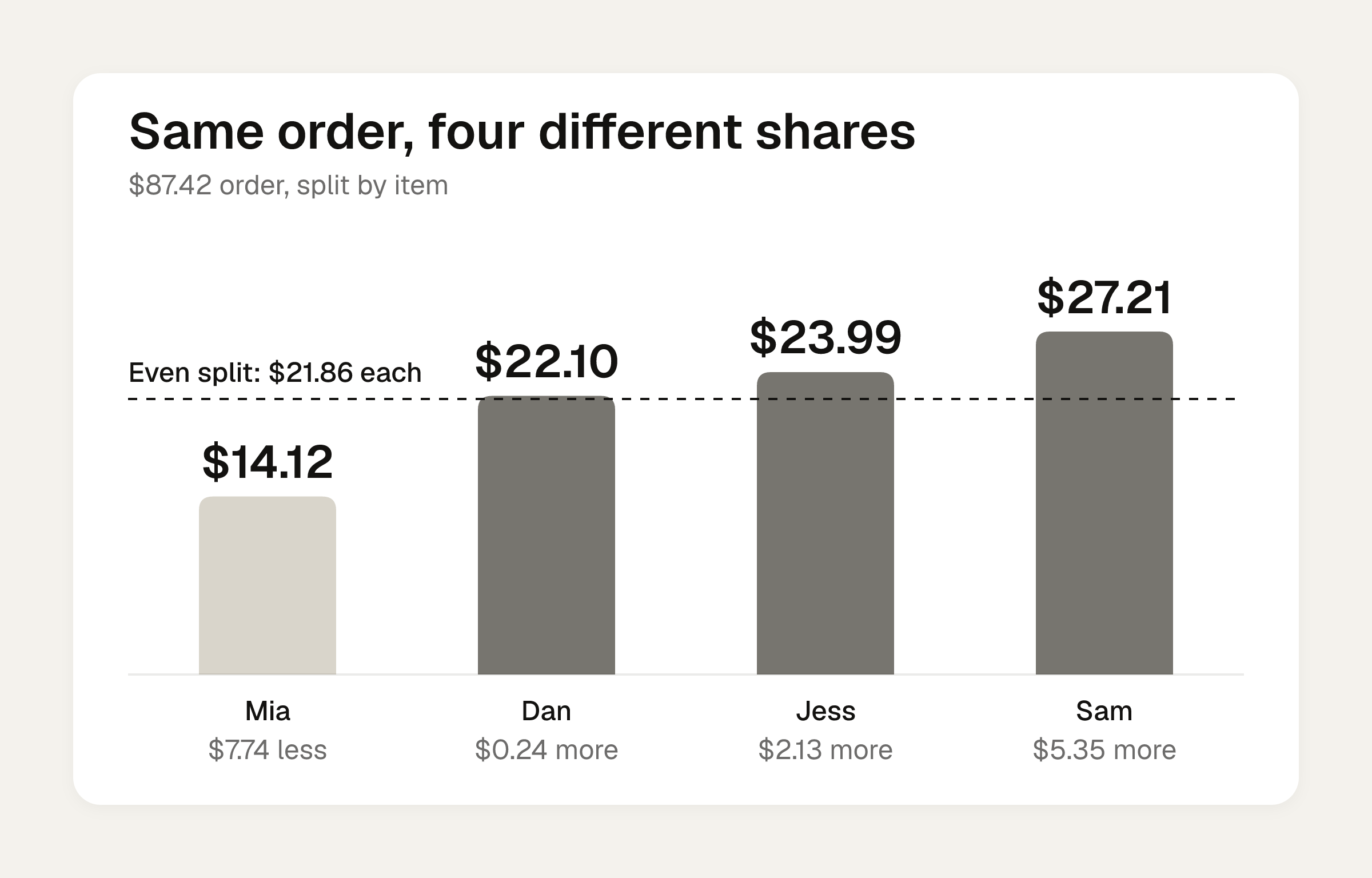
Even split: $87.42 divided by four is $21.855, so $21.86 each. That is a penny or two of rounding off the real total.
By item: Tax follows each person's food. The two fees are flat, so each person pays a quarter of the $7.50.
| Person | Ordered | Items | Tax (8%) | Fees (1/4) | Share | vs. $21.86 even |
|---|---|---|---|---|---|---|
| Mia | Garden salad, sparkling water | $11.33 | $0.91 | $1.88 | $14.12 | $7.74 less |
| Dan | Veggie burger, lemonade, cookie | $18.72 | $1.50 | $1.88 | $22.10 | $0.24 more |
| Jess | Chicken sandwich, onion rings | $20.48 | $1.64 | $1.87 | $23.99 | $2.13 more |
| Sam | Double burger, fries, milkshake | $23.47 | $1.87 | $1.87 | $27.21 | $5.35 more |
| Total | $74.00 | $5.92 | $7.50 | $87.42 |
Mia pays about $7.75 less than the even split, and Sam pays $5.35 more. Over one lunch that is small. Over a month of group orders, it gets old for whoever always orders the salad.
People also order more when the cost is shared. In a 2004 field experiment (Gneezy, Haruvy and Yafe), the mean meal cost rose from 37.3 shekels when diners paid individually to 50.9 when the bill was split evenly. That is about 36% higher.
To run your own order through the same math, use the bill split calculator and pick the by-item option. The calculators live under /calculators/ on the site. For the method behind it, see how to split tax and tip fairly.
How tip works in a split order
Each person sets their own tip. Couriers keep 100% of it, per Uber. If everyone tips 20% of their own food, the tips come out like this:
- Mia: $2.27, for a total of $16.39
- Dan: $3.74, for a total of $25.84
- Jess: $4.10, for a total of $28.09
- Sam: $4.69, for a total of $31.90
Together that is $14.80 in tips on $102.22. Compare the $80 example: 20% of $80 of food is $16, or $4 each if four people ordered about the same. The recommended tip for a group of 2-3 is 20% of the total.
Restaurant studies on group size and tipping don't settle this, because they didn't test delivery orders. One IHOP study found tips of 19% at tables of one, falling to 11% at tables of four and six. A courier carrying one bag to your door isn't a table of six. For timing and amounts, see how to tip on Uber Eats.
The fallback: Venmo on Uber Eats
If one person is fronting the order, you can pay with Venmo as the Uber payment method, then split the cost afterward from the Venmo payment feed. This is US-only.
- In Uber, go to your profile icon, then Wallet, then Add Payment Method.
- Choose Venmo and tap Authorize.
- Place the order.
- In the Venmo payment feed, choose the option to split the cost with friends and family. Typing "Uber Eats" in the note adds the emoji.
If the split option is missing, update the app. For the Venmo side, see how to split a bill on Venmo.
DoorDash has its own rules. The DoorDash split payments breakdown has a $106.14 example.
When Uber's split can't help
You will hit three cases:
- The order is already placed.
- One person fronted the whole thing on their card.
- Only some of the group is paying.
In those cases you are the one doing the math, and you can do it on the calculator above or in an app. Divvy bill splitting is an iPhone app, free to download. You tap a name on each item to assign it to whoever had it, and a shared item can be split between people. Tax and tip are split by each person's share of the items, not evenly.
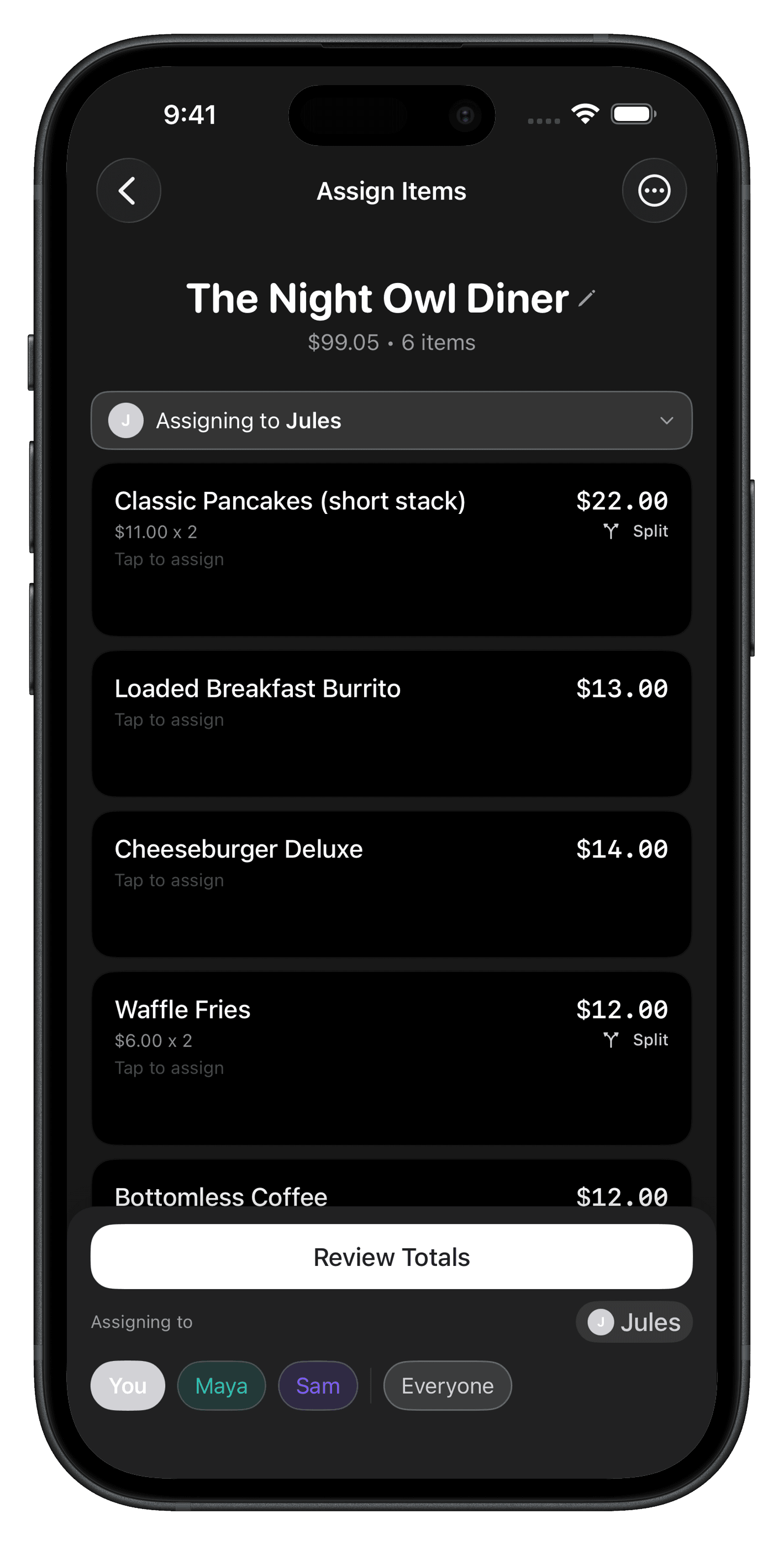
Each person's share becomes a Venmo or Cash App request in one tap, with reminders until it's paid. Friends don't need the app or an account. They open a share link, see what they owe, and pay.
Frequently asked questions
Can two people pay for one Uber Eats order with different cards?
Not on a single order. Uber Eats won't charge one order to two cards. The way around it is a group order where guests pay for themselves, so each person checks out their own part on their own card.
Do my friends need Uber Eats accounts to join a split group order?
Yes. Every participant has to be logged into their own Uber Eats account and add payment info. If a friend has no account, you front their part and get paid back afterward.
Does the Venmo option on Uber Eats work outside the US?
No. Venmo on Uber and Uber Eats is US-only. If the split option doesn't appear in your Venmo payment feed, update the app and check again.
Is the delivery fee the same as a tip?
No. Uber sets the delivery fee and the service fee, and neither goes to your courier as a tip. Couriers keep 100% of the tip, which each person sets on their own in a split order.
How far ahead should I schedule a big group order?
Uber treats orders for 10 or more people as large group orders and says to schedule them at least 24 hours ahead.